
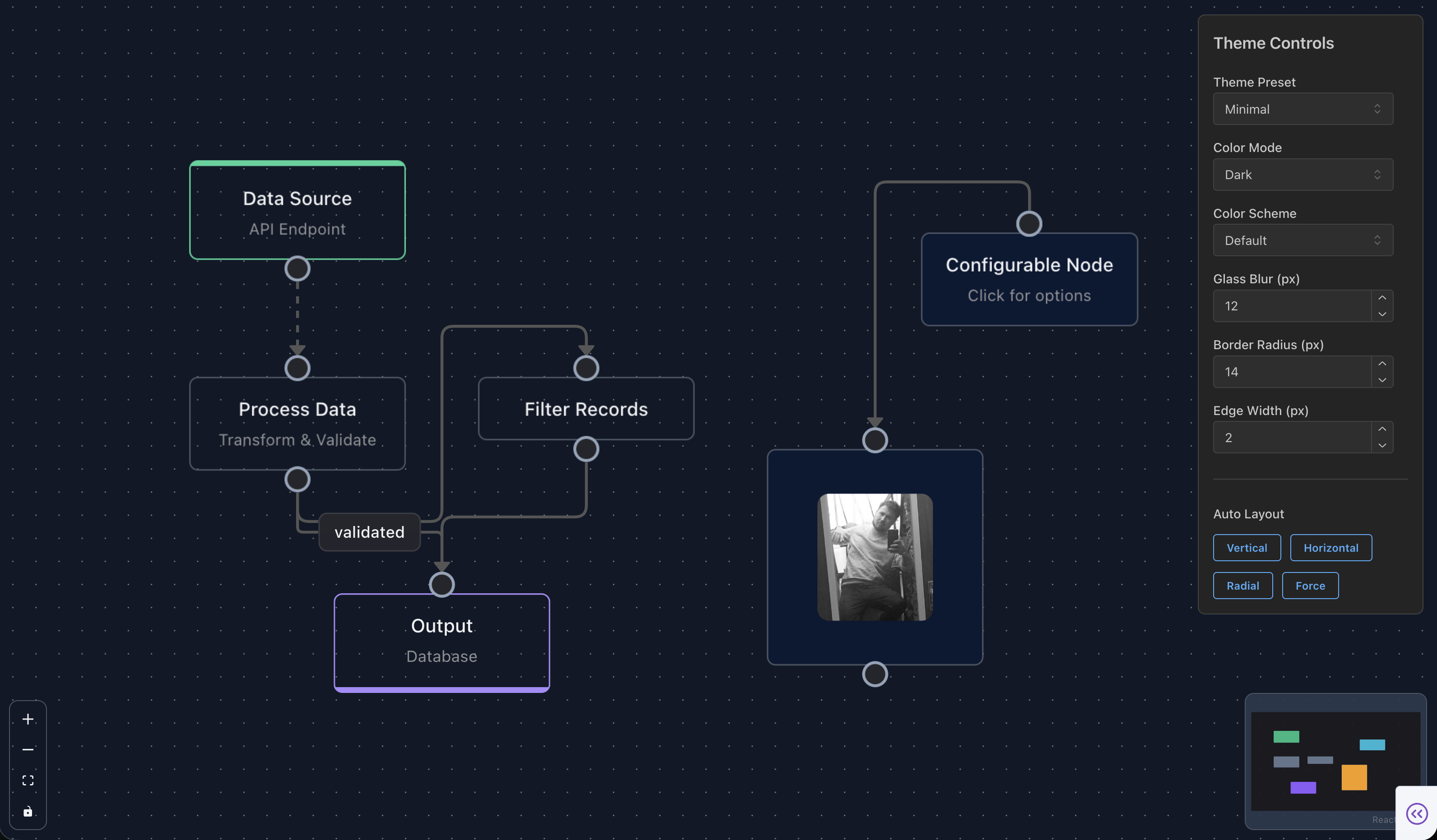
dash-flows wraps React Flow 12 (@xyflow/react) as a Plotly Dash
component library — build interactive, node-based diagrams (workflows, data pipelines, org charts,
state machines) that talk to your Python callbacks like any other Dash component.
1.3.0 is out, and this release is all about meeting Dash where it is now: it runs on Dash 4.2+,
ships a brand-new live-demo documentation site, moves to the latest React Flow 12.11, and
streamlines the package to Python-only.
 What’s new in 1.3.0
 Dash 4.2+ support. dash-flows now targets Dash
 >=4.0.0 (developed against 4.2),
still on React 18 — so no migration on your side. Because it’s a standard Dash component, your app can
take advantage of Dash 4.1+ features like the pluggable Flask / FastAPI / Quart backends and
websocket callbacks.
 A brand-new documentation site with live demos. Every one of the 35 examples now has a
runnable, embedded demo and its full source, all in one place. It’s a markdown-driven Dash app you
can also run locally (python run.py).
 dash-documentation-boilerplate best documentation in town
 React Flow 12.11.1. Updated to the latest upstream
 @xyflow/react
(zustand stays pinned to 4.x, as React Flow requires).
 Now Python-only. The R and Julia bindings were removed so the package is leaner and
focused squarely on the Dash/Python ecosystem.
 Reliability fixes, including:
- Fixed a “Maximum update depth exceeded” render loop by guarding the internal node/edge state sync.
- Fixed React Flow error 008 (null source/target handle) on resizable nodes — they now render
default handles so edges always bind. - The MiniMap now correctly follows the light/dark preference.
- Dark-mode fidelity fixes across the example demos (cards, buttons, and canvases now track the page theme).
 Install
pip install dash-flows
 Quick start
import dash
from dash import html
from dash_flows import DashFlows

app = dash.Dash(__name__)

nodes = [
    {"id": "1", "type": "input",   "data": {"label": "Start"},   "position": {"x": 250, "y": 0}},
    {"id": "2", "type": "default", "data": {"label": "Process"}, "position": {"x": 250, "y": 100}},
    {"id": "3", "type": "output",  "data": {"label": "End"},     "position": {"x": 250, "y": 200}},
]
edges = [
    {"id": "e1-2", "source": "1", "target": "2", "animated": True},
    {"id": "e2-3", "source": "2", "target": "3"},
]

app.layout = html.Div(
    DashFlows(
        id="flow",
        nodes=nodes,
        edges=edges,
        fitView=True,
        showControls=True,
        showMiniMap=True,
        style={"width": "100%", "height": "600px"},
    )
)

if __name__ == "__main__":
    app.run(debug=True)
 Feature highlights
If you haven’t seen dash-flows before, here’s what you get — every feature is exposed as a Dash prop
or callback output:
- Rich node & edge types — default, input, output, group, resizable, circle, toolbar; straight,
step, smoothstep, bezier, button, data, animated, and floating edges - Glass-morphism theme with light / dark / system color modes and 6 color schemes
- ELK layouts for automatic graph arrangement (+ animated layout transitions)
- DashIconify icons and embedded Dash components inside nodes
- Deep interactivity as callbacks — clicks, selection, connections & connection limits, drag/drop,
context menus, undo/redo, copy/paste, save/restore, and image export - Computing flows (topological sort / data-flow) and collapsible sub-flows
- MiniMap, controls, backgrounds, helper lines, smart handles, and accessibility/ARIA support
See them all running with source at dash-flows
 Links
Links
- Docs (live demos):
- PyPI: Client Challenge
 GitHub: GitHub - pip-install-python/dash-flows: React-flows brought over to the dash framework. · GitHub
 Discord: 2plot.ai
 YouTube (@2plotai): https://www.youtube.com/@2plotai
 Maintained by Pip Install Python LLC
dash-flows is one of several tools built and maintained by Pip Install Python LLC:
| Project | What it is |
|---|---|
| Pip Install Python |
Open-source documentation index for the Python & Dash ecosystem |
 ai-agent.buzz ai-agent.buzz |
Infinite AI canvas |
 2plot.media 2plot.media |
Videography application |
 piraresbargain.com piraresbargain.com |
Online shop with a tileset & sprite generator |
Build something amazing 
