Power BI - Plotly App Challenge

Hi Plotly Community,
We know you love building Dash apps and Plotly Studio apps. And we know many of you have also worked with Power BI before. So we thought, why not build on top of Power BI semantic models and create more apps?!

In this challenge, the community will connect Power BI semantic models to Dash or Plotly Studio and build a data app.

To participate in the challenge, either download the Microsoft AdventureWorks Sales.pbix file and import it to your Power BI workspace (see gif below) or use your own semantic model from your Power BI account (if you don’t have an account, opening a free trial Power BI account would be sufficient).

Import the .pbix file into your Power BI workspace to create the semantic model:
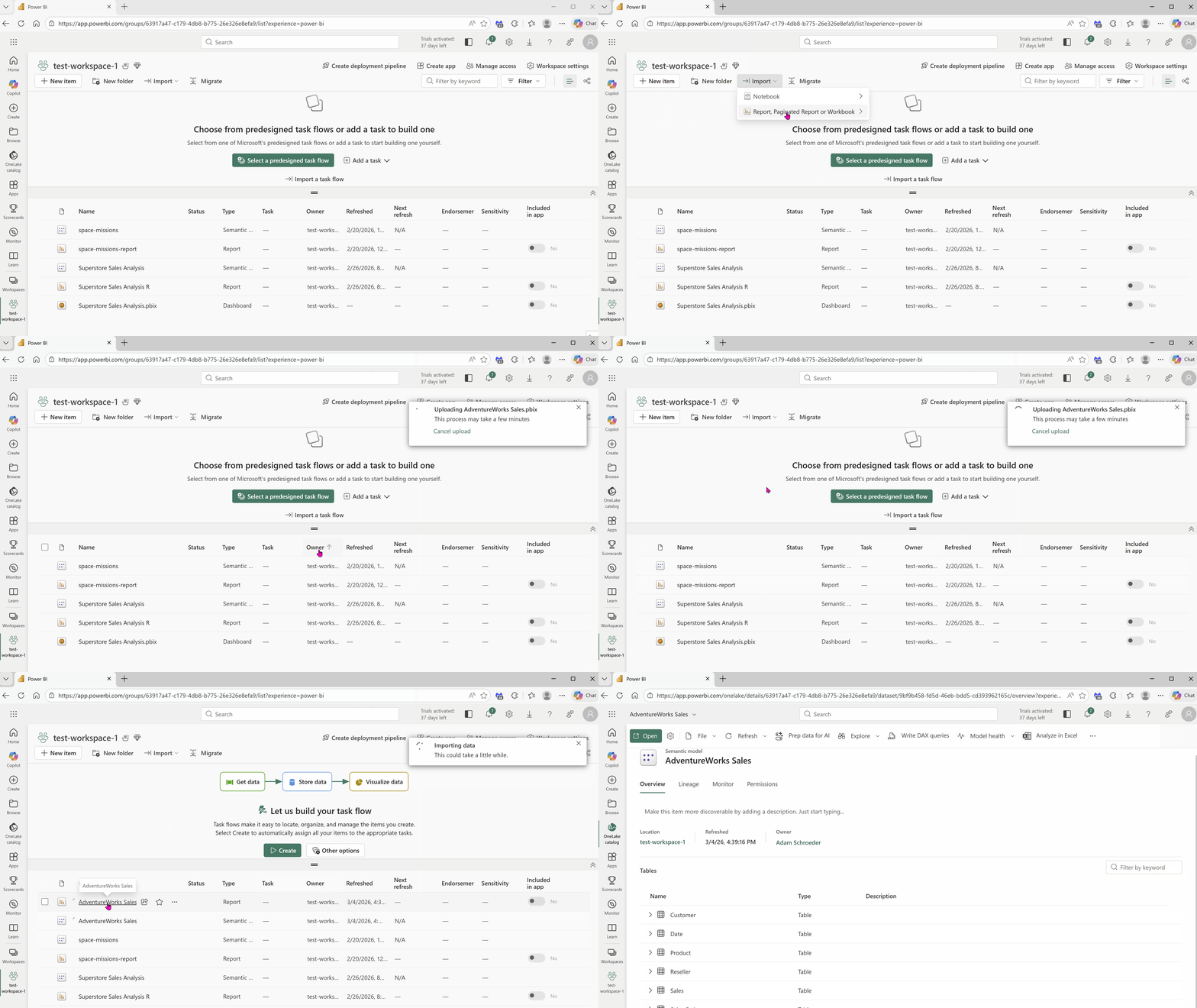
semantic-model

Once your semantic model has been created in Power BI, you can connect your model to Plotly Studio using your Power BI credentials (username, password, tenant ID). Or you can set up an Azure service principal and connect it to Plotly Studio, using this guide.
If you prefer to connect your semantic model into your Dash app directly, here’s sample code. Make sure to fill lines 6-11 with your credentials, and replace your_table_name on line 29. (Before publishing this code on GitHub make sure to put your powerbi credentials into environment variables.)

The winning apps will be judged according to the following categories:

  • Data insights revealed from the dataset
  • App UI/UX Design
  • Implementation of unique features not communly seen in a Dash or Plotly Studio app

The submission deadline: end of the day Sunday, May 3, 2026.

The winners will be announced a few weeks later and will receive a reward of:

  • *$250 for best Dash app, $250 for best Plotly Studio app
  • $150 for second place
  • $50 for third place

*Only one prize per community member

To enter your submission, please publish your app to Plotly Cloud and submit the app link as a new post in this thread. Please include a short description of the app and if it’s a Dash app, please include your code on GitHub.

For any questions, feel free to reply to the Forum topic or message me directly.
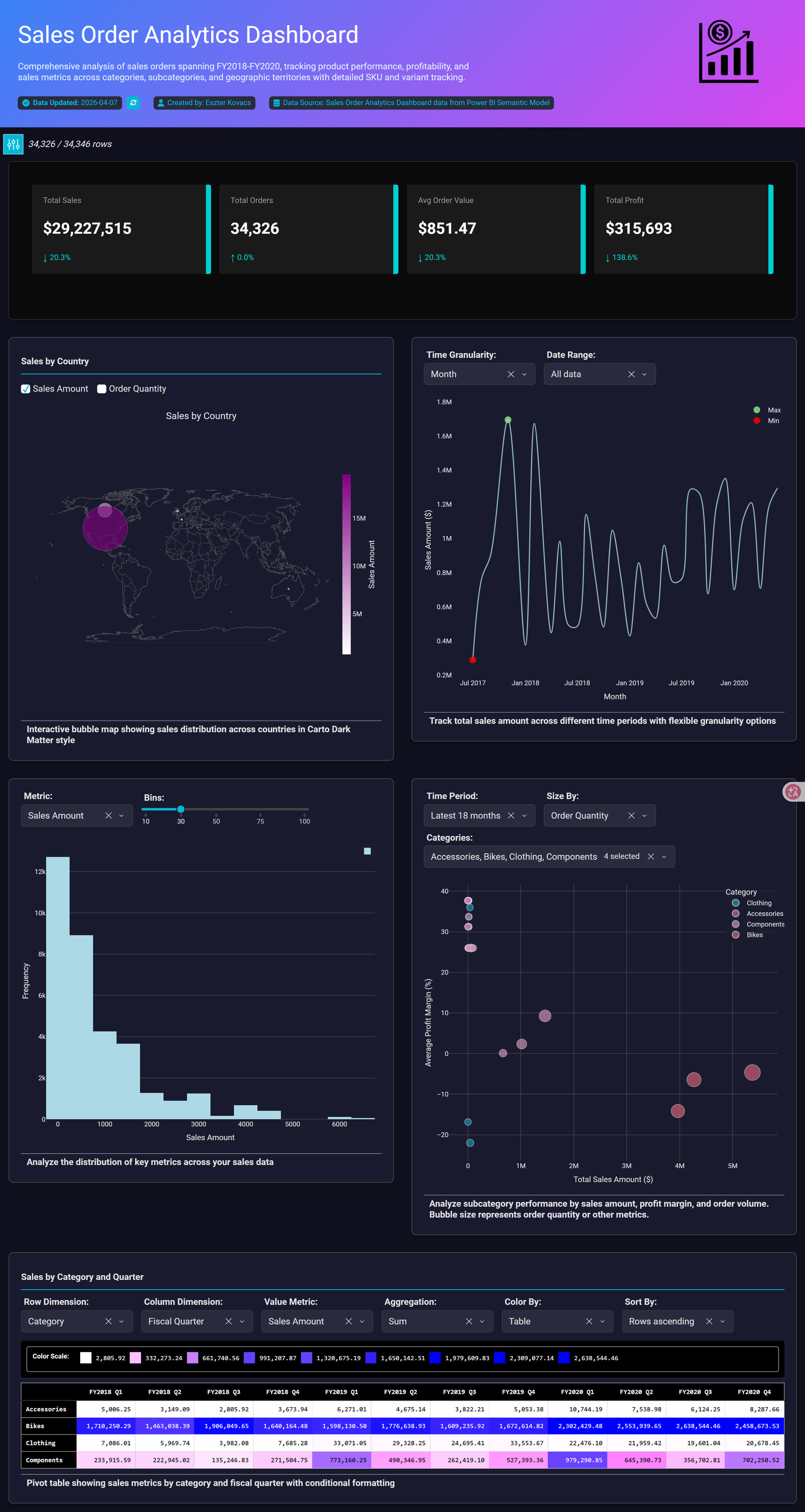
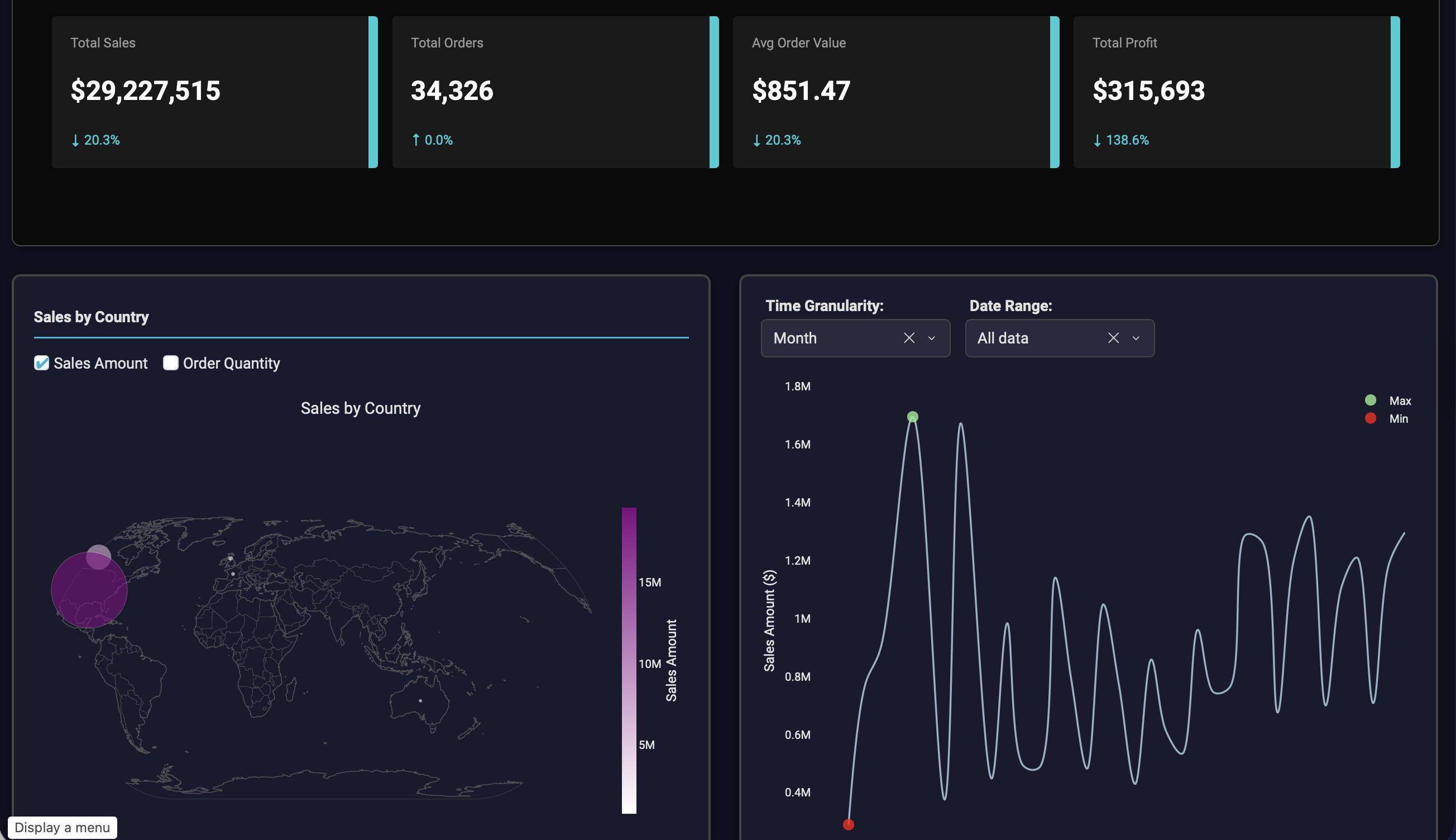
This Sales Order Analytics Dashboard was developed from Power BI using the AdventureWorks Sales semantic model. After providing the required credentials and establishing the connection, the dataset was loaded into Plotly Studio, where AI-assisted analysis was used to identify and select four core tables from the semantic model to create a streamlined but analytically rich reporting solution.

The dashboard combines multiple visualization techniques to analyze sales performance across FY2018–FY2020 and deliver both executive-level insights and operational analysis. The report includes:

  • KPI cards displaying Total Sales, Profit, Orders, and Average Order Value

  • A time-series line chart for monthly sales trend analysis

  • A bubble/scatter chart comparing Sales vs Profit Margin across product categories

  • A geographic map visualization showing regional sales distribution

  • A histogram illustrating transaction value distribution

  • A pivot table with conditional formatting for category-level performance comparison

  • Interactive slicers for dynamic filtering by category and date

Key business insights:

  • Total sales exceeded $29.2M with more than 34K completed orders.

  • Sales trends show recurring seasonal peaks and consistent year-over-year growth patterns.

  • Bikes generated the highest revenue contribution among product categories.

  • Several high-sales segments operate with lower profit margins, highlighting potential pricing and cost optimization opportunities.

  • Most transactions fall within lower sales ranges, while a smaller number of high-value orders contribute significantly to total revenue.

  • Geographic analysis reveals concentrated sales activity across selected regions.

The dashboard was designed with a modern dark-theme UI and neon-accent styling to enhance visual hierarchy, readability, and professional presentation quality while maintaining analytical depth.

Plotly Cloud link: https://9448cbcf-87c3-4804-a07a-67a0e3989289.plotly.app/

Thank you @Ester . The Plotly Studio app looks great.

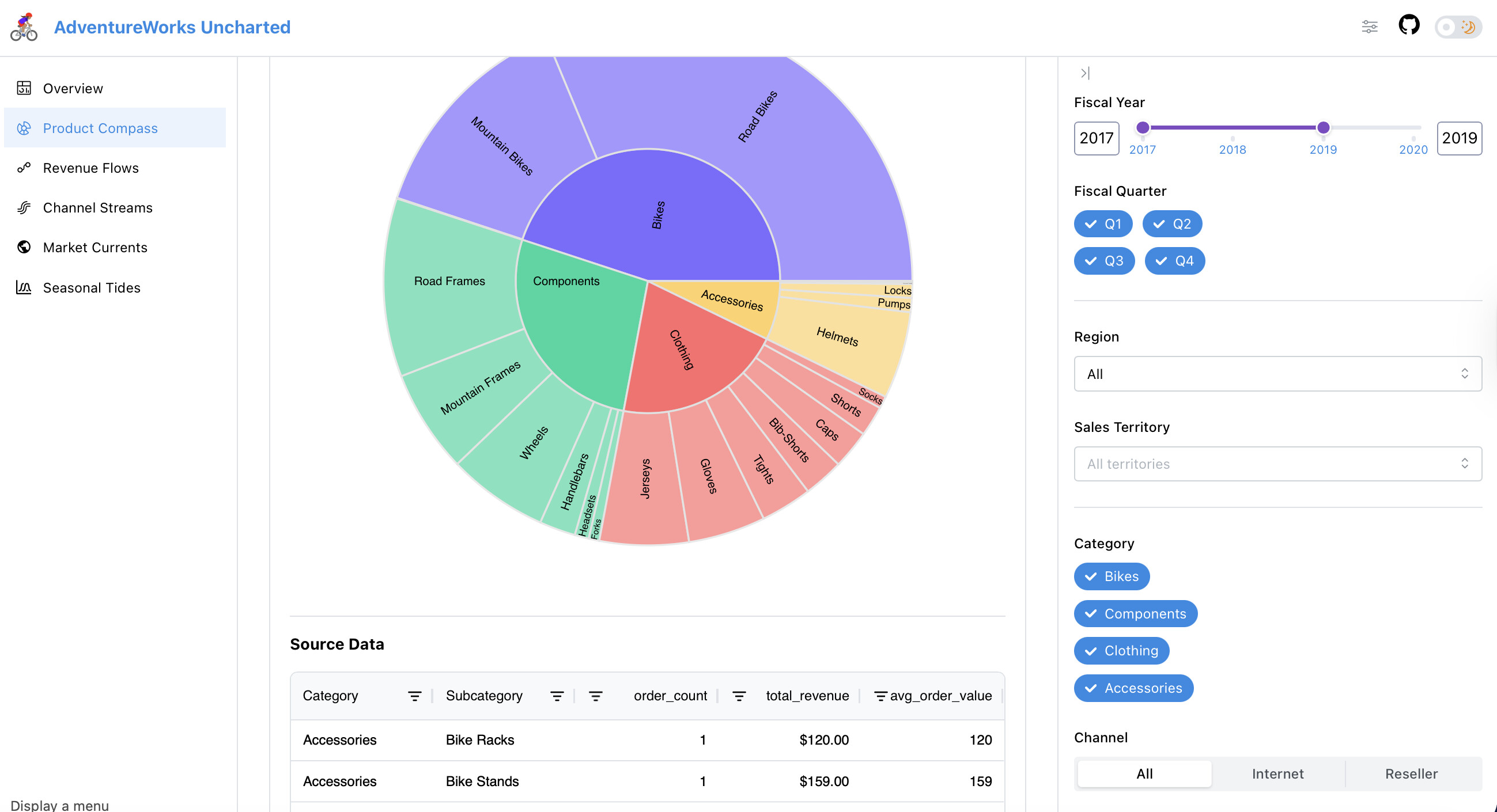
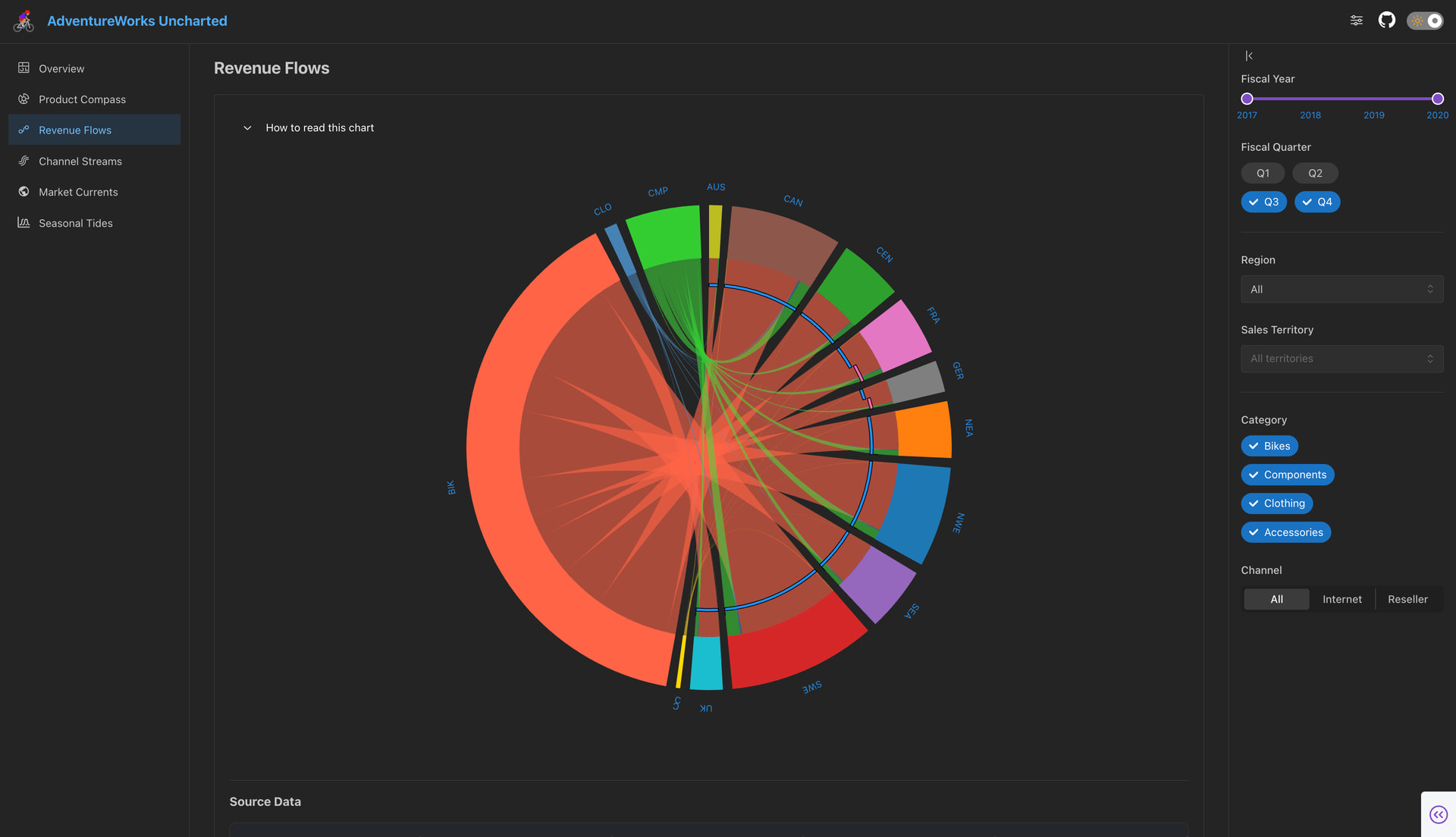
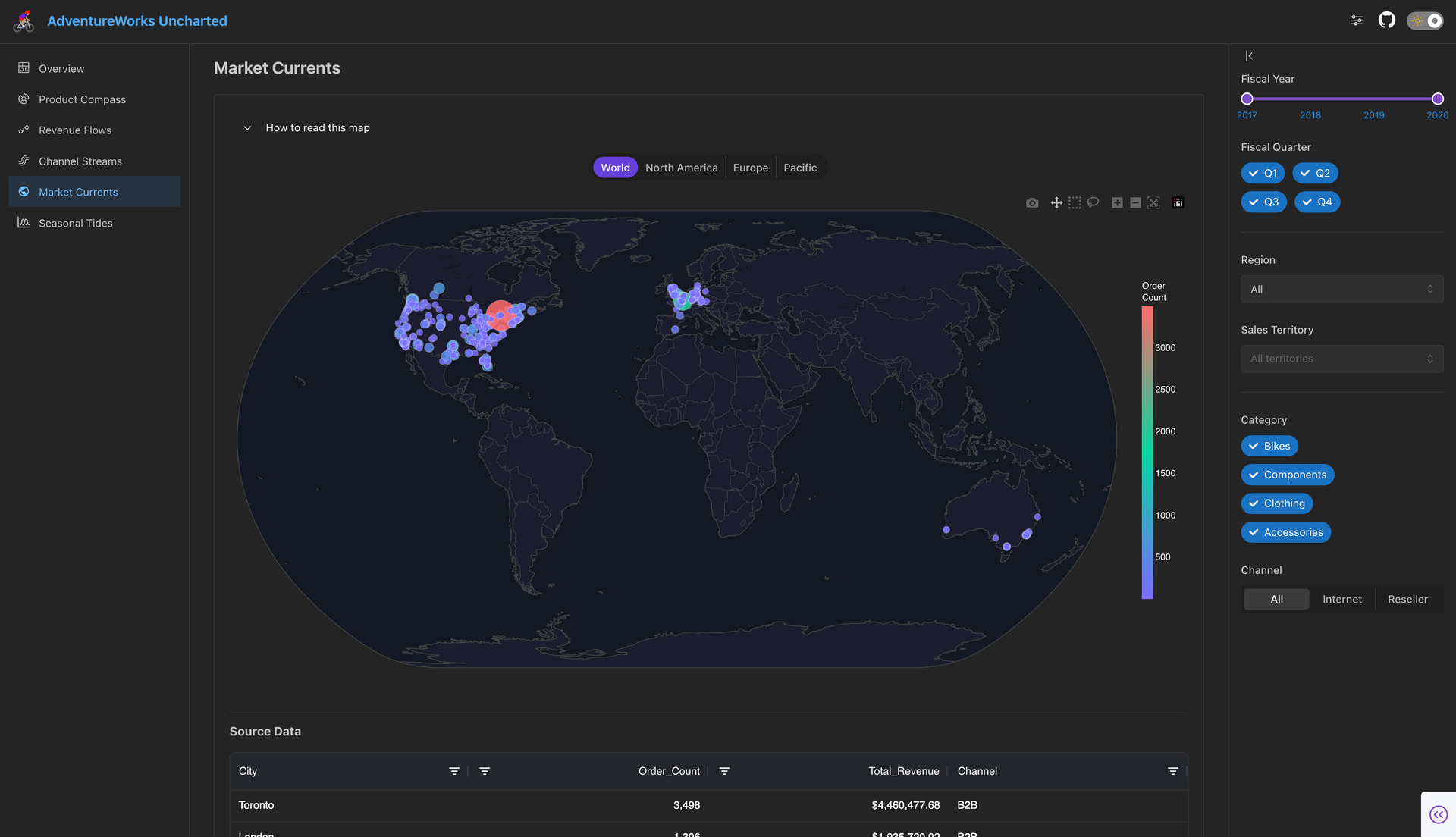
AdventureWorks Uncharted reimagines the most familiar dataset in business analytics — the one every analyst has seen through the lens of PowerBI — using unconventional visualisations that native BI tools were never built to produce.

Built with Dash and styled with Dash Mantine Components (thank you for the wonderful guides @AnnMarieW), it looks like a modern web application rather than a traditional dashboard complete with a collapsible filter aside, persistent global filters across pages, and smooth page transitions.

  • :cyclone: Product Compass — Interactive sunburst revealing product hierarchy and sales patterns across categories and subcategories

  • :blue_circle: Revenue Flows — Circos chord diagram mapping revenue flows between global territories and product categories

  • :wavy_dash: Channel Streams — Stream graph visualising the tension between B2B reseller and B2C direct channels over four fiscal years

  • :globe_showing_europe_africa: Market Currents — Bubble map plotting order intensity across 558 cities worldwide

  • :ocean: Seasonal Tides — Ridgeline distribution plot revealing how order value distributions have evolved across fiscal quarters
Link to live app: Adventureworks Uncharted - a Hugging Face Space by deepa-shalini
Link to GitHub repo: GitHub - deepa-shalini-k/adventureworks_uncharted: Interactive sales analytics dashboard using unconventional visualizations to explore the AdventureWorks dataset · GitHub

P.S. I couldn’t deploy in Plotly Cloud as it doesn’t seem to be compatible with apps which use the dash_bio library.

cc @adamschroeder

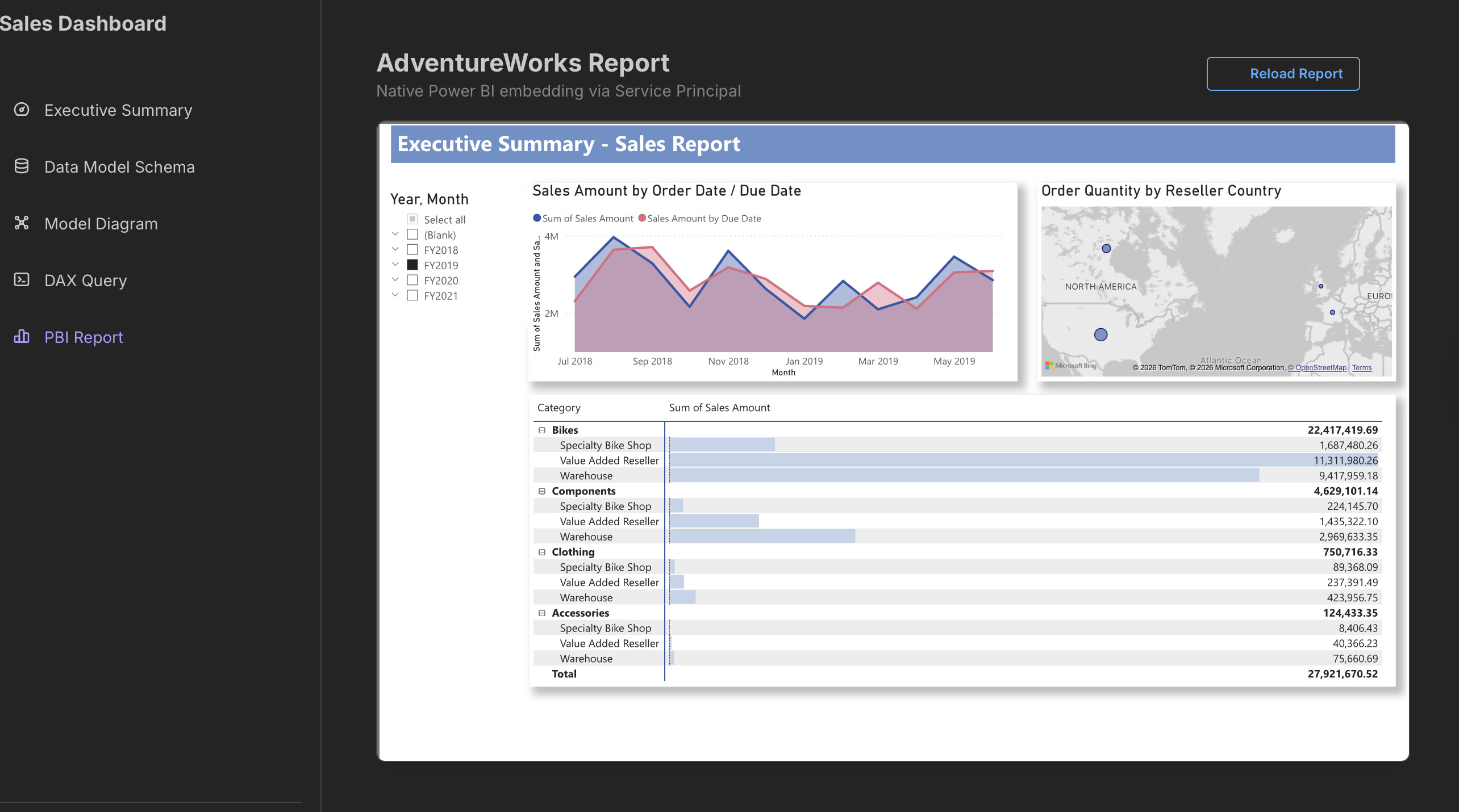
Power BI Semantic Shell — a white-label Dash developer platform over any Power BI model

Most Power BI + Dash integrations stop at pulling data and drawing charts. This app goes deeper — it treats the Power BI semantic model itself as the product, building a full analytics shell that connects to any workspace without touching the .pbix file.

Built with Dash, Dash Mantine Components, and a clean-architecture Python backend (domain / infrastructure / presentation layers), it authenticates via Azure AD service principal and exposes four live views over the AdventureWorks semantic model:

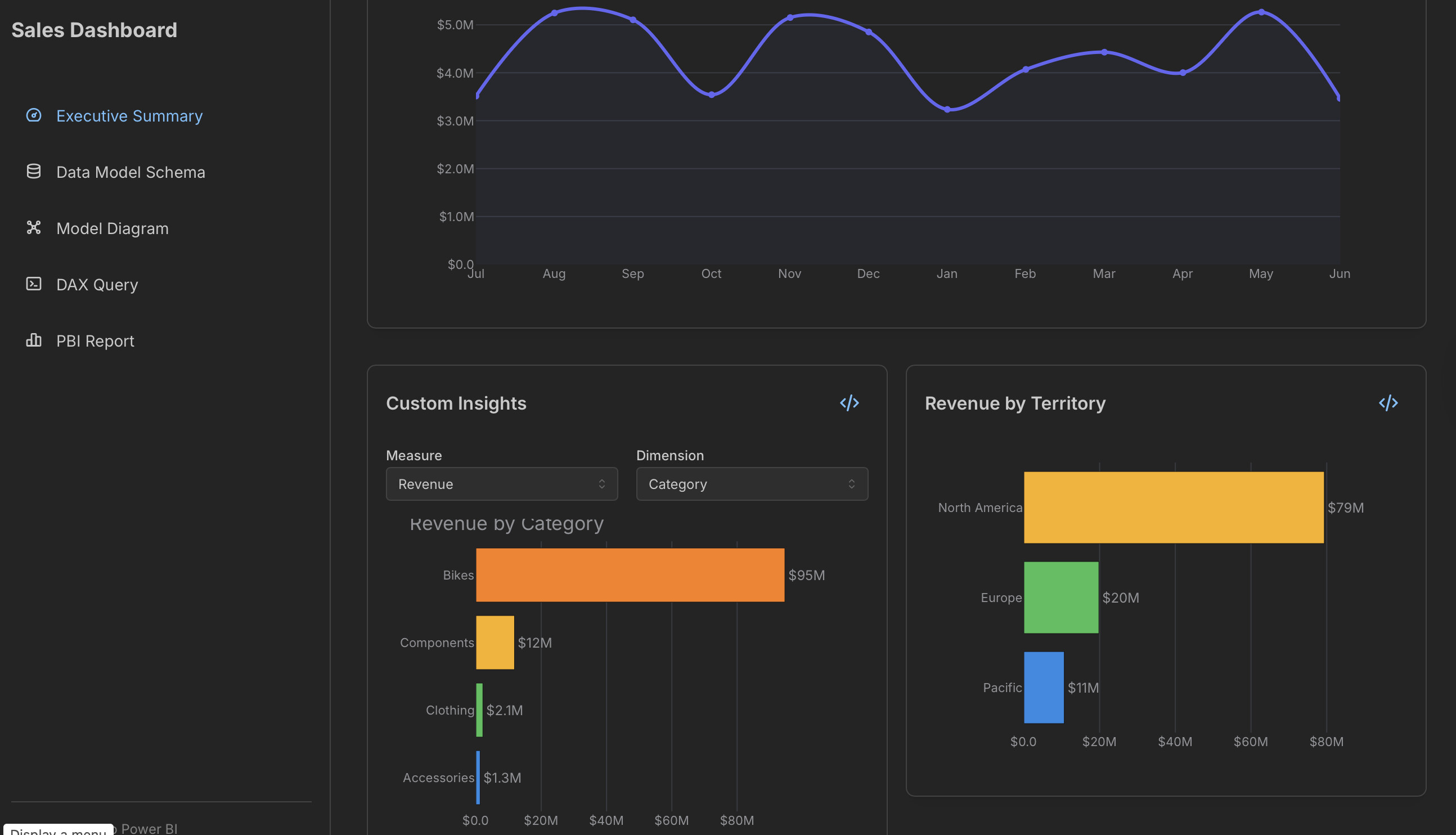
  • :bar_chart: Executive Summary — KPI cards, revenue trends, category breakdowns, and a product performance table powered by AG Grid, all driven by live DAX queries against the semantic model
  • :file_cabinet: Schema Explorer — browsable table / column / measure tree auto-generated from the live model — no hardcoded schema
  • :spider_web: Model Diagram — interactive entity-relationship diagram built from relationship metadata returned by the Power BI REST API
  • :memo: DAX Query Editor — write and execute arbitrary DAX against the live model with a full Ace editor, schema-aware autocomplete (tables, columns, measures), syntax highlighting, CSV export, and paginated AG Grid results
  • :frame_with_picture: Native Power BI Embed — the original Power BI report rendered inside the Dash shell via app-owns-data embedding (service principal token flow)
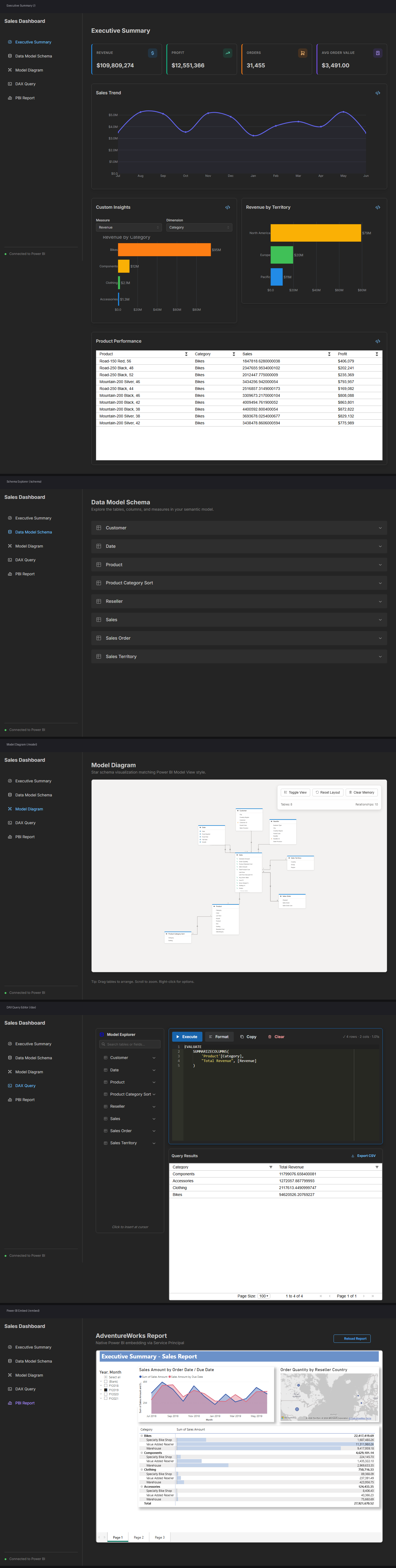

What makes this different: the app is designed to be model-agnostic. Point it at any Power BI workspace + dataset via environment variables and it self-configures — schema explorer, autocomplete, and diagrams all rebuild from the live metadata. No hardcoded table names, no dataset-specific code.

Live app: https://f75c585e-e923-4cf2-8867-847d94075ea6.plotly.app
GitHub: https://github.com/back1ply/plotly-power-bi-semantic-model

▎ Note: the app runs on Plotly Community Cloud free tier so there may be a ~10s cold start — hit any page and wait a moment for it to wake up.

Showcase screenshot below.

Thank you for your app submissions everyone.
The Plotly team will review the apps and decide on first, second and third place.
The decision will be posted mid-May.

Thank you :folded_hands:

Just an FYI, since I’ve deployed in the free tier of HuggingFace, the app falls asleep due to inactivity. The viewer needs to click on the button “Restart this space” to launch the app.

You might consider using Plotly Cloud where apps wake automatically! You can get started at: https://cloud.plotly.com

Hi @nathandrezner as I mentioned in my submission post, I tried Plotly cloud first, looks like it doesn’t support apps which utilize the dash_bio library.

:rocket: Thank you everyone for having participated in this challenge.
Integrating Power Bi semantic models into Dash or Plotly Studio is not straightforward, which is why we’re really proud of the apps that were submitted. In addition to showcasing strong visualizations, these apps stand out in their beautify and sophistication.

It was a pleasure for Plotly staff to judge these apps. After much deliberation, the winners are…

@Ester for the best Plotly Studio app.

Eszter’s app is absolutely beautiful: from the unique logo at the top right, to the color theme, and the pivot table presented, her work highlights how clean and readable Plotly Studio apps can be.


In the Dash category, in 2nd place we have @back1ply with the Sales Dashboard.

Back1ply’s app stands out thanks to the implementation of unique features not commonly seen in a Dash app. The way they integrated a DAX Query Editor and embeded the original Power BI report is phenomenal.

In addition, the model diagram is an elegant touch that allows one to get a bird’s eye view of the meta data. Finally, bonus points for the solid usage of the Dash Mantine Components library.


In 1st place, within the Dash category, we have @deepa-shalini and her AdventureWorks Uncharted app.

Deepa’s app wins frist place in these two categories:

  • Data insights revealed from the dataset
  • App UI/UX Design

The uniqueness of the charts chosen, combined with the Dash AG Grid, allows the user to explore the dataset in depth and gain quick insights. The ability to collaps the side bar and seemlessly filter the data with the controls is an element that the Plotly judges really liked.

The sunburst chart also provides a clear breakdown of the products, by order and revenue.

Another impressive build is the summary cards, which allow one to quickly change tabs after reading their inidividual summary.

Thank you again for making amazing Dash and Plotly Studio apps :folded_hands: