Hi all,
I’m creating a heatmap with a discrete colormap following this guide.
I noticed that when my z variable is one dimensional, the colorbar displays ticks in incorrect locations.
Here is the guide’s original code:
def discrete_colorscale(bvals, colors):
    """
    bvals - list of values bounding intervals/ranges of interest
    colors - list of rgb or hex colorcodes for values in [bvals[k], bvals[k+1]],0<=k < len(bvals)-1
    returns the plotly  discrete colorscale
    """
    if len(bvals) != len(colors) + 1:
        raise ValueError('len(boundary values) should be equal to  len(colors)+1')
    bvals = sorted(bvals)
    nvals = [(v - bvals[0]) / (bvals[-1] - bvals[0]) for v in bvals]  # normalized values

    dcolorscale = []  # discrete colorscale
    for k in range(len(colors)):
        dcolorscale.extend([(nvals[k], colors[k]), (nvals[k + 1], colors[k])])
    return dcolorscale


bvals = [2, 15, 40, 65, 90]
colors = ['#09ffff', '#19d3f3', '#e763fa' , '#ab63fa']
dcolorsc = discrete_colorscale(bvals, colors)

bvals = np.array(bvals)
tickvals = [np.mean(bvals[k:k + 2]) for k in range(len(bvals) - 1)]  # position with respect to bvals where ticktext is displayed
ticktext = [f'<{bvals[1]}'] + [f'{bvals[k]}-{bvals[k+1]}' for k in range(1, len(bvals)-2)]+[f'>{bvals[-2]}']

z = np.random.randint(bvals[0], bvals[-1]+1, size=(20, 20))

heatmap = go.Heatmap(z=z,
                     colorscale=dcolorsc,
                     colorbar=dict(
                         thickness=25,
                         tickvals=tickvals,
                         ticktext=ticktext,
                     ))
fig = go.Figure(data=[heatmap])
fig.update_layout(width=500, height=500)
fig.show()
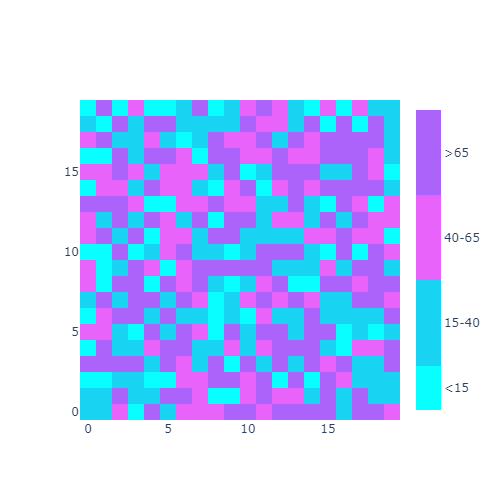
Now do the same thing, but only display the first line of z:
heatmap = go.Heatmap(z=[z[0]],
                     colorscale=dcolorsc,
                     colorbar=dict(
                         thickness=25,
                         tickvals=tickvals,
                         ticktext=ticktext,
                     ))
fig = go.Figure(data=[heatmap])
fig.update_layout(width=500, height=500)
fig.show()
There’s a slight but significant change in the location of colorbar ticks:
