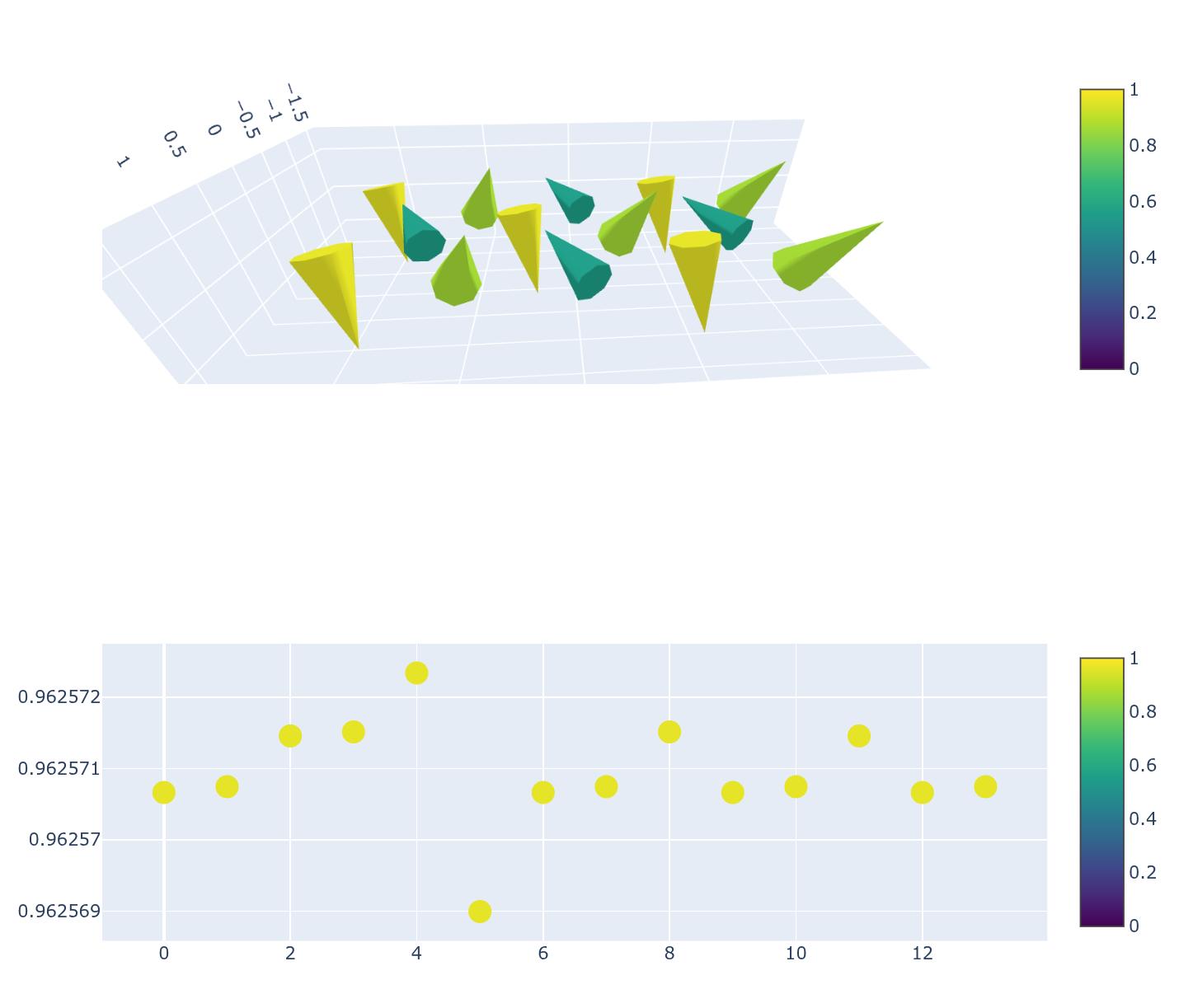
The cone plot’s colors and norms do not match the colors I set

This is my code.

x = [0. , 1. , 2. , 0.5, 1.5, 2.5, 3. , 4. , 3.5, 0. , 1. , 2. , 3. , 4. ]
y = [ 0.8660254,  0.8660254,  0.8660254,  0.       ,  0.       ,  0.       ,  0.8660254,  0.8660254,  0.       , -0.8660254, -0.8660254, -0.8660254, -0.8660254, -0.8660254]
z = [0, 0, 0, 0, 0, 0, 0, 0, 0, 0, 0, 0, 0, 0]
u = [-0.2457108 , -0.14523492,  0.3909496 ,  0.3909698 , -0.2457666 , -0.14518224, -0.2457108 , -0.14523492,  0.3909698 , -0.2457108 , -0.14523492,  0.3909496 , -0.2457108 , -0.14523492]
v = [ 0.5456254,  0.3224986, -0.8681328, -0.8681778,  0.5457494,  0.3223816,  0.5456254,  0.3224986, -0.8681778,  0.5456254,  0.3224986, -0.8681328,  0.5456254,  0.3224986]
w = [ 0.7539638 , -0.895234  ,  0.14158978,  0.14125808,  0.753858  , -0.8952828 ,  0.7539638 , -0.895234  ,  0.14125808,  0.7539638 , -0.895234  ,  0.14158978,  0.7539638 , -0.895234  ]

fig = go.Figure()

fig.add_trace(go.Cone(
    x=x,
    y=y,
    z=z,
    u=u,
    v=v,
    w=w,
    sizemode="raw",
    sizeref=1,
    cmin=0, cmax=1.,
    colorscale="Viridis",
))

Result is here.
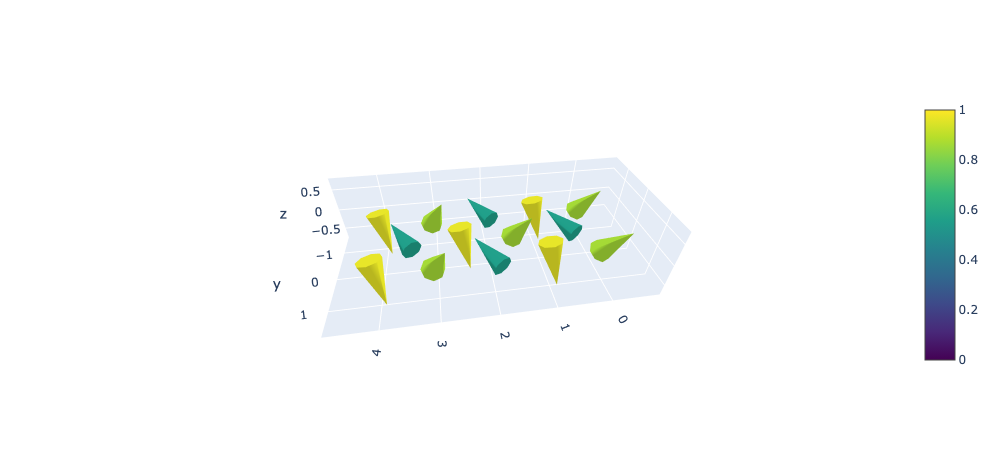
The norms of (u[i],v[i],w[i]) are very close (about 0.92), but they do not match the colorbar (they appear to range from 0.6 to 1.0).

Python verion: 3.13.9, plotly version: 6.5.0, I use macOS and vscode.
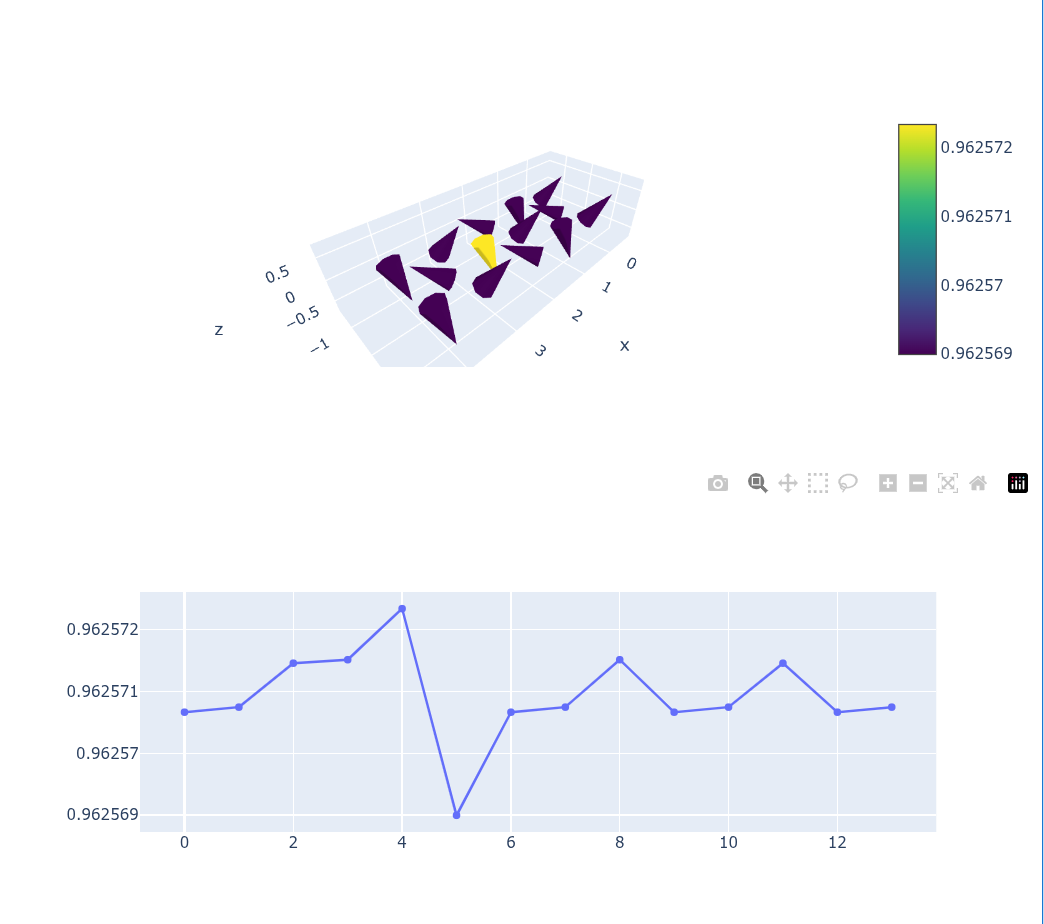
Hey @nito welcome to the forums.

You are setting cmin and cmax manually, effectively reducing the colors of the colorscale. Since the norm values are very similar, the color assignment gets tricky. I tried setting cmin and cmax with the actual values, but again, the values are very similar. I am not sure if this might be related to rounding issues. Did you check that in the source code?

import plotly.graph_objects as go
import numpy as np

x = [0. , 1. , 2. , 0.5, 1.5, 2.5, 3. , 4. , 3.5, 0. , 1. , 2. , 3. , 4. ]
y = [ 0.8660254,  0.8660254,  0.8660254,  0.       ,  0.       ,  0.       ,  0.8660254,  0.8660254,  0.       , -0.8660254, -0.8660254, -0.8660254, -0.8660254, -0.8660254]
z = [0, 0, 0, 0, 0, 0, 0, 0, 0, 0, 0, 0, 0, 0]
u = [-0.2457108 , -0.14523492,  0.3909496 ,  0.3909698 , -0.2457666 , -0.14518224, -0.2457108 , -0.14523492,  0.3909698 , -0.2457108 , -0.14523492,  0.3909496 , -0.2457108 , -0.14523492]
v = [ 0.5456254,  0.3224986, -0.8681328, -0.8681778,  0.5457494,  0.3223816,  0.5456254,  0.3224986, -0.8681778,  0.5456254,  0.3224986, -0.8681328,  0.5456254,  0.3224986]
w = [ 0.7539638 , -0.895234  ,  0.14158978,  0.14125808,  0.753858  , -0.8952828 ,  0.7539638 , -0.895234  ,  0.14125808,  0.7539638 , -0.895234  ,  0.14158978,  0.7539638 , -0.895234  ]

arr = np.array([u,v,w])
norms = np.linalg.norm(arr, axis=0)
_min = norms.min()
_max = norms.max()
_mean = np.mean(norms)

fig = go.Figure()

fig.add_trace(go.Cone(
    x=x,
    y=y,
    z=z,
    u=u,
    v=v,
    w=w,
    sizemode="raw",
    sizeref=1,
    #cmin=0, cmax=1,
    cmin=_min, cmax=_max,
    #cmid=_mean,
    colorscale="Viridis",
))

scatter = go.Figure(go.Scatter(x=np.arange(len(u)), y=norms))

fig.show()
scatter.show()

1 Like

My purpose is to make the norms match the colorbar. I use parameters with different norms and compare the resulting figures. I need the cone colors in each figure to follow the same colorbar (cmin = 0, cmax = 1). I don’t want to create color differences on the order of 10e-5.

OK, digging a bit, I think this might be a bug. Supposing I did the norm calculation correctly, the color mapping of the cone plot and scatter plot should look the same.

import plotly.graph_objects as go
import numpy as np

x = [0. , 1. , 2. , 0.5, 1.5, 2.5, 3. , 4. , 3.5, 0. , 1. , 2. , 3. , 4. ]
y = [ 0.8660254,  0.8660254,  0.8660254,  0.       ,  0.       ,  0.       ,  0.8660254,  0.8660254,  0.       , -0.8660254, -0.8660254, -0.8660254, -0.8660254, -0.8660254]
z = [0, 0, 0, 0, 0, 0, 0, 0, 0, 0, 0, 0, 0, 0]
u = [-0.2457108 , -0.14523492,  0.3909496 ,  0.3909698 , -0.2457666 , -0.14518224, -0.2457108 , -0.14523492,  0.3909698 , -0.2457108 , -0.14523492,  0.3909496 , -0.2457108 , -0.14523492]
v = [ 0.5456254,  0.3224986, -0.8681328, -0.8681778,  0.5457494,  0.3223816,  0.5456254,  0.3224986, -0.8681778,  0.5456254,  0.3224986, -0.8681328,  0.5456254,  0.3224986]
w = [ 0.7539638 , -0.895234  ,  0.14158978,  0.14125808,  0.753858  , -0.8952828 ,  0.7539638 , -0.895234  ,  0.14125808,  0.7539638 , -0.895234  ,  0.14158978,  0.7539638 , -0.895234  ]

arr = np.array([u,v,w])
norms = np.linalg.norm(arr, axis=0)
_min = norms.min()
_max = norms.max()
_mean = np.mean(norms)

fig = go.Figure()

fig.add_trace(go.Cone(
    x=x,
    y=y,
    z=z,
    u=u,
    v=v,
    w=w,
    sizemode="raw",
    sizeref=1,
    cmin=0, cmax=1,
    #cmin=_min, cmax=_max,
    #cmid=_mean,
    colorscale="Viridis",
))

scatter = go.Figure(
    go.Scatter(
        x=np.arange(len(u)),
        y=norms, 
            mode='markers',
    marker=dict(
        size=16,
        color=norms, 
        colorscale='Viridis',
        showscale=True,
        cmin=0, cmax=1,

    )))

fig.show()
scatter.show()

see also: Cones color issue · Issue #2827 · plotly/plotly.py · GitHub

2 Likes