I want that a number column be right aligned:
from dash import Dash, html
import dash_ag_grid as dag

grid = dag.AgGrid(
	id = 'grid',
	rowData = [dict(i=i) for i in [1,10,2,11]],
	columnDefs=[
		{
			'field': 'i', 'cellStyle':{'width': 'auto','text-align': 'right'},
			'valueFormatter': {'function': '(params.value ? params.value : 0).toLocaleString("pt-BR",{minimumFractionDigits: 2})'},
			'type': 'rightAligned','textAlign':'right',
		},
	],
	columnSize = 'autoSize',
	dashGridOptions= {
		'pagination':True,'paginationPageSize':2,
		'domLayout': 'autoHeight',
	},
	style={'width': 'auto'},
)

app = Dash(__name__,)
app.layout = [html.Div([grid]),]

if __name__ == '__main__':
    app.run(debug=True)
It works in the first page:
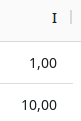
But not in the second:
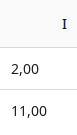
If I come back to the first page it is not aligned any more.
What am I missing?