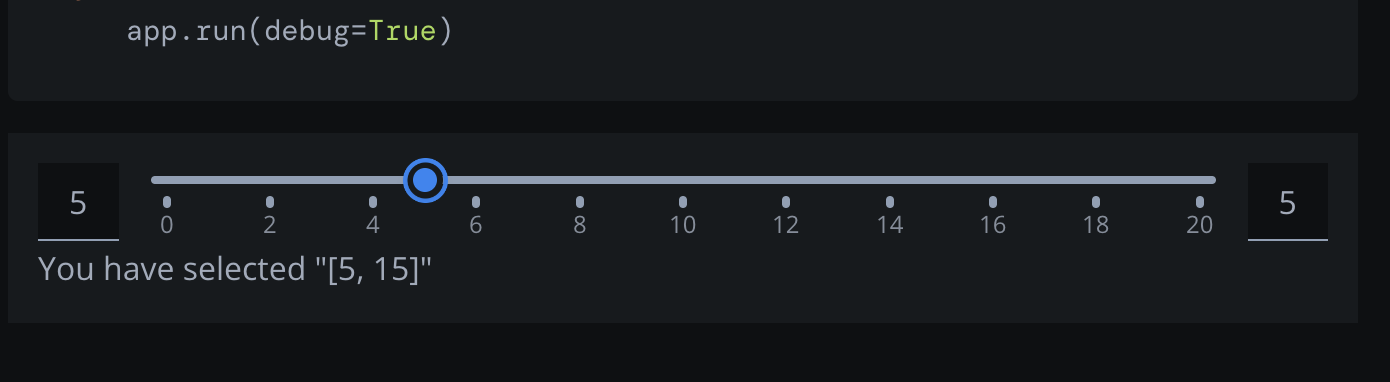
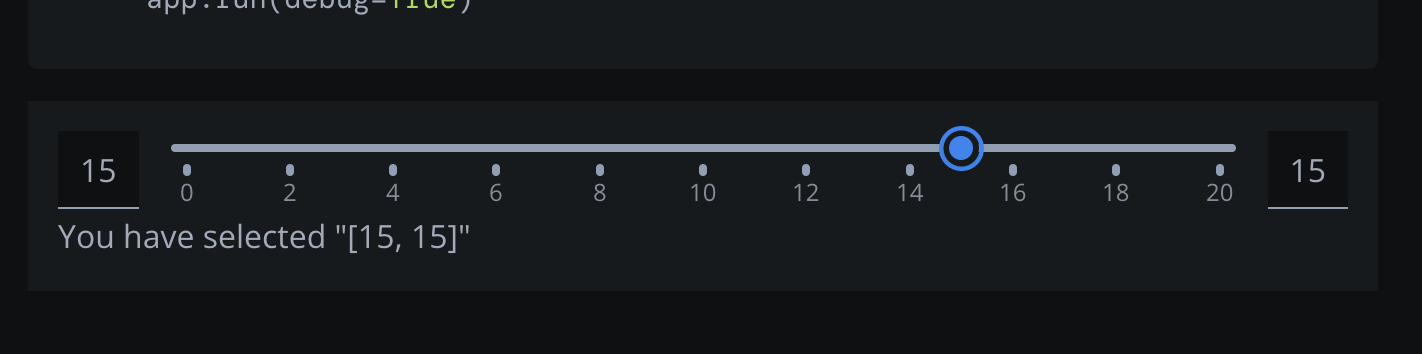
If I want to select a single value on the range slider, it works when dragging the lower value to the same position as the higher value but not the other way around.
This behaviour can even be observed on the examples page.
Move the higher slider down to the lower one and the value of the higher slider will remain unchanged:
Other way around it works:
Thank you for looking into this.
Hi @heartshime ,
If I understood your report correctly, I think it’s working as intended.
If you move the higher handle down to the lower one, the value of the higher handle (to the right) will remain unchanged because once it surpasses the lower handle, it becomes the lower handle. Therefore, you will see the value on the left change.
But it does not reflect the UI State of the compnent at all. You could have both set to 5 according to the UI, and yet the “value” of the right one is still at 15. This seems very confusing. See the output from the callback in the first screenshot.
Sorry, I think I wasn’t clear on this. The right value in the callback is wrong.
Also why would it be allowed to have the same value if you slide the left one up, but not if you slide the right one down?
@heartshime
Yes, it looks like you found a bug. Thanks for reporting. It would be helpful if you could open an issue on the Dash GitHub
now I see what you mean. The values inside the square brackets don’t update correctly. Definttely seems to be a bug, like @AnnMarieW suggested. Would you mind reporting this as a new issue on our GitHub?