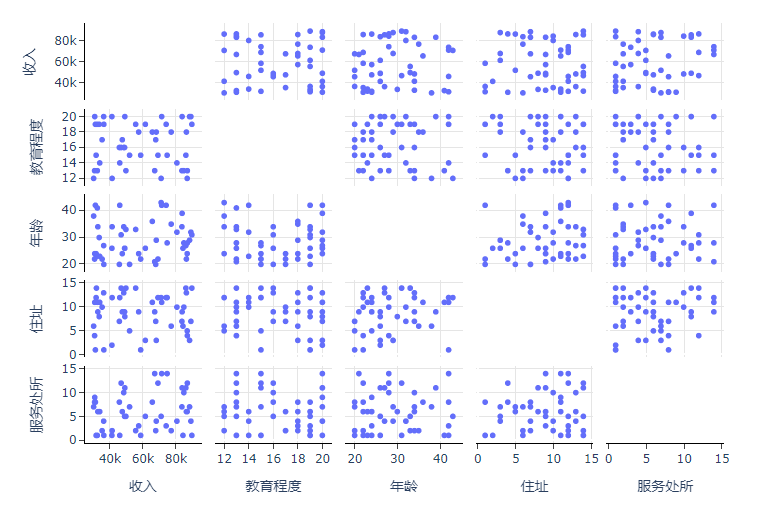
import pandas as pd
import numpy as np
from plotly.subplots import make_subplots
import plotly.graph_objects as go


def get_width_wight(n):
    if n <= 2:
        width = 600
        height = 480
    elif 2 < n <= 4:
        width = 800
        height = 610
    elif 4 < n <= 6:
        width = 1000
        height = 740
    elif 6 < n <= 8:
        width = 1200
        height = 870
    else:
        width = 1400
        height = 1000
    return width, height


def plot_sub(data, col_var, row_var):
    trace = go.Scatter(
        x=data[col_var],
        y=data[row_var],
        mode='markers',
        marker={'color': '#0054A6'},
        showlegend=False,
        hovertemplate=(
            f"{col_var} = %{{x}}<br>"
            f"{row_var} = %{{y}}"
        ),
        name=''
    )
    return trace


def plot_matrix_scatter(fig, data, n, dims):
    for i, row_var in enumerate(dims):
        for j, col_var in enumerate(dims):
            row = i + 1
            col = j + 1
            fig.update_xaxes(mirror=True, showline=True, linewidth=1, linecolor='black', row=row, col=col)
            fig.update_yaxes(mirror=True, showline=True, linewidth=1, linecolor='black', row=row, col=col)
            if i == j:  # 跳过对角线的子图
                fig.add_trace(go.Scatter(), row=row, col=col)
                fig.update_xaxes(showgrid=False, row=row, col=col)
                fig.update_yaxes(showgrid=False, row=row, col=col)
            else:  # 其他子图
                fig.add_trace(plot_sub(data, col_var, row_var), row=row, col=col)
                fig.update_xaxes(showgrid=True, gridcolor='#e5e5e5', row=row, col=col)
                fig.update_yaxes(showgrid=True, gridcolor='#e5e5e5', row=row, col=col)
            if i == n - 1:  # 最后一行,增加刻度和标签
                fig.update_xaxes(title_text=dims[j], ticks='outside', showticklabels=True, row=row, col=col)
            else:
                fig.update_xaxes(showticklabels=False, row=row, col=col)
            if j == 0:  # 第一列,增加刻度和标签
                fig.update_yaxes(title_text=dims[i], ticks='outside', showticklabels=True, row=row, col=col)
            else:
                fig.update_yaxes(showticklabels=False, row=row, col=col)
    return fig


if __name__ == '__main__':
    df = pd.DataFrame(
        {
            'AAA': np.random.randint(30000, 90000, 50),
            'BBB': np.random.randint(12, 21, 50),
            'CCC': np.random.randint(20, 45, 50),
            'DDD': np.random.randint(1, 15, 50),
            'EEE': np.random.randint(1, 15, 50),
            # 'FFF': np.random.randint(30000, 90000, 50),
            # 'GGG': np.random.randint(12, 21, 50),
            # 'HHH': np.random.randint(20, 45, 50),
            # 'III': np.random.randint(1, 15, 50),
            # 'JJJ': np.random.randint(1, 15, 50)
        }
    )
    n_columns = df.shape[1]
    assert 2 <= n_columns <= 10, '数据列数必须大于等于2小于等于10'
    dims = list(df.columns)
    fig = make_subplots(
        rows=n_columns, cols=n_columns,
        shared_xaxes=True, shared_yaxes=True,
        horizontal_spacing=0.01, vertical_spacing=0.01
    )
    fig = plot_matrix_scatter(fig, df, n_columns, dims)
    width, height = get_width_wight(n_columns)
    fig.update_layout(
        width=width, height=height,
        title={
            'x': 0.5,
            'y': 0.95,
            'text': '矩阵散点图',
            'xanchor': 'center',
            'yanchor': 'bottom'
        },
        template='plotly_white',
        plot_bgcolor='white',
        paper_bgcolor='white',
        hoverlabel={
            'bgcolor': '#FFFFFF',
            'bordercolor': '#e5e5e5',
            'font': {'color': '#666666'},
        },
        margin={'l': 0, 'r': 0, 'b': 0, 't': 80, 'pad': 0}
    )
    fig.show()