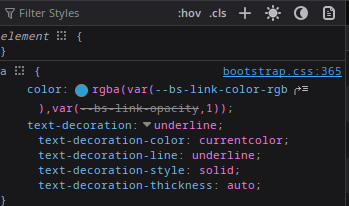
Yes, I’m using dag and dbc:
import dash_ag_grid as dag, dash_bootstrap_components as dbc
from dash import Dash, dcc, html, Input, Output, callback, ctx, hooks
...
columnDefs=[
	{'field': 'markdown', 'headerName': 'Produto', 'filter': True, 'cellStyle':{'width':'auto','text-decoration':'none','text-decoration-color': 'white'}, 'cellRenderer':'markdown', 'linkTarget':'_blank'},
	],
...
dashGridOptions= {
	"theme": {
		"function":
			"themeQuartz.withParams({backgroundColor: 'rgb(10,10,50)', foregroundColor: 'rgb(255,255,255)', headerTextColor: 'rgb(255,255,255)', headerBackgroundColor: 'rgb(10,10,50)', oddRowBackgroundColor: 'rgb(0, 0, 0, 0.03)', headerColumnResizeHandleColor: 'rgb(0,0,0)', fontSize: '1em', gridSize: '50%', borderColor: 'rgb(80,80,80)', decorationColor: 'rgb(0,0,0)'})"
    	},
...
app = Dash(
	__name__,
	external_stylesheets=[dbc.themes.CYBORG],
...