I’m trying to learn how to use an mjs file in Dash. So far I have a file, example.mjs, in the assets folder. It contains this code
// Export a named function
export function greet(name) {
  return `Hello, ${name}!`;
}

// Export a default variable
const PI = 3.14159;
export default PI;
when I run my app, I get this error in the developer console
I’m having this exact same issue. I have several clientside callbacks in separate .js files that I would like to simplify by defining some reusable functions in a separate file.
Here’s figure_functions.mjs - the intent is that this is a module with some common functions used for updating figures and traces that would be used in multiple callback functions.
export function hide_all_traces(figure) {
    /**
     * Hides all traces in figure
     */
    for (var key in figure['data']) {
        figure['data'][key]['visible'] = false;
    }
};
Here’s a simplified version of otd_callback.js In the real app there are a large number of clientside callbacks, so to keep it organized I would like to be able to group them by page.
backlog_callback.js is similar and also depends on functions in figure_functions.mjs. The goal is to not have a single giant .js file for all my clientside callbacks and also not need to copy functions from figure_functions.mjs into each callback file.
When running my app I get the error:
Failed to load module script: Expected a JavaScript-or-Wasm module script but the server responded with a MIME type of “text/plain”. Strict MIME type checking is enforced for module scripts per HTML spec.
Not a stupid idea! I originally tried using figure_functions.js but that resulted in an error about imports not allowed outside of a module. I read in the docs that you could import modules using the .mjs file type.
I was able to find a work around though - as you suggested, I changed the file to figure_functions.js, then removed the export keywords and defined them as regular functions. In the files where I use these functions (like otd_callback.js) I removed the import and this just … worked?
I’m much more familiar with Python than JS, so my Python brain is struggling with why this would work - how can I use a function I defined in a completely different file without importing it? It works, but I’m not satisfied with it
I’m just guessing, but the error you got sounds like if at some point the browser tries to use the function defined in the mjs file and the corresponding file is then uploaded to the internal server. This server checks the mime type and does not recognize it as valid js and defaults to mime type text. Which is not allowed and the corresponding error is raised.
Even if it might be complete bs, I like my little story
Actually, .mjs files do work in Dash. The error you had was because you can’t use import in a regular .js file. It also has to be a .mjs file.
It’s ok to define functions in different files. Dash loads all the .js (and .mjs) file at the start. They are loaded by file name, sorted alphanumerically so you may have to be careful where they are defined. If the function is used inside another function, it’s ok, because it’s called at run-time. But if it was called in the top level, it would have to be loaded already.
I’d like some follow-up advice to this topic. I set up everything correctly and the browser was still complaining that the modules were returned as text/plain. After sparring with the AI, it told me:
Dash allowing .mjs does not guarantee your local Python MIME registry knows .mjs.
If that prints (‘text/plain’, None) or None, that explains the browser failure.
Sure enough, the AI was right and that test was indeed printing text/plain. I called that print statement before initializing my app. As a solution it told me to tell Python to manually map mjs as javascript:
I did that and magically, everything works. Now, one might say, that’s a win for the AI. However, it leaves a bit of a bad taste. Why would I have to manually specify the mimetype to make that work. The Dash documentation doesn’t talk about this and the example above neither.
Can someone comment on what’s happening here? Why is my system not recognizing the MIME type for mjs automatically?
Just because something has a certain ending doesnt automatically mean that is the mimetype that will be sent in the response from the server to the client. .mjs isnt a standard for Dash, so it doesnt know to set it as such. The client has to know what to expect in the response in order to treat the response properly.
That doesn’t necessarily sound unlogical, but it is still strange behavior. I haven’t seen it mentioned anywhere that the mimetype for .mjs files has to be specifcally added in the Dash app. It is not mentioned in the Dash docs, nor is it mentioned in posts like these. So, this gives me the feeling that this is not a universal thing.
Is this a thing you had to set up as well? Why is my system not recognizing the mjs extension? A program I didn’t install, a configuration I didn’t set?
No, I do not use .mjs, but I have ran into the mime-type issue before. It’s not really an issue of your computer knowing what is or isnt a certain extension, its about the browser.
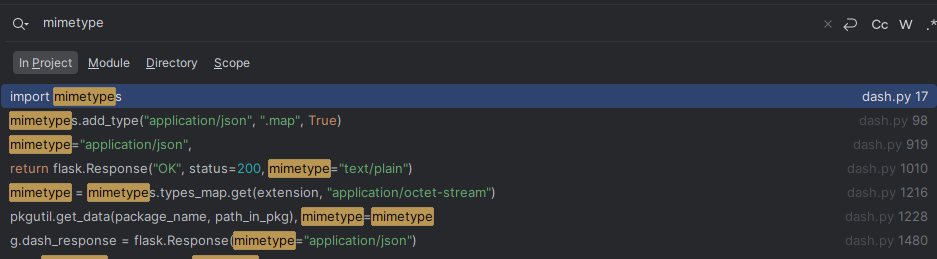
Here is a search in the repo for mimetype declared in the base dash:
I will raise a GitHub issue with this question. If it is something that has to be configured manually by the developer, then it would be helpful if it is mentioned in the documentation pages. The error message in the browser is really unhelpful in understanding the real problem, so it’s very unintuitive to come to the right solution.
While they could add this to the documentation and alternatively add something for it to get the right mimetype; this is in the realm of a more advanced server design. This is more an issue of how Flask handles the files than the Dash built server.
I would love to see a more advanced section for the Dash docs that would handle things like custom server setup, how the process of the application works, the process flow of the renderer, etc.