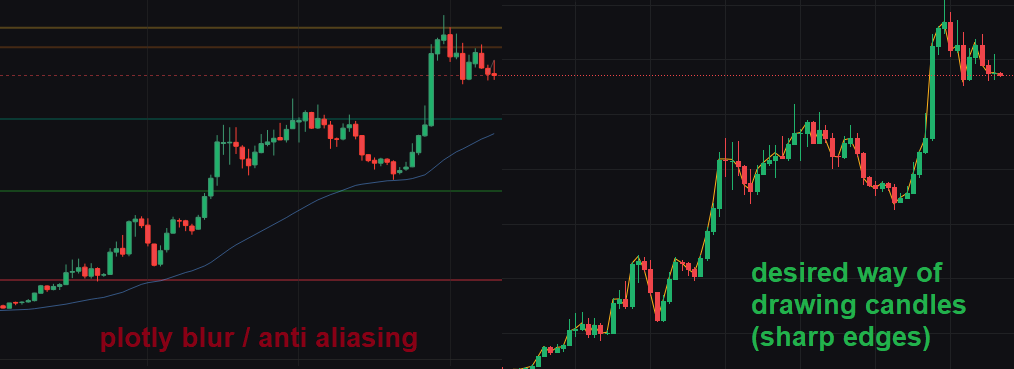
Hi, I’d like plotly to draw candlesticks with sharp borders, like the “Tradingview” candles you see on the right side.
Thanks in advance!
AIMPED
April 6, 2026, 9:55am
2
Hey @Zangief I am not sure if that is enough for your needs, but part of the blur derives from the fill color and line color/ width. Try this:
import plotly.graph_objects as go

import pandas as pd
from datetime import datetime

df = pd.read_csv('https://raw.githubusercontent.com/plotly/datasets/master/finance-charts-apple.csv')

fig = go.Figure(
    data=go.Candlestick(
        x=df['Date'],
        open=df['AAPL.Open'],
        high=df['AAPL.High'],
        low=df['AAPL.Low'],
        close=df['AAPL.Close'],
        line=dict(width=0.0),
        increasing=dict(
            fillcolor="green",
            line=dict(
                color="rgba(0,0,0,0)",
                width=0
            )
        ),
        decreasing=dict(
            fillcolor="red",
            line=dict(
                color="rgba(0,0,0,0)",
                width=0
            )
        )
    ),
    layout=dict(height=800)
)

fig.show()
mrep candlestick
1 Like
Still not perfectly sharp but a lot better idd.