callback_error_plugin_demo_8
This plugin provides a reusable error banner component for Dash applications. The error_banner_component function creates a customizable, banner for displaying error messages at the top or bottom of the page. The register_error_banner_callbacks function manages the banner’s visibility and provides a show_banner function to display custom error messages programmatically. This helps standardize error handling and user notifications in Dash apps.
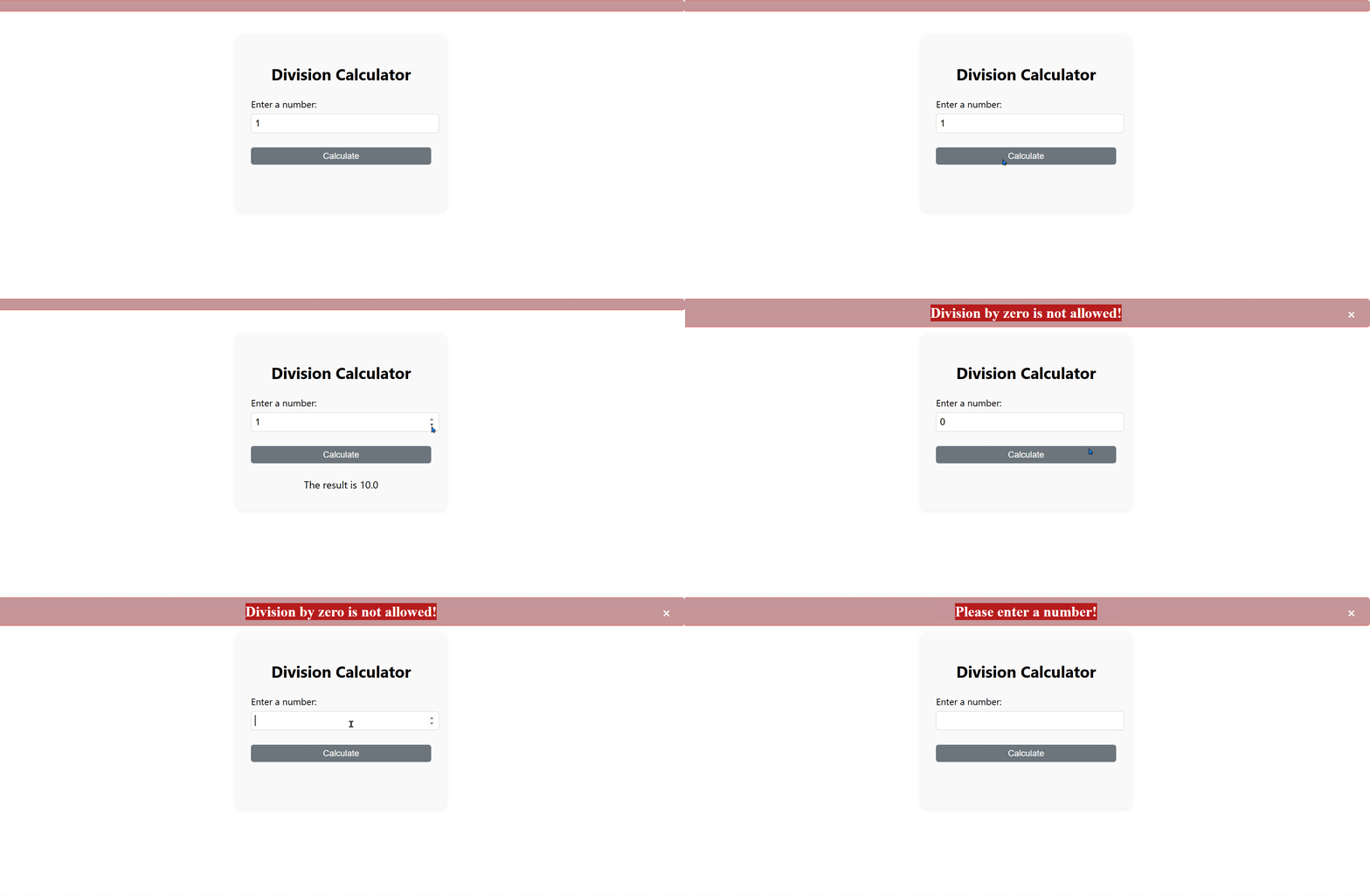
pip install callback-error-plugin_demo_8
from dash import Dash, html, dcc, Input, Output, State, callback
from callback_error_plugin_demo_8 import error_banner_component, register_error_banner_callbacks

app = Dash(__name__)

# Create a customizable error banner
show_error = register_error_banner_callbacks(
    banner_id="my-error-banner",
    text_id="my-error-text",
    dismiss_id="my-dismiss-button",
    default_text="Custom error will display here.",
    color="white",
    background="#b71c1c",
    border_color="#f44336",
    z_index=9999,
    position="top",
)

def hide_error_banner():
    show_error("")

app.layout = html.Div(
    [
        # Place the error banner at the top
        error_banner_component(
            banner_id="my-error-banner",
            text_id="my-error-text",
            dismiss_id="my-dismiss-button",
            default_text="Custom error will display here.",
            color="white",
            background="#b71c1c",
            border_color="#f44336",
            z_index=9999,
            position="top",
        ),
        html.Div(
            [
                html.H2(
                    "Division Calculator",
                    style={"textAlign": "center", "fontSize": "2.2rem"},
                ),
                html.Label(
                    "Enter a number:",
                    htmlFor="input-number",
                    style={"fontSize": "1.3rem"},
                ),
                dcc.Input(
                    id="input-number",
                    type="number",
                    value=1,
                    style={
                        "fontSize": "1.3rem",
                        "width": "100%",
                        "marginBottom": "1rem",
                        "marginTop": "0.5rem",
                        "padding": "0.5rem",
                        "borderRadius": "6px",
                        "border": "1px solid #ccc",
                    },
                ),
                html.Button(
                    "Calculate",
                    id="calc-btn",
                    style={
                        "width": "100%",
                        "fontSize": "1.2rem",
                        "marginTop": "1rem",
                        "padding": "0.5rem",
                        "borderRadius": "6px",
                        "backgroundColor": "#6c757d",
                        "color": "white",
                        "border": "none",
                    },
                    n_clicks=0,
                ),
                html.Div(
                    id="output-div",
                    style={
                        "fontSize": "1.4rem",
                        "marginTop": "2rem",
                        "minHeight": "2.5rem",
                        "textAlign": "center",
                    },
                ),
            ],
            style={
                "maxWidth": "400px",
                "margin": "80px auto 0 auto",  # 80px top margin for the banner
                "boxShadow": "0 2px 12px rgba(0,0,0,0.08)",
                "borderRadius": "12px",
                "backgroundColor": "#f9f9f9",
                "fontFamily": "Segoe UI, Arial, sans-serif",
                "padding": "32px",
            },
        ),
    ]
)

@callback(
    Output("output-div", "children"),
    Input("calc-btn", "n_clicks"),
    State("input-number", "value"),
)
def update_output(n_clicks, value):
    hide_error_banner()
    if n_clicks == 0:
        return ""
    if value is None:
        show_error("Please enter a number!")
        return ""
    if value == 0:
        show_error("Division by zero is not allowed!")
        return ""
    result = 10 / value
    return f"The result is {result}"

if __name__ == "__main__":
    app.run(debug=True)