Non existent object and ID not found with circular dependency

Related to a Circular Dependency question

I want that when a page loads, the hash value in the url (http://localhost:8050/#some_text) to be inserted in an input field. And when the input field is changed, it updates the hash value.

When I use a circular reference in the same callback it works but I get two errors

app.py

from dash import dcc, page_container, html, Dash

app = Dash(
   __name__,
   use_pages=True,
)

location = dcc.Location(id='location', refresh=False)
app.layout = [location, page_container]

if __name__ == '__main__':
   app.run(debug=True)

home.py

from dash import callback, Output, Input, register_page, dcc

register_page(__name__, name='home', path='/')

layout = dcc.Input(id='input',autoFocus=True,debounce=True)

@callback (
   Output('location', 'hash'),
   Output('input', 'value'),
   Input('location', 'hash'),
   Input('input', 'value'),
)
def update_input(hash: str, input: str):
   if input is None: input = hash.lstrip('#')
   else: hash = '#' + input
   return hash, input

The Id not found in layout error can be suppressed but is it advisable?

If set_props is used instead of Output there is no error:

@callback (
   Output('input', 'value'),
   Input('location', 'hash'),
   Input('input', 'value'),
)
def update_input(hash: str, input: str):
   if input is None: input = hash.lstrip('#')
   else: hash = '#' + input
   set_props('location', {'hash': hash})
   return input
Hi @clodoaldo

Some of the errors come from the way components are added dynamically when using the Pages feature. You can fix that suppressing the warning by adding:

app = Dash(__name__, use_pages=True, suppress_callback_exceptions=True)

However, there is still a timing error in the callback. The Input('location', 'hash'), is triggering the callback before the content of the home.py is loaded. You could fix it by changing it to a State:
State('location', 'hash'),

Another option is to put the dcc.Input into the main app.layout

You mean to put the dcc.Input into app.py’s app.layout? Then I can’t have more than one page? If I can still have more than one page how would I know which page layout to set app.layout to from app.py? I guess app.py runs only once at app start.

I’m sorry for being so confused.

Their are many paths to configuring or setting this up, a practical approach from the app.py prospective. We have a 'display_content` callback which has a range of useful functionality like-

OUTPUT - content, children
OUTPUT - session_data, data
INPUT - url, pathname
INPUT - logout_trigger, n_clicks
STATE - session_data, data

So within a dcc.location(id=‘url’) based on the input of url pathname you can fetch the landed on url and use that to run logic within the callback located in the app.py.

Outside of this it could be further simplified, through seperate methods but take a look at the dcc.location and the from dash import register_page as those two components in dash will help you.

1 Like

With minimal examples, it’s sometimes hard to see what your actual use-case is

If your dcc.Input is included in a component that’s used on all pages, like a header or navbar, then those components could be moved to app.layout.

If your dcc.Input is only on one page, then you have a few other options:

  • use State rather than Input for dcc.Location so the callback is only triggered by changes to the dcc.Input
  • add another dcc.Location to the page - just to trigger changes when that page is active
  • investigate whether making the inputs optional might work for you Advanced Callbacks | Dash for Python Documentation | Plotly
1 Like

The use case is to have an url with parameters (in the hash) posted somewhere on the internet to open a page in the application with those parameters applied to the sql query and to the page elements. Just suggest what the minimal example I posted is lacking and I will supplement.

This is an early version: https://pcbuild.codepoint.net

The current version has a landing page, hence the multipage, and many improvements.

I would recommend using State in the callback like this:

@callback (
   Output('location', 'hash'),
   Output('input', 'value'),
   State('location', 'hash'),
   Input('input', 'value'),
)

and suppress warrnings:

app = Dash(__name__, use_pages=True, suppress_callback_exceptions=True)
1 Like

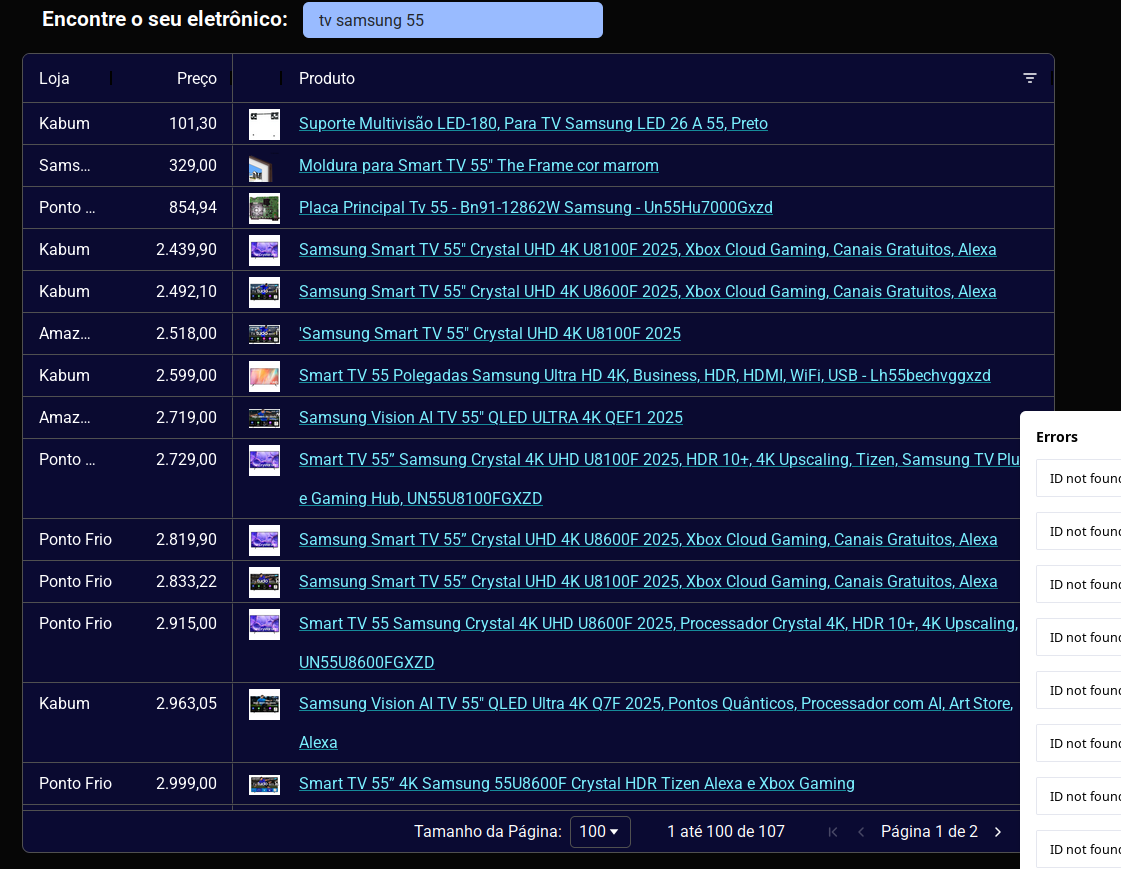
Still the same errors. But the errors are a minor annoyance. There are real consequences from this timing problem. Components and styling are not loaded. Intermittently. The theme should be this one:

But sometimes it results in this one:

It misses the gridOptions:

   dashGridOptions= {
      'suppressHorizontalScroll': False,
      'pagination':True,'paginationPageSize':100,
      'domLayout': 'normal',
      'theme': {
         'function':
            "themeQuartz.withParams({backgroundColor: 'rgb(10,10,50)', foregroundColor: 'rgb(255,255,255)', headerTextColor: 'rgb(255,255,255)', headerBackgroundColor: 'rgb(10,10,50)', oddRowBackgroundColor: 'rgb(0, 0, 0, 0.03)', headerColumnResizeHandleColor: 'rgb(0,0,0)', fontSize: '1em', gridSize: '50%', borderColor: 'rgb(80,80,80)', decorationColor: 'rgb(0,0,0)'})"
       },
      'localeText': ag_grid_locale_br
   },

Introducing a delay in the callback function “fixes” it

   sleep(0.05)

By “fixes” I mean the theme loading problem. Not the errors.

I tried hard to reproduce the theme problem with a minimalist example without success.

I wonder if there is a way to avoid the client executing until the page is fully loaded.

I ran your first example app using State, and it worked correctly without any errors. Did you also include

app = Dash(__name__, use_pages=True, suppress_callback_exceptions=True)

Not sure about the grid styling, a minimal example would really help.

Yes, using State instead of Input eliminates the Non existent object error

and using suppress_callback_exceptions=True suppresses the ID not found one. So I don’t get the messages.

But as I said above. the messages are just a minor nuisance. The big problem is that those timing errors are still messing the grid styling. And they really are very likely timing problems because the introduction of a delay in the callback function “fixes” it. And the removal of the location logic also fixes it.

Now my options are:

  1. Find a javascript solution that waits for the page load to be completed to only then callback
  2. Retry the approach suggested by PipInstallPython
  3. Retry to reproduce the problem with a tiny example
  4. What else?

Moving location out of app.wsgi and into the layout of the home page gets rid of all the errors even using Input instead of State and with suppress_callback_exceptions=False

app.wsgi

from dash import dcc, page_container, html, Dash

app = Dash(
   __name__,
   use_pages=True,
   suppress_callback_exceptions=False
)

app.layout = page_container

if __name__ == '__main__':
   app.run(debug=True)

home.py

from dash import callback, Output, Input, register_page, dcc, html

register_page(__name__, name='home', path='/')

location = dcc.Location(id='location')
layout = [
   location,
   dcc.Input(id='input',autoFocus=True,debounce=True)
]

@callback (
   Output('location', 'hash'),
   Output('input', 'value'),
   Input('location', 'hash'),
   Input('input', 'value'),
)
def update_input(hash: str, input: str):
   if input is None: input = hash.lstrip('#')
   else: hash = '#' + input
   return hash, input

Still the styling problem in the main application persists