Conditional Formatting Recipes
This post shows how to recreate the conditional formatting recipes from the DataTable documentation using Dash AG Grid.
For more information please see the Dash Docs AG Gris styling sections, including:
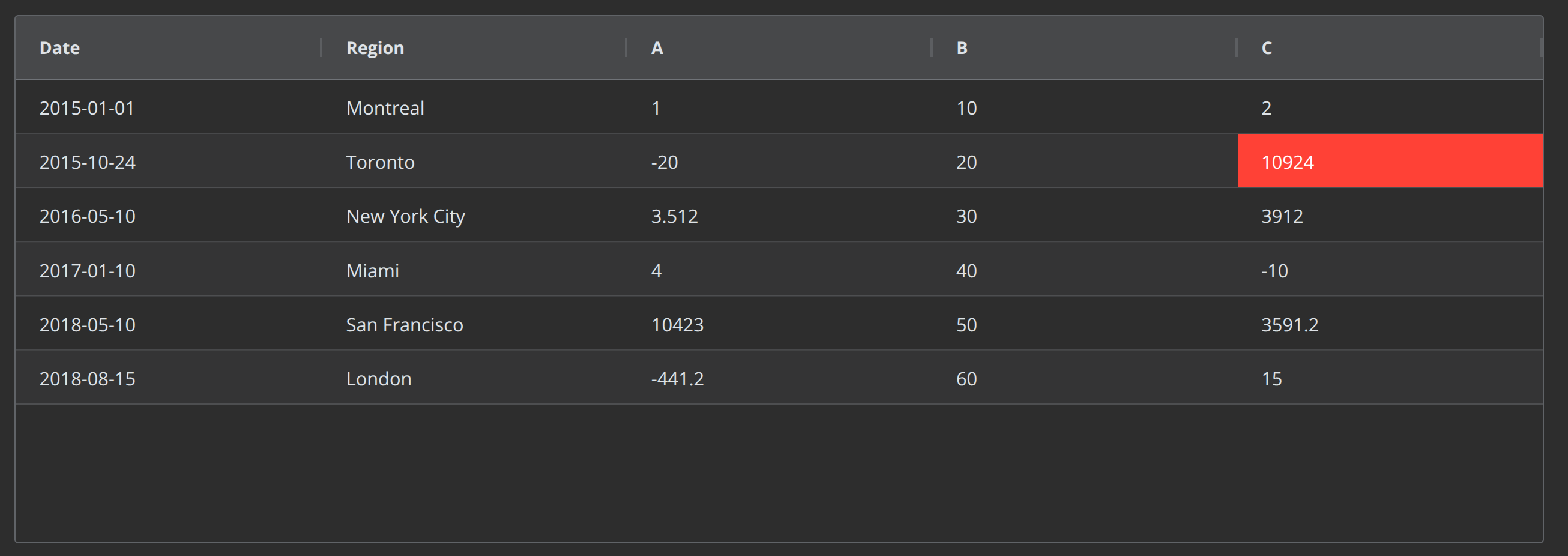
Highlighting the Max Value in a Column
from dash import Dash
import pandas as pd
import dash_ag_grid as dag


data = dict(
    [
        ("Date", ["2015-01-01", "2015-10-24", "2016-05-10", "2017-01-10", "2018-05-10", "2018-08-15"]),
        ("Region", ["Montreal", "Toronto", "New York City", "Miami", "San Francisco", "London"]),
        ("A", [1, -20, 3.512, 4, 10423, -441.2]),
        ("B", [10, 20, 30, 40, 50, 60]),
        ("C", [2, 10924, 3912, -10, 3591.2, 15]),
    ]
)
df = pd.DataFrame(data)

app = Dash()

cellStyle =  {
    "styleConditions": [
        {
            "condition": f"params.value === {df['C'].max()}",
            "style": {'backgroundColor': '#FF4136', "color": "white"}
        }
    ]
}

app.layout = dag.AgGrid(
    rowData=df.to_dict('records'),
    columnDefs=[
        {"field": i} for i in ["Date", "Region", "A", "B"]
        ]+[
        {"field": "C", "cellStyle": cellStyle}
    ],
    columnSize="sizeToFit",
)

if __name__ == '__main__':
    app.run(debug=True)
Highlighting a Row with the Min Value

from dash import Dash
import pandas as pd
import dash_ag_grid as dag


data = dict(
    [
        ("Date", ["2015-01-01", "2015-10-24", "2016-05-10", "2017-01-10", "2018-05-10", "2018-08-15"]),
        ("Region", ["Montreal", "Toronto", "New York City", "Miami", "San Francisco", "London"]),
        ("A", [1, -20, 3.512, 4, 10423, -441.2]),
        ("B", [10, 20, 30, 40, 50, 60]),
        ("C", [2, 10924, 3912, -10, 3591.2, 15]),
    ]
)
df = pd.DataFrame(data)

app = Dash(__name__)

getRowStyle =  {
    "styleConditions": [
        {
            "condition": f"params.data.A == {df.A.min()}",
            "style": {'backgroundColor': '#FF4136', "color": "white"}
        }
    ]
}

app.layout = dag.AgGrid(
    rowData=df.to_dict('records'),
    columnDefs=[{"field": i} for i in df.columns],
    getRowStyle=getRowStyle,
    columnSize="sizeToFit",
)

if __name__ == '__main__':
    app.run(debug=True)
Highlighting the Top Three or Bottom Three Values in a Column

from dash import Dash
import pandas as pd
import dash_ag_grid as dag


data = dict(
    [
        ("Date", ["2015-01-01", "2015-10-24", "2016-05-10", "2017-01-10", "2018-05-10", "2018-08-15"]),
        ("Region", ["Montreal", "Toronto", "New York City", "Miami", "San Francisco", "London"]),
        ("A", [1, -20, 3.512, 4, 10423, -441.2]),
        ("B", [10, 20, 30, 40, 50, 60]),
        ("C", [2, 10924, 3912, -10, 3591.2, 15]),
    ]
)
df = pd.DataFrame(data)


bottom3 = df['C'].nsmallest(3).tolist()
style_bottom3 =  {
    "styleConditions": [
        {
            "condition": f"{bottom3}.includes(params.value)",
            "style": {'backgroundColor': '#7FDBFF', "color": "white"}
        }
    ]
}


top3 = df['A'].nlargest(3).tolist()
style_top3 =  {
    "styleConditions": [
        {
            "condition": f"{top3}.includes(params.value)",
            "style": {'backgroundColor': '#0074D9', "color": "white"}
        }
    ]
}


app = Dash(__name__)
app.layout = dag.AgGrid(
    rowData=df.to_dict('records'),
    columnDefs=[
        {"field": "Date"},
        {"field": "Region"},
        {"field": "A", "cellStyle": style_top3},
        {"filed": "B"},
        {"field": "C", "cellStyle": style_bottom3}
    ],
    columnSize="sizeToFit",
)

if __name__ == '__main__':
    app.run(debug=True)
Highlighting the Max Value in Every Row

from dash import Dash
import pandas as pd
import dash_ag_grid as dag


data = dict(
    [
        ("Date", ["2015-01-01", "2015-10-24", "2016-05-10", "2017-01-10", "2018-05-10", "2018-08-15"]),
        ("Region", ["Montreal", "Toronto", "New York City", "Miami", "San Francisco", "London"]),
        ("A", [1, -20, 3.512, 4, 10423, -441.2]),
        ("B", [10, 20, 30, 40, 50, 60]),
        ("C", [2, 10924, 3912, -10, 3591.2, 15]),
    ]
)
df = pd.DataFrame(data)


app = Dash(__name__)

app.layout = dag.AgGrid(
    rowData=df.to_dict('records'),
    columnDefs=[
        {"field": "Date"},
        {"field": "Region"},
        ] + [
        {
            "field": i,
            "cellClassRules":  {"max-value": "params.value == maxRowValue(params.data)"}
        } for i in ["A", "B", "C"]
    ],
    defaultColDef={"editable": True},
    columnSize="sizeToFit",
)

if __name__ == '__main__':
    app.run(debug=True)


"""
Put the following in a .css file in the /assets folder
------


.max-value {
    background-color: #3D9970;
}

"""


""""
Put the following in a .js file in the /assets folder:
------


var dagfuncs = window.dashAgGridFunctions = window.dashAgGridFunctions || {};

// Returns the max value in a row
dagfuncs.maxRowValue = (obj) => {
    const numericValues = Object.values(obj).filter(value => typeof value === 'number' && !isNaN(value));
    return  Math.max(...numericValues)
}

"""
Highlighting the Maximum Value in the Grid

from dash import Dash, clientside_callback, Input, Output
import pandas as pd
import dash_ag_grid as dag


data = dict(
    [
        ("Date", ["2015-01-01", "2015-10-24", "2016-05-10", "2017-01-10", "2018-05-10", "2018-08-15"]),
        ("Region", ["Montreal", "Toronto", "New York City", "Miami", "San Francisco", "London"]),
        ("A", [1, -20, 3.512, 4, 10423, -441.2]),
        ("B", [10, 20, 30, 40, 50, 60]),
        ("C", [2, 10924, 3912, -10, 3591.2, 15]),
    ]
)
df = pd.DataFrame(data)


app = Dash()

app.layout = dag.AgGrid(
    id="grid-style-max",
    rowData=df.to_dict('records'),
    columnDefs=[{"field": i} for i in df.columns],
    defaultColDef={
        "editable": True,
        "cellClassRules":  {"max-value": "params.value == maxGridValue(params)"}
    },
    columnSize="sizeToFit",
)


# refresh the grid to apply the styles when the grid is edited
clientside_callback(
    """async function () {
        var api = await dash_ag_grid.getApiAsync("grid-style-max")
        api.redrawRows();
        return dash_clientside.no_update
    }""",
    Output("grid-style-max", "id"),
    Input("grid-style-max", "cellValueChanged"),
    prevent_initial_call=True,
)

if __name__ == '__main__':
    app.run(debug=True)


"""
Put the following in a .css file in the /assets folder
------


.max-value {
    background-color: #3D9970;
}
"""


"""

Put the following in a .js file in the /assets folder:
------


var dagfuncs = window.dashAgGridFunctions = window.dashAgGridFunctions || {};

// Returns the max number in a row
dagfuncs.maxRowValue = (obj) => {
    const numericValues = Object.values(obj).filter(value => typeof value === 'number' && !isNaN(value));
    return  Math.max(...numericValues)
}

// Returns the max number in a grid.
dagfuncs.maxGridValue = (params) => {
    const maxRowValues = [];
    params.api.forEachLeafNode((node) => {
        maxRowValues.push(dagfuncs.maxRowValue(node.data));
    });
    return Math.max(...maxRowValues)
}

"""
Highlighting a Range of Values

from dash import Dash
import pandas as pd
import dash_ag_grid as dag


data = dict(
    [
        ("Date", ["2015-01-01", "2015-10-24", "2016-05-10", "2017-01-10", "2018-05-10", "2018-08-15"]),
        ("Region", ["Montreal", "Toronto", "New York City", "Miami", "San Francisco", "London"]),
        ("A", [1, -20, 3.512, 4, 10423, -441.2]),
        ("B", [10, 20, 30, 40, 50, 60]),
        ("C", [2, 10924, 3912, -10, 3591.2, 15]),
    ]
)
df = pd.DataFrame(data)


app = Dash(__name__)

app.layout = dag.AgGrid(
    rowData=df.to_dict('records'),
    columnDefs=[{"field": i} for i in df.columns],
    defaultColDef={
        "editable": True,
        "cellClassRules":  {"range-value": "params.value >=5 && params.value < 30"}
    },
    columnSize="sizeToFit",
)

if __name__ == '__main__':
    app.run(debug=True)


"""

Put the following in a .css file in the /assets folder
------

.range-value {
    background-color: #3D9970;
}
"""
Highlighting None, NaN, or Empty String Values

from dash import Dash, html
import pandas as pd
import numpy as np
import dash_ag_grid as dag

data_with_none = [
    {"Firm": "Acme", "2017": "", "2018": 5, "2019": 10, "2020": 4},
    {"Firm": "Olive", "2017": None, "2018": 3, "2019": 13, "2020": 3},
    {"Firm": "Barnwood", "2017": np.nan, "2018": 7, "2019": 3, "2020": 6},
    {"Firm": "Henrietta", "2017": 14, "2018": 1, "2019": 13, "2020": 1},
]
df = pd.DataFrame(data_with_none)

app = Dash()


cellStyle = {
    "styleConditions": [
        {
            "condition": "params.value === '' || params.value === null",
            "style": {"backgroundColor": "#FF4136"},
        }
    ]
}

app.layout = html.Div(
    [
        dag.AgGrid(
            rowData=df.to_dict("records"),
            columnDefs=[
                {
                    "field": i,
                }
                for i in df.columns
            ],
            defaultColDef={"cellStyle": cellStyle, "editable": True},
            columnSize="sizeToFit",
        )
    ]
)

if __name__ == "__main__":
    app.run(debug=True)
Displaying Special Values for NaN or None Values

from dash import Dash, html
import pandas as pd
import numpy as np
import dash_ag_grid as dag

data_with_none = [
    {"Firm": "Acme", "2017": "", "2018": 5, "2019": 10, "2020": 4},
    {"Firm": "Olive", "2017": None, "2018": 3, "2019": 13, "2020": 3},
    {"Firm": "Barnwood", "2017": np.nan, "2018": 7, "2019": 3, "2020": 6},
    {"Firm": "Henrietta", "2017": "zero", "2018": 1, "2019": 13, "2020": 1},
]
df = pd.DataFrame(data_with_none)

app = Dash(__name__)

app.layout = html.Div(
    [
        dag.AgGrid(
            rowData=df.to_dict("records"),
            columnDefs=[
                {"field": "Firm"},
                {
                    "field": "2017",
                    "valueFormatter": {"function": "formatNaN(params.value)"},
                },
                {"field": "2018"},
            ],
            defaultColDef={"editable": True},
            columnSize="sizeToFit",
        )
    ]
)

if __name__ == "__main__":
    app.run(debug=True)


"""
Put the following in a .js file in /assets:

----------

dagfuncs.formatNaN = function (val) {
    return isNaN(val) ? 'N/A' : (val === '' ? 'None' : val);
};
"""
Highlighting Row that Contains a Value

from dash import Dash
import pandas as pd
import dash_ag_grid as dag


data = dict(
    [
        ("Date", ["2015-01-01", "2015-10-24", "2016-05-10", "2017-01-10", "2018-05-10", "2018-08-15"]),
        ("Region", ["Montreal", "Toronto", "New York City", "Miami", "San Francisco", "London"]),
        ("A", [1, -20, 3.512, 4, 10423, -441.2]),
        ("B", [10, 20, 30, 40, 50, 60]),
        ("C", [2, 10924, 3912, -10, 3591.2, 15]),
    ]
)
df = pd.DataFrame(data)


getRowStyle = {
    "styleConditions": [
        {
            "condition": "params.data['Region'].includes('City')",
            "style": {"backgroundColor": "#3D9970"},
        },
    ]
}

app = Dash(__name__)

app.layout = dag.AgGrid(
    rowData=df.to_dict('records'),
    columnDefs=[{"field": i} for i in df.columns],
    getRowStyle=getRowStyle,
    columnSize="sizeToFit",
)

if __name__ == '__main__':
    app.run(debug=True)
Displaying Data Bars

from dash import Dash, html
import pandas as pd
import dash_ag_grid as dag


df_gapminder = pd.read_csv('https://raw.githubusercontent.com/plotly/datasets/master/gapminderDataFiveYear.csv')
df = df_gapminder[:500]

app = Dash(__name__)


def data_bars(df, column):
    n_bins = 100
    bounds = [i * (1.0 / n_bins) for i in range(n_bins + 1)]
    ranges = [
        ((df[column].max() - df[column].min()) * i) + df[column].min() for i in bounds
    ]
    styles = []

    for i in range(1, len(bounds)):
        min_bound = ranges[i - 1]
        max_bound = ranges[i]
        max_bound_percentage = bounds[i] * 100
        styles.append(
            {
                "condition": f"params.value >= {min_bound}"
                             + (
                                 f" && params.value < {max_bound}"
                                 if (i < len(bounds) - 1)
                                 else ""
                             ),
                "style": {
                        "background":
                            f"""
                                linear-gradient(90deg,
                                #83C7AF 0%,
                                #83C7AF {max_bound_percentage}%,
                                white {max_bound_percentage}%,
                                white 100%)
                            """,
                        "color": "black",

                    }
            }
        )
    return styles

app.layout = html.Div(
    dag.AgGrid(
        rowData=df.to_dict('records'),
        columnDefs=[
            {'field': "country"},
            {"field": "year"},
            {"field": "lifeExp", "cellStyle": {"styleConditions": data_bars(df, 'lifeExp') }},
            {"field": "gdpPercap","cellStyle": {"styleConditions": data_bars(df, 'gdpPercap') }},
        ],
        columnSize="sizeToFit",
    style={"height": 600}
))


if __name__ == '__main__':
    app.run(debug=True)
Style Rows with a Dropdown Color Picker

"""
based on the docs
https://dash.plotly.com/dash-ag-grid/provided-cell-editors
https://dash.plotly.com/dash-ag-grid/styling-rows#conditional-row-classes

"""

import dash_ag_grid as dag
from dash import Dash, html, dcc

app = Dash(__name__)

rowClassRules = {
    "priority-1": "params.data.priority == 'High'",
    "priority-2": "params.data.priority == 'Medium'",
    "priority-3": "params.data.priority == 'Low'",
}

columnDefs = [
    {
        "headerName": "Set Priority",
        "field": "priority",
        "cellEditor": "agSelectCellEditor",
        "cellEditorParams": {
            "values": ["Low", "Medium", "High"],
        },
    },
    {
        "headerName": "Large Text Editor",
        "field": "description",
        "cellEditorPopup": True,
        "cellEditor": "agLargeTextCellEditor",
        "cellEditorParams": {
            "maxLength": 250,
            "rows": 10,
            "cols": 50,
        },
        "flex": 1,
    },
]


rowData = [
    {"priority": "High", "description": "Enter task description"},
    { "priority": "Medium", "description": "Enter task description"},
    { "priority": "Low", "description": "Enter task description"},
    {"priority": "High", "description": "Enter task description"},
    {"priority": "Medium", "description": "Enter task description"},
    {"priority": "Low", "description": "Enter task description"},
]


app.layout = html.Div(
    [
        dcc.Markdown(
            "Row color changes based on the priority column"
        ),
        dag.AgGrid(

            columnDefs=columnDefs,
            rowData=rowData,
            defaultColDef={"editable": True, "sortable": True},
            rowClassRules=rowClassRules,
            columnSize="sizeToFit",
        ),

    ],
)


if __name__ == "__main__":
    app.run(debug=True)


"""

add to a .css file in the /assets folder

------------------
.priority-1 {
    background-color: #0074D9 !important;
}
.priority-2 {
    background-color: #3D9970 !important;
}
.priority-3 {
    background-color: #cd0200; !important;
}

"""
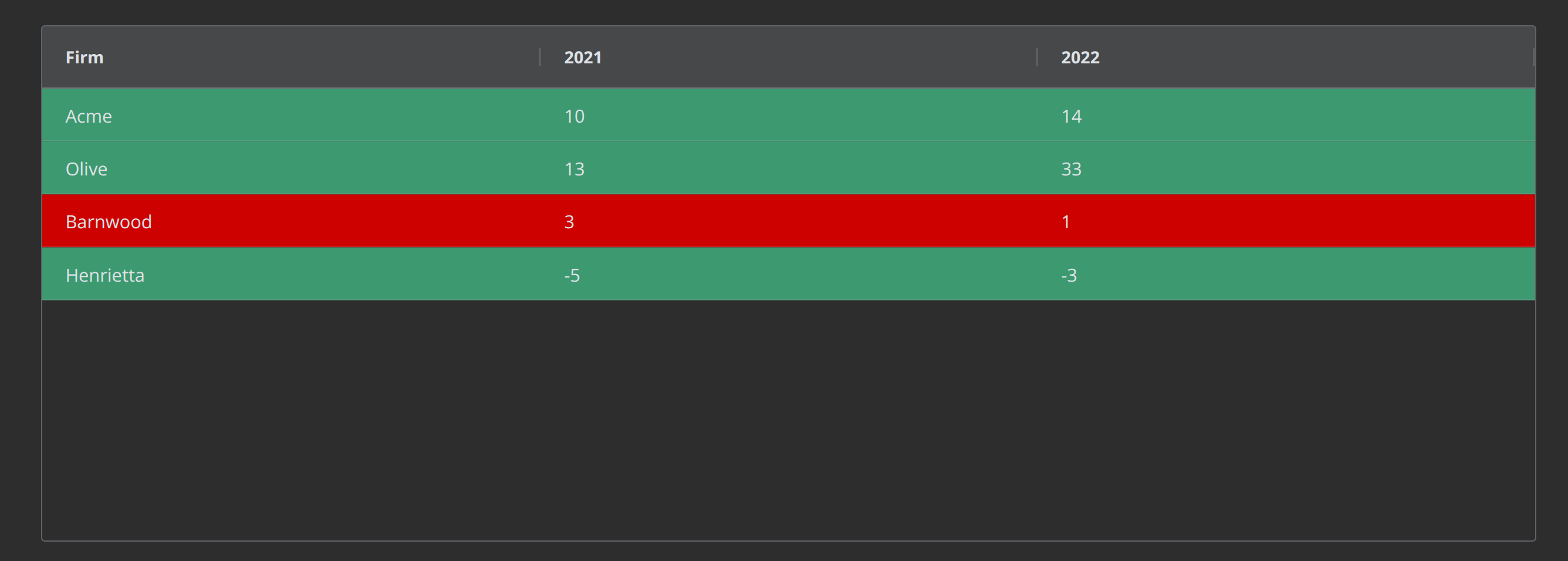
Style Rows Based on Value of 2 Columns
from dash import Dash, html
import dash_ag_grid as dag
import pandas as pd

rowData = [
    {"Firm": "Acme",  "2021": 10, "2022": 14},
    {"Firm": "Olive", "2021": 13, "2022": 33},
    {"Firm": "Barnwood", "2021": 3, "2022": 1},
    {"Firm": "Henrietta", "2021": -5, "2022": -3},
]
df = pd.DataFrame(rowData)

getRowStyle = {
    "styleConditions": [
        {
            "condition": "params.data['2022'] > params.data['2021']",
            "style": {"backgroundColor": "#3D9970"},
        },
        {
            "condition": "params.data['2022'] <= params.data['2021']",
            "style": {"backgroundColor": "#cd0200"},
        },
    ]
}


app = Dash(__name__)

grid = dag.AgGrid(
    rowData=df.to_dict("records"),
    columnDefs=[{ 'field': c } for c in df.columns],
    getRowStyle=getRowStyle,
    columnSize="sizeToFit"
)

app.layout = html.Div([grid])

if __name__ == "__main__":
    app.run(debug=True)