Hi everyone,
Please find below a minimal reproducible example of a Dash app I am working on.
It has two graphs, one polar and another classical scatter plot, two dropdown menus and a slider.
On the left graph are plotted markers and on the right their associated signal, so one marker on the left equals one signal on the right.
The slider selects a value that indexes both coordinates and signal values list.
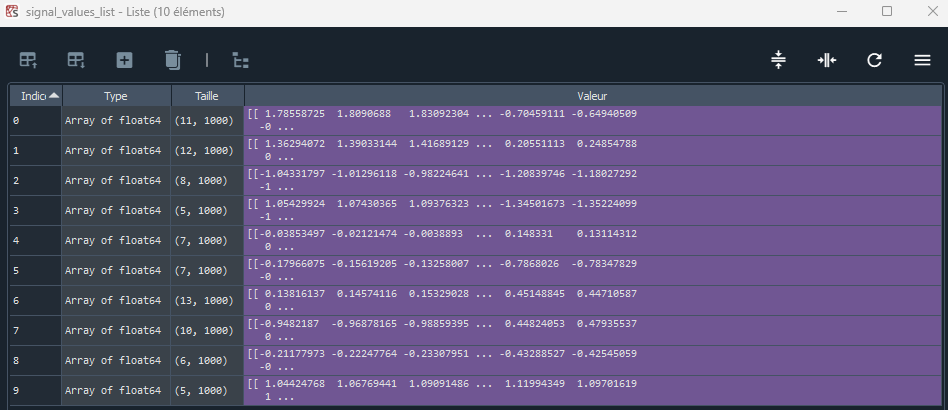
Below is what the coordinates and signals list look like. The slider value will index both list and update the graphs accordingly.

graphs_div is an html.Div that containes two dbc.Col, one for the left graph, and the other one on the right for both the signals graph and the dropdowns (organized as two dbc.Row).
What I want to implement:
-
grouped filtering: being able to filter both the left and right graphs simultaneously by double-clicking on the right graph legend. I used to be able to do that when I was using a subplot before. But I wanted to add the dropdown menus in the same column as the right graph for aesthetics purposes. So now that I am not using subplots anymore, impossible to group the legends. Tell me if there is a way to use a subplot but still have this layout. Otherwise, how could I acheive grouped legends without a subplot?
-
filtering out new data: for a particular slider value, I may have 5 data points (5 markers on the left graph and thus 5 signals on the right graph). If I double-click on one of them it will gray out the others (GOOD). I have implemented fig[‘layout’][‘uirevision’] = ‘some-constant’ to keep the filtering state even when the slider changes. But if I go to a slider value indexing a list element where I have more elements to plot than the previous slider value, it will display it and not gray it out (NOT GOOD). Is there a way to display any additional data points as grayed out?
5 markers are displayed on the left, and their corresponding signals on the right.

By double-clicking on “Source 0” on the right graph legend, I gray out the other signals for clearer analysis. Note that this does not filters the left graph accordingly. This relates to my first bullet point.

Now, moving the slider to the next value, it displays 7 sources (2 more than the previous slider value). As they were not part of the filtering in the previous state, they are not grayed out. I want them to be grayed out automatically.

Here is the code to reproduce:
import numpy as np
import plotly.express as px
import plotly.graph_objects as go
import plotly.io as pio
pio.renderers.default = 'browser'
from dash import Dash, dcc, html, Output, Input, callback
import dash_bootstrap_components as dbc


# Set a random seed for reproducibility
np.random.seed(42)

# Create two lists to hold the arrays
polar_coordinates_list = []
signal_values_list = []

# Generate 10 arrays for each list
for i in range(10):
    # Randomly determine the number of coordinates/signals for this array
    num_points = np.random.randint(5, 15)  # Random number between 5 and 14

    # Generate polar coordinates: (r, theta)
    r = np.random.uniform(0.5, 5.0, num_points)  # Random radii between 0.5 and 5.0
    theta = np.random.uniform(0, 2 * np.pi, num_points)  # Random angles between 0 and 2π
    polar_coordinates = np.column_stack((r, theta))

    # Generate sinusoidal signals: A*sin(2πft + φ)
    t = np.linspace(0, 1, 1000)  # Time array for 1 second
    A = np.random.uniform(0.5, 2.0, num_points)  # Random amplitudes
    f = np.random.uniform(1.0, 5.0, num_points)  # Random frequencies
    phi = np.random.uniform(0, 2 * np.pi, num_points)  # Random phases

    signals = np.array([A[i] * np.sin(2 * np.pi * f[i] * t + phi[i]) for i in range(num_points)])

    # Append to the lists
    polar_coordinates_list.append(polar_coordinates)
    signal_values_list.append(signals)

# Initialisation of the app
app = Dash(__name__, external_stylesheets=[dbc.themes.BOOTSTRAP])

# Graphs Div
graphs_div = html.Div(
    style={'height': '70vh', 'width': '100vw'},
    children=[
        dbc.Row([
            dbc.Col([
                dcc.Graph(id='left-graph', figure={})
                ],
                width=5
            ),
            dbc.Col([
                dbc.Row([
                        dbc.Col([
                                dbc.Label("Parameter 1:", className="mr-2"),
                                dcc.Dropdown(
                                    id='dropdown1',
                                    options=[
                                        {'label': 'Option 1', 'value': '1'},
                                        {'label': 'Option 2', 'value': '2'},
                                        {'label': 'Option 3', 'value': '3'}
                                    ],
                                    value='1',
                                    clearable=False
                                ),
                            ],
                        ),
                        dbc.Col([
                                dbc.Label("Parameter 2:", className="mr-2"),
                                dcc.Dropdown(
                                    id='dropdown2',
                                    options=[
                                        {'label': 'Option 1', 'value': '1'},
                                        {'label': 'Option 2', 'value': '2'}
                                    ],
                                    value='1',
                                    clearable=False
                                ),
                            ],
                        )
                    ]
                ),
                dbc.Row([
                    dcc.Graph(id='right-graph', figure={})
                    ]
                    )
            ],
            width=7
            )
        ])
    ]
)

# Slider Div
slider_div = html.Div(
    style={'height': '10vh', 'width': '100vw'},
    children=[
        dbc.Row([
            dcc.Slider(id='slider', min=0, max=len(signal_values_list)-1, step=1, value=0, marks={0: '0', len(signal_values_list)-1: f'{len(signal_values_list)-1}'}, tooltip={"placement": "bottom", "always_visible": True})
        ]),
    ]
)

app.layout = dbc.Container(
    style={
        'display': 'flex',
        'flexDirection': 'column',
        'height': '100vh',
        'width': '100vw',
        'padding': '0%',
        'boxSizing': 'border-box',
        'overflow': 'hidden'
        },
    children=[
        graphs_div,
        slider_div
    ],
    fluid=True,
)

@callback(
    [Output('left-graph', 'figure'),
     Output('right-graph', 'figure')],
    [Input('slider', 'value')]
)
def update_figure(slider_value):
    print(slider_value)

    # Select sequence
    coordinates_array = polar_coordinates_list[slider_value].copy()
    signal_values_array = signal_values_list[slider_value].copy()

    # Instantiate the figures
    fig1 = go.Figure()
    fig2 = go.Figure()
    # Seed uirevision parameter to keep ui changes when updating the figure through callbacks
    fig1['layout']['uirevision'] = '1'
    # Choose a color palette
    fig1.update_layout(colorway=px.colors.qualitative.Dark24, margin=dict(l=20, r=20, t=20, b=20))
    # Seed uirevision parameter to keep ui changes when updating the figure through callbacks
    fig2['layout']['uirevision'] = '1'
    # Choose a color palette
    fig2.update_layout(colorway=px.colors.qualitative.Dark24, margin=dict(l=20, r=20, t=20, b=20) )

    # Plot sources spectrums in dB in a single Plotly interactive browser plot
    for k in range(0, coordinates_array.shape[0]):

        fig1.add_trace(go.Scatterpolar(r=coordinates_array[k:k+1, 0], theta=coordinates_array[k:k+1, 1], thetaunit="radians", mode='markers+text', marker=dict(size=8, symbol='cross'), name="", showlegend=False, textposition='bottom right'))
        fig1.update_polars(radialaxis=dict(range=[0, 90]))

        fig2.add_trace(go.Scatter(x=t, y=signal_values_array[k, :], mode="lines", name=f"Source {k}", showlegend=True))
        fig2.update_xaxes(title_text="Time [s]", range=[0, 1], dtick="D1")

    return fig1, fig2


if __name__ == '__main__':
    app.run(debug=False, port=8050)
Many thanks in advance for your help!
Antoine