LaTeX not rendering in Python - `plotly.express.timeline` (text parameter)

Hi,

I’m having trouble to generate a plotly.express.timeline in Python with a provided argument for the text parameter. This is a sample code snippet that I’m currently trying to get working:

from datetime import datetime, timedelta
import pandas as pd
import plotly.express as px


df = pd.DataFrame({
    'name': ['$s_{03}$', '$x_{3,1,1} = 19.0$', '$s_{31}$', '$x_{1,1,1} = 11.0$'],
    'start': [0.0, 5.0, 62.0, 71.0],
    'stop': [5.0, 62.0, 71.0, 82.0],
    'type': ['Setup', 'Job', 'Setup', 'Job'],
    'machine':[1, 1, 1, 1],
    'time': [1, 1, 1, 1],
})

now = datetime(year=1970, month=1, day=1)
df['start'] = [now + timedelta(seconds=t) for t in df['start']]
df['stop'] = [now + timedelta(seconds=t) for t in df['stop']]
df['machine'] = [f'Machine {h}' for h in df['machine']]

fig = px.timeline(df, x_start="start", x_end="stop", y="machine", color='type', text='name')
fig.update_yaxes(autorange="reversed")

fig.update_layout(
                  plot_bgcolor='rgba(0, 0, 0, 0)',
                  paper_bgcolor='rgba(0, 0, 0, 0)',
                  xaxis=dict(tickformat = '%s'),
                  yaxis_title = r'',
                  legend=dict(
                              yanchor="top",
                              y=1.2,
                              xanchor="center",
                              orientation="h",
                              x=0.5
                              ))

fig.update_xaxes(showline=True, linewidth=2, linecolor='black')
fig.update_yaxes(showline=True, linewidth=2, linecolor='black')
fig.update_traces(textposition='inside')
fig.update_layout(uniformtext_minsize=8, uniformtext_mode='hide')

for n in fig.data:
    n["marker"]['line']["color"]='#000000'
    n['marker']['color']='rgba(0, 0, 0, 0)'

fig.show()

However, the figure generated looks like this β€” the LaTeX syntax is not rendered:

I also tried the workaround suggested here. While that solution allows LaTeX rendering for the example provided in the discussion, it doesn’t work for my code.

import plotly
from IPython.display import display, HTML

plotly.offline.init_notebook_mode()
display(HTML(
    '<script type="text/javascript" async src="https://cdnjs.cloudflare.com/ajax/libs/mathjax/2.7.1/MathJax.js?config=TeX-MML-AM_SVG"></script>'
))

I’ve tested this code both in the VS Code integrated terminal and in JupyterLab using Firefox and Chrome, all running on Ubuntu 24.04.3 LTS, but the behavior is the same in all cases.
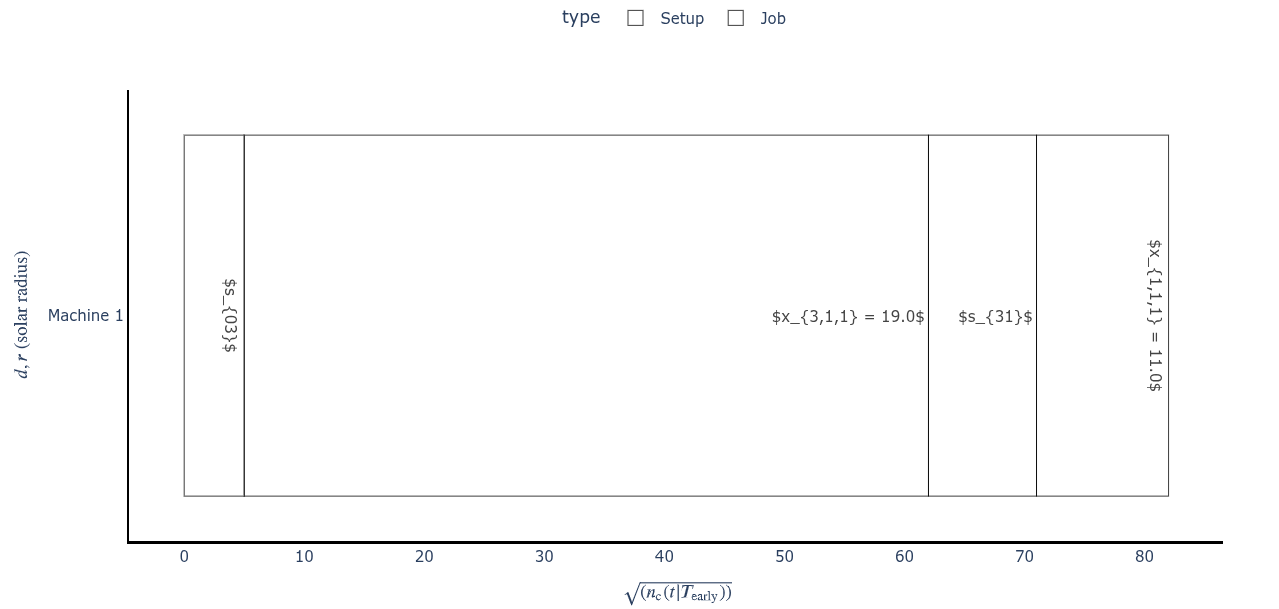
Hello @Josa_Ferreira !

You could try changing the renderer. I just tried the example from the plotly docs and it did not render out of the box. Once I switched to a different renderer it was shown correctly.

Unfortunately, this did not work with your example. I am actually not sure if the LateX rendering works for trace names and other entities except titles (figure, axis).

import plotly.io as pio
pio.renderers.default = 'iframe'

print(pio.renderers)
"""
Renderers configuration
-----------------------
    Default renderer: 'iframe'
    Available renderers:
        ['plotly_mimetype', 'jupyterlab', 'nteract', 'vscode',
         'notebook', 'notebook_connected', 'kaggle', 'azure', 'colab',
         'cocalc', 'databricks', 'json', 'png', 'jpeg', 'jpg', 'svg',
         'pdf', 'browser', 'firefox', 'chrome', 'chromium', 'iframe',
         'iframe_connected', 'sphinx_gallery', 'sphinx_gallery_png']
"""

Your example with added titles renders like this on my machine:

from datetime import datetime, timedelta
import pandas as pd
import plotly.express as px
import plotly.io as pio
pio.renderers.default = 'iframe'

df = pd.DataFrame({
    'name': [r'$s_{03}$', r'$x_{3,1,1} = 19.0$', r'$s_{31}$', r'$x_{1,1,1} = 11.0$'],
    'start': [0.0, 5.0, 62.0, 71.0],
    'stop': [5.0, 62.0, 71.0, 82.0],
    'type': ['Setup', 'Job', 'Setup', 'Job'],
    'machine':[1, 1, 1, 1],
    'time': [1, 1, 1, 1],
})

now = datetime(year=1970, month=1, day=1)
df['start'] = [now + timedelta(seconds=t) for t in df['start']]
df['stop'] = [now + timedelta(seconds=t) for t in df['stop']]
df['machine'] = [f'Machine {h}' for h in df['machine']]

fig = px.timeline(df, x_start="start", x_end="stop", y="machine", color='type', text='name')
fig.update_yaxes(autorange="reversed")

fig.update_layout(
                  plot_bgcolor='rgba(0, 0, 0, 0)',
                  paper_bgcolor='rgba(0, 0, 0, 0)',
                  xaxis=dict(tickformat = '%s'),
                  yaxis_title = r'',
                  legend=dict(
                              yanchor="top",
                              y=1.2,
                              xanchor="center",
                              orientation="h",
                              x=0.5
                              ))

fig.update_xaxes(showline=True, linewidth=2, linecolor='black')
fig.update_yaxes(showline=True, linewidth=2, linecolor='black')
fig.update_traces(textposition='inside')
fig.update_layout(uniformtext_minsize=8, uniformtext_mode='hide')

for n in fig.data:
    n["marker"]['line']["color"]='#000000'
    n['marker']['color']='rgba(0, 0, 0, 0)'


fig.update_layout(
    xaxis_title=r'$\sqrt{(n_\text{c}(t|{T_\text{early}}))}$',
    yaxis_title=r'$d, r \text{ (solar radius)}$'
)

EDIT: I actually think this might be a problem within px.timeline. If you convert your graph to a quick&dirty px.scatter the tracenames get rendered in the correct format (hovertext is excluded from that, you might need to use html tags)

Conclusion: I would try building your graph using plotly.graph_objects

2 Likes