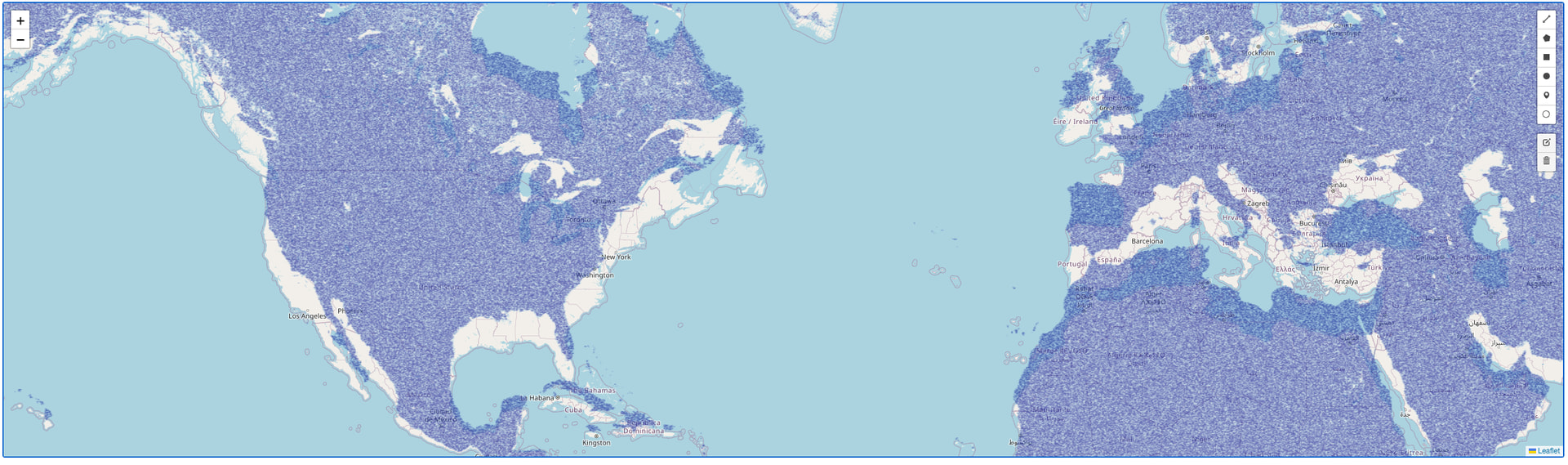
I am using the ImageOverlay using Datashader via Dash callback, i am able to show the rendered image as it zooms in and out, but it is not aligning properly at all, need help with this. I am new to GIS/mapping, dash and dash-leaflet (@emil) so my code is not efficient, please point out if there are easier ways to do this. I am using the projection EPSG4326 by setting the geopandas dataframe to epsg=4326 but when plotting the points are not aligning properly, please help! I tried to use the dash_leaflet Map crs="EPSG4326" and it is way off in alignment.
import dash
from dash.dependencies import Input, Output, State
from dash import html
import dash_leaflet as dl
import datashader as ds
import pandas as pd
import base64
from io import BytesIO

import geopandas as gdp


app = dash.Dash(__name__)

def get_bounds(df):
    minx, miny, maxx, maxy = df.total_bounds
    return [[float(miny), float(minx)], [float(maxy), float(maxx)]]


latlon_gpd_filename        =  "my_geopandas_filename.feather"

df    = gdp.read_feather(latlon_gpd_filename).to_crs(epsg=4326)


image_bounds = get_bounds(df)
zoom_level = 3

@app.callback(
    Output("image-overlay", "url"),
    Output("image-overlay", "bounds"),
    [Input("map", "bounds"), Input("map", "zoom")]
)
def update_datashader_overlay(bounds, zoom):

    if bounds is None:
        return "", image_bounds

    # bounds format: [[south, west], [north, east]]
    south, west = bounds[0]
    north, east = bounds[1]

    # 2. Server-side Datashading
    # Filter the data based on current map bounds (conceptual)
    filtered_df = df[(df['lon'] >= west) & (df['lon'] <= east) &
                     (df['lat'] >= south) & (df['lat'] <= north)]


    # Use datashader to generate image (conceptual)
    canvas = ds.Canvas(x_range=(west, east), y_range=(south, north), plot_width=1600,)
    agg = canvas.points(filtered_df, 'lon', 'lat')
    img = ds.transfer_functions.shade(agg, cmap=["lightblue", "darkblue"]).to_pil()

    # 3. Encode image to base64
    buffered = BytesIO()
    img.save(buffered, format="PNG")
    encoded_image = base64.b64encode(buffered.getvalue()).decode()

    print('\n', bounds)
    print(get_bounds(filtered_df))
    return f"data:image/png;base64,{encoded_image}", bounds #get_bounds(filtered_df)


url, image_bounds = update_datashader_overlay(image_bounds, zoom_level)

app.layout = html.Div([
    dl.Map(id="map", style={'width': '100%', 'height': '50vh'}, center=[35, -98], zoom=zoom_level,
        #crs="EPSG4326",
        children=[
        dl.TileLayer(),# FeatureGroup to contain editable layers
        dl.FeatureGroup(
            [
                # EditControl enables drawing tools, including the circle tool
                dl.EditControl(
                    # You can configure which drawing tools are available if desired
                    drawToolbar={"circle": True, "polygon": False, "polyline": False, "rectangle": False, "marker": False}
                ),
            ]
        ),
            dl.ImageOverlay(id="image-overlay", opacity=0.6, url=url, bounds=image_bounds),
        ]),
])

if __name__ == '__main__':
    app.run(debug=True)
see below Zoomed Out - not aligning

Zoomed In - as I zoom in it aligns better than the zoom out, but it does not align perfectly