Hi,
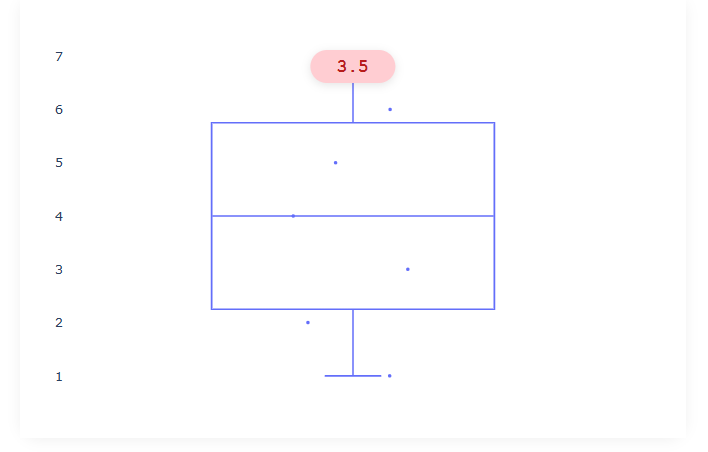
I think, with Plotly’s go.Box and add_annotation, you cannot create an annotation with a rounded background and a pointer arrow below it, because Plotly’s shapes do not support border radius and annotation arrows are not styled as tooltips.
In Dash, you can use HTML and CSS to fully customize the annotation’s appearance, including rounded corners and a custom arrow, making it ideal for this kind of visual effect.
In my example:
import dash
from dash import dcc, html
import plotly.graph_objects as go

app = dash.Dash(__name__)

# Example data
y = [1, 2, 3, 4, 5, 6, 7]
x = [1] * len(y)
mean = 3.5

fig = go.Figure()
fig.add_trace(go.Box(
    y=y,
    x=x,
    boxpoints='all',
    jitter=0.5,
    whiskerwidth=0.2,
    marker_size=3,
    pointpos=0,
    fillcolor='white',
    line_width=1.5
))
fig.update_layout(
    margin=dict(l=40, r=40, t=40, b=40),
    plot_bgcolor='white',
    paper_bgcolor='white',
    showlegend=False,
    xaxis=dict(showticklabels=False)
)

app.layout = html.Div([
    html.Div([
        # This is the rounded annotation overlay
        html.Div(
            str(mean),
            style={
                "position": "absolute",
                "left": "50%",
                "top": "50px",  # adjust as needed
                "transform": "translateX(-50%)",
                "background": "#ffcdd2",
                "color": "#b71c1c",
                "borderRadius": "30px", #radius
                "padding": "6px 24px",
                "fontFamily": "Courier New, monospace",
                "fontSize": "16px",
                "fontWeight": "bold",
                "boxShadow": "0 2px 8px rgba(0,0,0,0.10)",
                "zIndex": "10",
                "textAlign": "center"
            }
        ),
        dcc.Graph(
            id="box-plot",
            figure=fig,
            style={"height": "400px", "background": "white"}
        ),
    ], style={
        "position": "relative",
        "width": "600px",
        "margin": "40px auto",
        "background": "white",
        "borderRadius": "18px",
        "boxShadow": "0 2px 12px rgba(0,0,0,0.06)"
    }),
], style={
    "background": "white",
    "minHeight": "100vh"
})

if __name__ == "__main__":
    app.run(debug=True)