Hello,
I’m trying to build a button group component with both a standard button and dropdown menu using the bootstrap components library. I have a callback that updates the text (children) displayed on the button based on the dropdown selection. The dropdown will be used to select a type of chart to be added to an analysis tool and I want the button to reflect that selection so if the user wants to add the same type of chart in the future, they just have to click the button rather than searching the dropdown.
The callback works as expected if you select from the lowest item on the list and then work your way up. That is, if you select the lowest item in the dropdown, the button text updates. You can then work your way up the dropdown items and the button text will continue to update. However, if after you’ve selected an item in the dropdown and then try to select an item below that, the button text does not update. The callback does fire (verified by looking at the n_clicks_timestamp property), but the button text does not update. Please see the component and callback, below.
import dash
from dash import callback, dcc, html, Input, Output, State, MATCH, ALL
import dash_bootstrap_components as dbc

chart_selector = html.Div(
    id='chart-selector',
    children=[
        dbc.ButtonGroup([
            dbc.Button('Add Chart', id='add-chart-button', size='sm'),
            dbc.DropdownMenu(
            id='add-chart-selector',
            label='',
            children=[
                dbc.DropdownMenuItem('Bar', id='add-bar-chart-button'),
                dbc.DropdownMenuItem('Heatmap', id='add-heatmap-chart-button'),
                dbc.DropdownMenuItem('Histogram', id='add-histogram-chart-button'),
                dbc.DropdownMenuItem('Scatter', id='add-scatter-chart-button'),
                dbc.DropdownMenuItem('ScatterMap', id='add-scattermap-chart-button'),
                dbc.DropdownMenuItem('Timeline', id='add-timeline-chart-button')
            ],
            size='sm',
            group=True
        ),
        ]),
        html.Div(
            id='chart-col-limiter',
            children=[
                html.Div(
                    className='chart-limiter-container',
                    children=[
                        html.P('Columns'),
                        html.Div(
                            className='chart-limiter',
                            children=[
                                dbc.Input(
                                    id='max-col-limit',
                                    inputmode='numeric',
                                    min=1,
                                    placeholder=1,
                                    size='sm'
                                )
                            ]
                        )
                    ]
                )
            ]
        )
    ]
)

@callback(Output('add-chart-button', 'children'),
Input('add-bar-chart-button', 'n_clicks'),
Input('add-heatmap-chart-button', 'n_clicks'),
Input('add-histogram-chart-button', 'n_clicks'),
Input('add-scatter-chart-button', 'n_clicks'),
Input('add-scattermap-chart-button', 'n_clicks'),
Input('add-timeline-chart-button', 'n_clicks'))
def update_button(bar_click, heat_click, hist_click, scatter_click, s_map_click, time_click):

    if bar_click:

        return 'Bar'

    elif heat_click:

        return 'Heatmap'

    elif hist_click:

        return 'Histogram'

    elif scatter_click:

        return 'Scatter'

    elif s_map_click:

        return 'ScatterMap'

    elif time_click:

        return 'Timeline'

    else:

        return 'Add Chart'

# Function to return the layout
def layout():
    return chart_selector
Here’s what the component looks like:
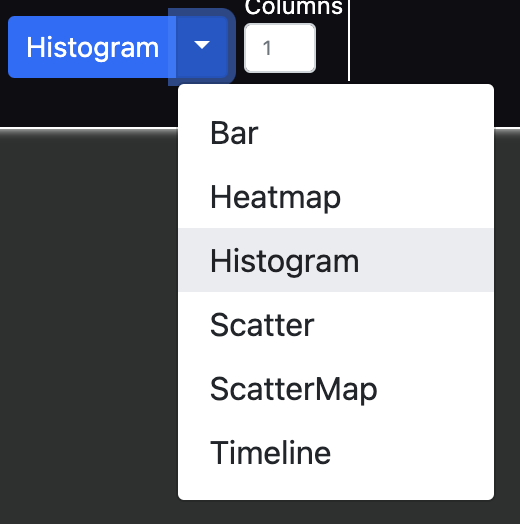
What’s needed is for the button text to update with any selection from the dropdown, in any order.
Thank you for the help.