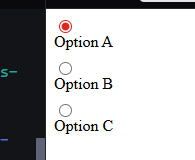
I have a small app that can create a screenshot of the webpage and save it as a pdf report. It uses a clientside callback and the html2pdf library to create the screenshot. Starting at Dash 4.0 there is a buggy interaction where dcc.RadioItems components have the current selection deselected when a screenshot is generated. I did some backwards testing with Dash 2.18 and 3.3 and the issue didn’t occur there.
To try out, load the included sample app and press the pdf report button. The screenshot generates. Then check the state of the radio items component in the dashboard. With Dash 2.18 and Dash 3.3 the last selected item is still selected. Now install Dash 4.0, after generating the screenshot, the radioitems selection gets unselected.
I looked in the html2pdf repo for issues on this and found 2 issues: issue 1 and issue 2, dating from 2019, but those suggestions don’t really help.
Any here that have some experience with html2pdf that have an idea what’s going on? Or any Dash 4 experts have an idea what change in the dcc library triggered this behavior?
Edit: I just saw that html2pdf has version 0.14.0 available from the Github page and I was still referring to the old 0.10.1 release. The issue still occurs with the latest version of html2pdf, so that also doesn’t resolve the issue. Unfortunately, the latest release is not available from CDN so to test the latest release you have to download the release and put the bundle file in the assets folder next to your app. If you do, you can remove the app.index_string statement from the sample app.
Solution
This issue was also addressed on Github. Final verdict is to either take the Patch solution suggested by @jinnyzor or return the value as a callback output as suggested in the GitHub issue.
Requirements
# Interaction ok
dash==2.18.1
plotly==5.24.0
dash-bootstrap-components==1.6.0
# Interaction ok!
dash==3.3.0
plotly==6.6.0
dash-bootstrap-components==2.0.4
# Interaction bad :(
dash==4.0.0
plotly==6.6.0
dash-bootstrap-components==2.0.4
Sample app
import dash
from dash import dcc, html, clientside_callback, Input, Output, State, callback
import dash_bootstrap_components as dbc

app = dash.Dash(__name__, external_stylesheets=[dbc.themes.BOOTSTRAP])

app.index_string = """
<!DOCTYPE html>
<html>
    <head>
        {%metas%}
        <title>{%title%}</title>
        {%favicon%}
        {%css%}
    </head>
    <body>
        {%app_entry%}
        <footer>
            {%config%}
            {%scripts%}
            <script type="text/javascript"
                src="https://cdnjs.cloudflare.com/ajax/libs/html2pdf.js/0.10.1/html2pdf.bundle.min.js"
                integrity="sha512-GsLlZN/3F2ErC5ifS5QtgpiJtWd43JWSuIgh7mbzZ8zBps+dvLusV+eNQATqgA/HdeKFVgA5v3S/cIrLF7QnIg=="
                crossorigin="anonymous"
                referrerpolicy="no-referrer">
            </script>
            {%renderer%}
        </footer>
    </body>
</html>
"""
button_pdf_report = dbc.Button(
    id="button_download_report",
    children="Download PDF report",
    color="primary",
    outline=True,
    style={"marginLeft": "10px", "width": "200px"},
)

app.layout = dbc.Container(
    [
        html.H2("Radio Items & PDF Report", className="my-4"),
        dcc.RadioItems(
            id="radio-items",
            options=[
                {"label": "Option A", "value": "A"},
                {"label": "Option B", "value": "B"},
                {"label": "Option C", "value": "C"},
            ],
            value="A",
            labelStyle={"display": "block", "marginBottom": "8px"},
        ),
        html.Div(
            [
                dbc.Button(
                    id="button_show_value",
                    children="Show Selected Value",
                    color="secondary",
                    outline=True,
                    style={"width": "200px"},
                ),
                html.Div(id="selected-value-output", className="mt-2"),
            ],
            className="mt-4",
        ),
        html.Div(button_pdf_report, className="mt-4"),
    ],
    className="p-4",
    id="main_container",
    style={"minWidth": "1253px"}
)

clientside_callback(
    """
    function (button_clicked) {
        if (button_clicked && button_clicked > 0) {
            var mainContainerElement = document.getElementById("main_container");
            var main_container_width = parseInt(mainContainerElement.style.minWidth);

            var opt = {
                // margin units are those that are defined in jsPDF key below.
                margin: 10,
                filename: "test_file.pdf",
                image: { type: 'jpeg', quality: 0.98 },
                html2canvas: {
                    scale: 3,
                    width: main_container_width,
                    dpi: 300,
                },
                jsPDF: { unit: 'mm', format: 'A4', orientation: 'p' },
            };
            html2pdf().from(mainContainerElement).set(opt).save().then(function() {
                // Force a repaint of the radio items after pdf generation
                var radioEl = document.getElementById("radio-items");
                if (radioEl) {
                    radioEl.style.display = 'none';
                    // Reading offsetHeight forces the browser to flush layout
                    void radioEl.offsetHeight;
                    radioEl.style.display = '';
                }
            });
        }
    }
    """,
    Input(component_id="button_download_report", component_property="n_clicks"),
)

@callback(
    Output("selected-value-output", "children"),
    Input("button_show_value", "n_clicks"),
    State("radio-items", "value"),
    prevent_initial_call=True,
)
def show_selected_value(n_clicks, value):
    return f"Selected value: {value}"


if __name__ == "__main__":
    app.run(debug=True)