Hey Community!
The Dash 3.3.0 might seam like a small update but actually enables a new way of defining Dash components in Python. Thanks to @jinnyzor partial property updates [PATCH]( Partial Property Updates | Dash for Python Documentation | Plotly ) is now also available via set_props, running and on the client side.
But what do I mean by that? There are two key advantages:
- using PATCH together with event_callbacks in streaming callbacks
- Writing Class components and Class methods to encapsulate UI / state updates from callback logic
Streaming, set_props & Patch
We can now append, prepend and delete etc. properties during a stream which is definitely needed if you want to create any kind of feed or chat app. Here is a small example - it is already build with the class structure which will be covered in more detail:

import dash_mantine_components as dmc
from dash_event_callback import event_callback, stream_props
from dash.development.base_component import Component
from dash import Input, Patch, set_props, ctx
from pydantic import BaseModel, `ValidationError

from typing import TypeAlias, Callable
from time import sleep

from .api import (
    load_users,
    add_user_to_json,
    delete_user_from_json,
    update_user
)


DictIDType: TypeAlias = Callable[[int | _Wildcard | str | None], dict[str, int | str | _Wildcard | None]]


class User(BaseModel):
    id: int | None = None
    name: str = Field(min_length=5, max_length=50)
    email: str = Field(pattern=r"[^@]+@[^@]+\.[^@]+", min_length=5)
Feed Component
classmethods make it possible to give the function access to the class properties and methods by passing the cls object to the function. By defining the ids in the class body, it’s possible to use them across the component while defining them just ones. Our class Component now contains all UI updates and can be directly used in callbacks. UI updates regarding our feed container are basically adding and removing components.
class FeedComponent(dmc.Stack):

    class ids:
        container: str = "feed-component-container"


    @classmethod
    def add_child(cls, child: Component, stream: bool = False, prepend: bool = False):
        patch = Patch()
        patch.append(child) if not prepend else patch.prepend(child)
        if stream:
            return stream_props(cls.ids.container, {"children": patch})

        set_props(cls.ids.container, {"children": patch})


    @classmethod
    def remove_child(cls, child_index: int, stream: bool = False):
        patch = Patch()
        del patch[child_index]
        if stream:
            return stream_props(cls.ids.container, {"children": patch})

        set_props(cls.ids.container, {"children": patch})


    def __init__(self):
        super().__init__(id=self.ids.container, children=dmc.Loader(m="auto"))
User Card Component
We can easily extend the the ID class logic to pattern matching ids. Here we utillise the user_id as ID for the component and use the html data property to store extra data that we need for callbacks without the need of a additional Store component.
class UserCard(dmc.Card):

    class ids:
        delete_btn: DictIDType = lambda user_id: {"user_id": user_id, "type": "delete-user-btn"}
        card: DictIDType = lambda user_id: {"user_id": user_id, "type": "user-card"}
        edit_btn: DictIDType = lambda user_id: {"user_id": user_id, "type": "edit-user-btn"}

    @classmethod
    def update(cls, user_data: User, card_idx: int):
        patch = Patch()
        new_card = cls(user_data)
        patch[card_idx] = new_card
        set_props(FeedComponent.ids.container, {"children": patch})


    def __init__(self, user_data: User) -> None:
        name_box = dmc.Text(
            user_data.name,
            fw="bold",
            fz="md",
            style={
                "overflow": "hidden",
                "textOverflow": "ellipsis",
                "whiteSpace": "nowrap"
            }
        )
        email_box = dmc.Text(
            user_data.email,
            fz="sm",
            c="gray",
            style={
                "overflow": "hidden",
                "textOverflow": "ellipsis",
                "whiteSpace": "nowrap"
            }
        )
        delete_button = dmc.Button(
            "Delete",
            id=self.ids.delete_btn(user_data.id),
            color="red",
            variant="light",
            size="xs",
            ml="auto",
            **{"data-user-name": user_data.name}
        )
        edit_button = dmc.Button(
            "Edit",
            id=self.ids.edit_btn(user_data.id),
            color="blue",
            variant="light",
            size="xs",
            **{"data-user-name": user_data.name, "data-user-email": user_data.email}
        )
        super().__init__(
            className="fade-in-right",
            id=self.ids.card(user_data.id),
            children=dmc.Group(
                [
                    dmc.Avatar(get_initials(user_data.name), radius="xl"),
                    dmc.Stack([name_box, email_box], gap=0, miw=0, flex=1),
                    delete_button,
                    edit_button,
                ],
                wrap="nowrap",
            )
        )
Callback
The callback now just operates on the classes themself and when you adjust the ID of the class, the callback definition updates automatically making your program more robust.
# Load the components as soon as its in the layout
@event_callback(
    Input(FeedComponent.ids.container, "id"),
    prevent_initial_call=False,
)
def load_feed(_):
    users = load_users()
    for user in users:
        sleep(0.2)
        user_card = UserCard(user)
        yield FeedComponent.add_child(user_card, stream=True)
Add, Update, Delete
Notification Component
The user should be notified in each step, dmc’s notifications gets used for that:
class NotificationsContainer(dmc.NotificationContainer):

    class ids:
        container: str = "notifications-container"
        notification: str = "default-notification-id"

    @classmethod
    def send_notification(
        cls,
        title: str,
        message: str,
        id: str | None = None,
        color: str = "primary",
        autoClose: bool = True,
        **kwargs,
    ):
        _id = id if id else random.randint(0, 1000)
        set_props(
            cls.ids.container,
            {
                "sendNotifications": [
                    dict(
                        title=title,
                        id=_id,
                        action="show",
                        message=message,
                        color=color,
                        autoClose=autoClose,
                        position="bottom-center",
                        **kwargs,
                    )
                ]
            },
        )

    def __init__(self):
        super().__init__(
            id=self.ids.container,
            transitionDuration=500,
            position="bottom-center"
        )
Modal Component
Lets extend the example by adding a modal that is the window to our forms. We want to open, close and reset the modal, so lets create our classmethods for that.
class UserModal(dmc.Group):

    class ids:
        modal: str = "user-modal"
        open_button: str = "open-user-modal-button"

    @classmethod
    def close(cls):
        cls.reset()
        set_props(cls.ids.modal, {"opened": False})

    @classmethod
    def open(cls, form: UserForm | DeleteForm, title: str = "User Management"):
        set_props(cls.ids.modal, {"children": form, "opened": True, "title": title})

    @classmethod
    def reset(cls):
        set_props(cls.ids.modal, {"children": None})

    def __init__(self) -> None:
        super().__init__(
            [
                dmc.Modal(
                    id=self.ids.modal,
                    opened=False,
                    title="User Management",
                ),
                dmc.Text("User Management", fw="bold", fz="lg", mr="auto"),
                dmc.Button("Add User", id=self.ids.open_button, variant="outline", disabled=True),
            ],
        )
When the user closes the modal without real interaction, the children gets removed.
@callback(Input(UserModal.ids.modal, "opened"))
def on_modal_opened(opened: bool):
    if not opened:
        UserModal.reset()
Delete Form
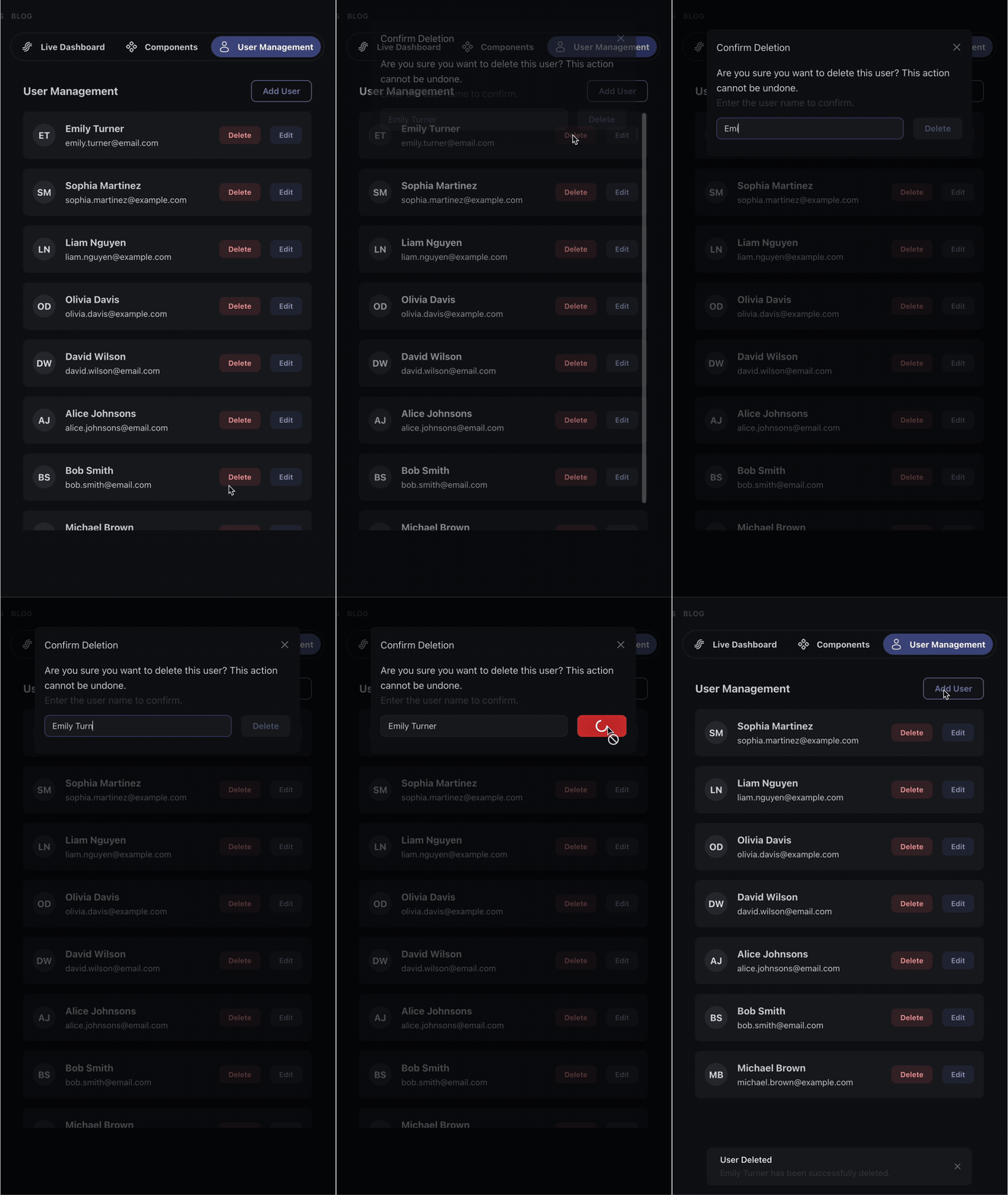
The user should not be able to directly delete a user and has to enter the name of the user that gets deleted. So the delete button should be disabled as UI update
class DeleteForm(dmc.Stack):

    class ids:
        name_input: str = "delete-form-name-input"
        confirm_button: str = "delete-form-confirm-button"
        button_data: str = "data-delete-user"

    @classmethod
    def set_button_disabled(cls, disabled: bool):
        set_props(cls.ids.confirm_button, {"disabled": disabled})

    def __init__(
        self,
        user_name: str = "",
        user_id: int | None = None,
        index: int | None = None
    ):
        delete_data = (
            {"user_id": user_id, "index": index}
            if user_id is not None and index is not None else {}
        )
        super().__init__(
            children=[
                dmc.Text(
                    "Are you sure you want to delete this user? This action cannot be undone."
                ),
                dmc.Text("Enter the user name to confirm.", c="dimmed"),
                dmc.Group([
                    dmc.TextInput(
                        id=self.ids.name_input,
                        my="sm",
                        flex=1,
                        placeholder=user_name
                    ),
                    dmc.Button(
                        "Delete",
                        id=self.ids.confirm_button,
                        color="red",
                        disabled=True,
                        **{self.ids.button_data: delete_data}
                    )
                ]),
            ]
        )
When the user clicks the delete button, the delete form gets added to the modal children and the modal gets opened.
@callback(
    Input(UserCard.ids.delete_btn(ALL), "n_clicks"),
    State(UserCard.ids.delete_btn(ALL), "data-user-name"),
)
def init_delete(_, user_names: list[str]):
    triggered_id = ctx.triggered_id or {}
    user_id = triggered_id["user_id"]
    inputs = [x["id"] for x in ctx.inputs_list[-1]]
    idx = inputs.index(triggered_id)
    form = DeleteForm(user_name=user_names[idx], user_id=user_id, index=idx)
    UserModal.open(form, "Confirm Deletion")
User input gets validated and if it matches, we enable the button to delete the user.
@callback(
    Input(DeleteForm.ids.name_input, "value"),
    State(DeleteForm.ids.name_input, "placeholder"),
)
def validate_delete(name_input: str, user_name: str):
    if not user_name:
        return

    is_match = name_input.strip().lower() == user_name.strip().lower()
    DeleteForm.set_button_disabled(not is_match)
@callback(
    Input(DeleteForm.ids.confirm_button, "n_clicks"),
    State(DeleteForm.ids.confirm_button, DeleteForm.ids.button_data),
    running=[(Output(DeleteForm.ids.confirm_button, "loading"), True, False)],
)
def delete_user(_, user_data: dict[str, int]):
    sleep(1)
    user_id = user_data["user_id"]
    component_idx = user_data["index"]
    deleted_user = delete_user_from_json(user_id)
    if not deleted_user:
        NotificationsContainer.send_notification(
            title="Error", message="User could not be deleted.", color="red"
        )
        return

    FeedComponent.remove_child(component_idx)
    UserModal.close()
    NotificationsContainer.send_notification(
        title="User Deleted",
        message=f"{deleted_user.name} has been successfully deleted.",
    )
User Form
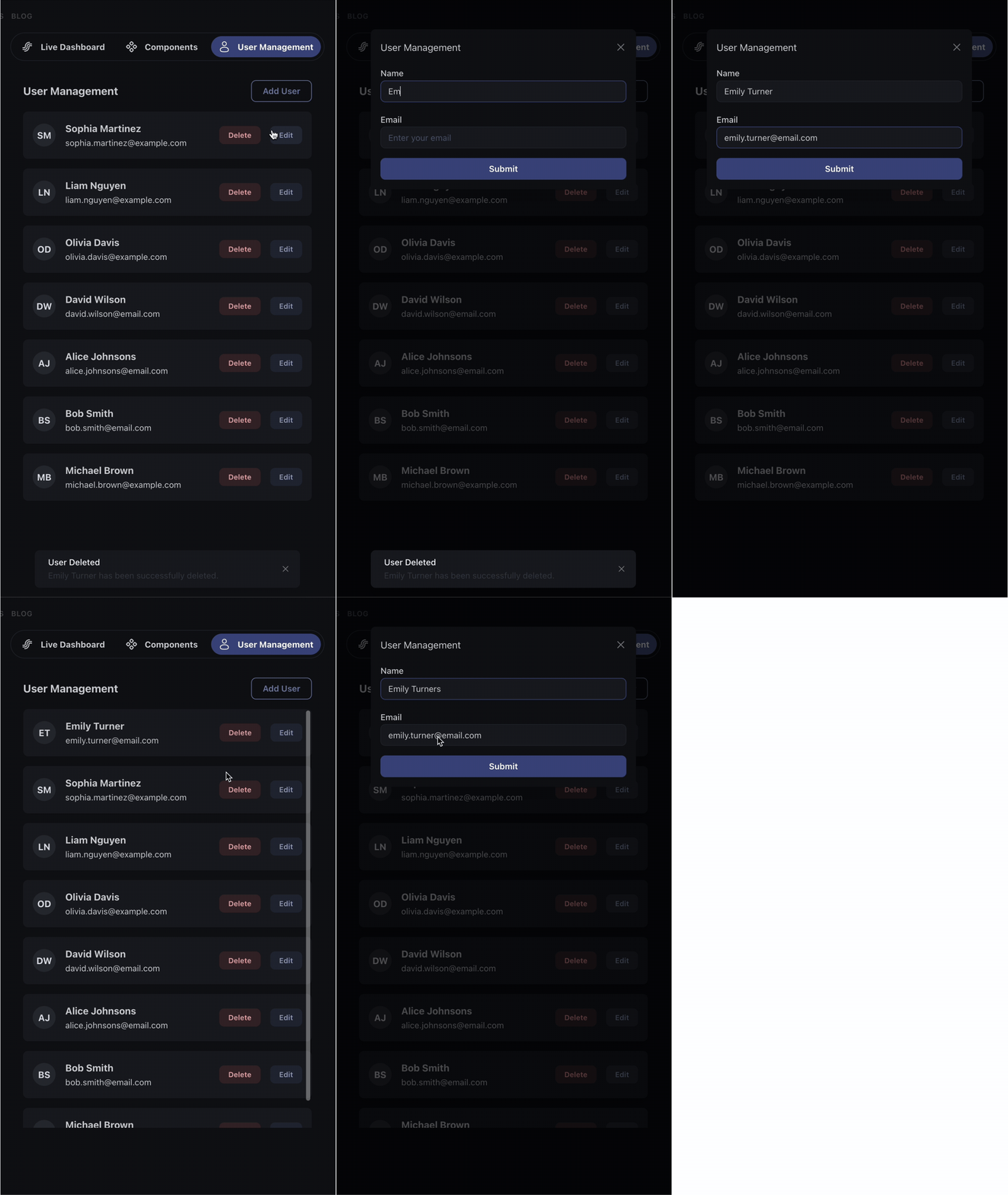
Our form should handle adding but also updating users. Instead of defining two buttons, we again use the data props to know in which mode we are. We also want to block users from adding wrong data and show the forms error states.
class UserForm(dmc.Stack):

    class ids:
        name_field: str = "user-name-field"
        email_field: str = "user-email-field"
        submit_button: str = "user-submit-button"
        edit_data: str = "data-user-data"  # custom prop to track edit mode

    @classmethod
    def set_edit_mode(cls, user_id: int | None, index: int | None = None):
        data = (
            {"user_id": user_id, "index": index}
            if index is not None
            else None
        )
        set_props(cls.ids.submit_button, {cls.ids.edit_data: data})

    @classmethod
    def set_error_state(
        cls, name_error: str | None = None, email_error: str | None = None
    ):
        set_props(cls.ids.name_field, {"error": name_error})
        set_props(cls.ids.email_field, {"error": email_error})

    def __init__(
        self,
        name: str = "",
        email: str = "",
        edit_data: dict[str, int] | None = None
    ):
        super().__init__(
            children=[
                dmc.TextInput(
                    label="Name",
                    id=self.ids.name_field,
                    placeholder="Enter your name",
                    value=name
                ),
                dmc.TextInput(
                    label="Email",
                    id=self.ids.email_field,
                    placeholder="Enter your email",
                    value=email
                ),
                dmc.Button(
                    "Submit",
                    id=self.ids.submit_button,
                    **{self.ids.edit_data: edit_data} if edit_data else {}
                )
            ]
        )
@callback(Input(UserModal.ids.open_button, "n_clicks"))
def open_user_modal(_):
    form = UserForm()
    UserModal.open(form, "User Management")
All callbacks to this point have been quite simple, lets have a look at the update callback and compare it to how it would look like if you don’t use set_props and classmethods.
@callback(
    Input(ids.submit_button, "n_clicks"),
    State(ids.submit_button, ids.edit_data),
    State(ids.name_field, "value"),
    State(ids.email_field, "value"),
    running=[(Output(UserForm.ids.submit_button, "loading"), True, False)],
    prevent_initial_call=True,
)
def store_user(
    _,
    edit_data: dict[str, int],
    name: str,
    email: str
):
    try:
        _ = User(name=name, email=email)
    except ValidationError as e:
        errors_dict = parse_validation_errors(e, User)
        UserForm.set_error_state(
            name_error=errors_dict.get("name"),
            email_error=errors_dict.get("email")
        )
        return

    if edit_data:
        edit_id = edit_data["user_id"]
        edit_index = edit_data["index"]
        updated = update_user(edit_id, name, email)
        if not updated:
            NotificationsContainer.send_notification(
                title="Error",
                message=f"Information for user {name} could not be updated.",
            )
            return

        UserCard.update(updated, edit_index)
        NotificationsContainer.send_notification(
            title="Success",
            message=f"{updated.name} information has been successfully updated.",
            color="green",
        )

    else:
        user = add_user_to_json(name, email)
        card = UserCard(user)
        _ = FeedComponent.add_child(card, prepend=True)


    UserModal.close()
Old Callback:
@callback(
    Output("feed-component-container", "children"),
    Output("user-modal", "opened", allow_duplicate=True),
    Output("user-name-field", "value", allow_duplicate=True),
    Output("user-email-field", "value", allow_duplicate=True),
    Output("user-submit-button", "user-edit-mode", allow_duplicate=True),
    Output("user-name-field", "error", allow_duplicate=True),
    Output("user-email-field", "error", allow_duplicate=True),
    Output("notifications-container", "sendNotifications", allow_duplicate=True),
    Input("user-submit-button", "n_clicks"),
    State("user-submit-button", "user-edit-mode"),
    State("user-name-field", "value"),
    State("user-email-field", "value"),
    running=[(Output("user-submit-button", "loading"), True, False)],
    prevent_initial_call=True,
)
def store_user(
    _,
    edit_data: dict[str, int],
    name: str,
    email: str
):
    # Validate using Pydantic model
    try:
        User(name=name, email=email)
    except ValidationError as e:
        errors_dict = parse_validation_errors(e, User)
        name_error = errors_dict.get("name")
        email_error = errors_dict.get("email")
        return no_update, no_update, no_update, no_update, no_update, name_error, email_error, no_update
    except Exception as e:
        # Handle any other unexpected errors
        notification = [create_notification(
            title="Error",
            message=str(e),
            color="red"
        )]
        return no_update, no_update, no_update, no_update, no_update, None, None, notification

    sleep(1)

    patch = Patch()
    notification = None

    if edit_data:
        edit_id = edit_data["user_id"]
        edit_index = edit_data["index"]
        updated = update_user(edit_id, name.strip(), email.strip())
        if not updated:
            notification = [create_notification(
                title="Error",
                message=f"Information for user {edit_id} could not be updated.",
                color="red"
            )]
            return no_update, no_update, no_update, no_update, no_update, None, None, notification

        # Update the card at the specific index
        patch[edit_index] = user_card(updated)
        notification = [create_notification(
            title="Success",
            message=f"{updated.name} information has been successfully updated.",
        )]
    else:
        user = add_user_to_json(name, email)
        patch.append(user_card(user))
        notification = [create_notification(
            title="Success",
            message=f"{user.name} information has been successfully saved.",
        )]

    # Return: updated children, close modal, reset form fields, reset edit mode, clear errors, send notification
    return patch, False, "", "", None, None, None, notification

def create_notification(title: str, message: str, color: str = "primary", autoClose=True):
    """Helper to create notification dict"""
    return dict(
        title=title,
        id=random.randint(0, 1000),
        action="show",
        message=message,
        color=color,
        autoClose=autoClose,
    )
I think callbacks become way easier to manage, especially the callback definition and return signatures. You can now put a lot more state updates without cluttering the callback. Overall, callbacks become more rest-ful and turning more into backend and Component orchestrators, receiving and validating data from the frontend → giving detailed and individual feedback on each steps success → extracting and passing the right data to your backend functions and Component updates. Together with Pydantic, it is possible to write clean, secure and super complex callbacks with perfect separation of concerns and reduced callback signature definitions.
Not to forget how more accessible streaming callbacks get, thanks to Patch in set_props!
Let me know what you think and how you construct and structure your component - looking forward and happy coding!
