### Author:  [@adamschroeder](https://community.plotly.com/u/adamschroeder)
#### Post date: [June 4, 2020, 1:34am UTC](https://community.plotly.com/t/how-to-get-your-questions-answered-on-the-plotly-forum/40551/1 "2020-06-04T01:34:07Z")
Your Plotly community members answer a great majority of the questions posted on the forum. However, responders’ time is limited. **To greatly increase your chances of getting _your_ post answered, your questions need to be easy to read and easy to reply to**. This post will illustrate exactly how to do that.
- TL;DR: jump to section WHILE POSTING.
## **BEFORE POSTING:**
1. Often, strange or problematic behaviour has been fixed in the most recent version of `dash` or of `plotly` so always ensure you’re using the latest versions if you can. The latest versions are available from PyPI: [dash · PyPI](https://pypi.org/project/dash/) and [plotly · PyPI](https://pypi.org/project/plotly/)
2. It is very likely that someone has already asked and received an answer to the same question you have. So, before you ask your question, make sure to do a quick search for answers. Use the Plotly Forum to search for answers by typing your question or coding error message inside the “Find” section.

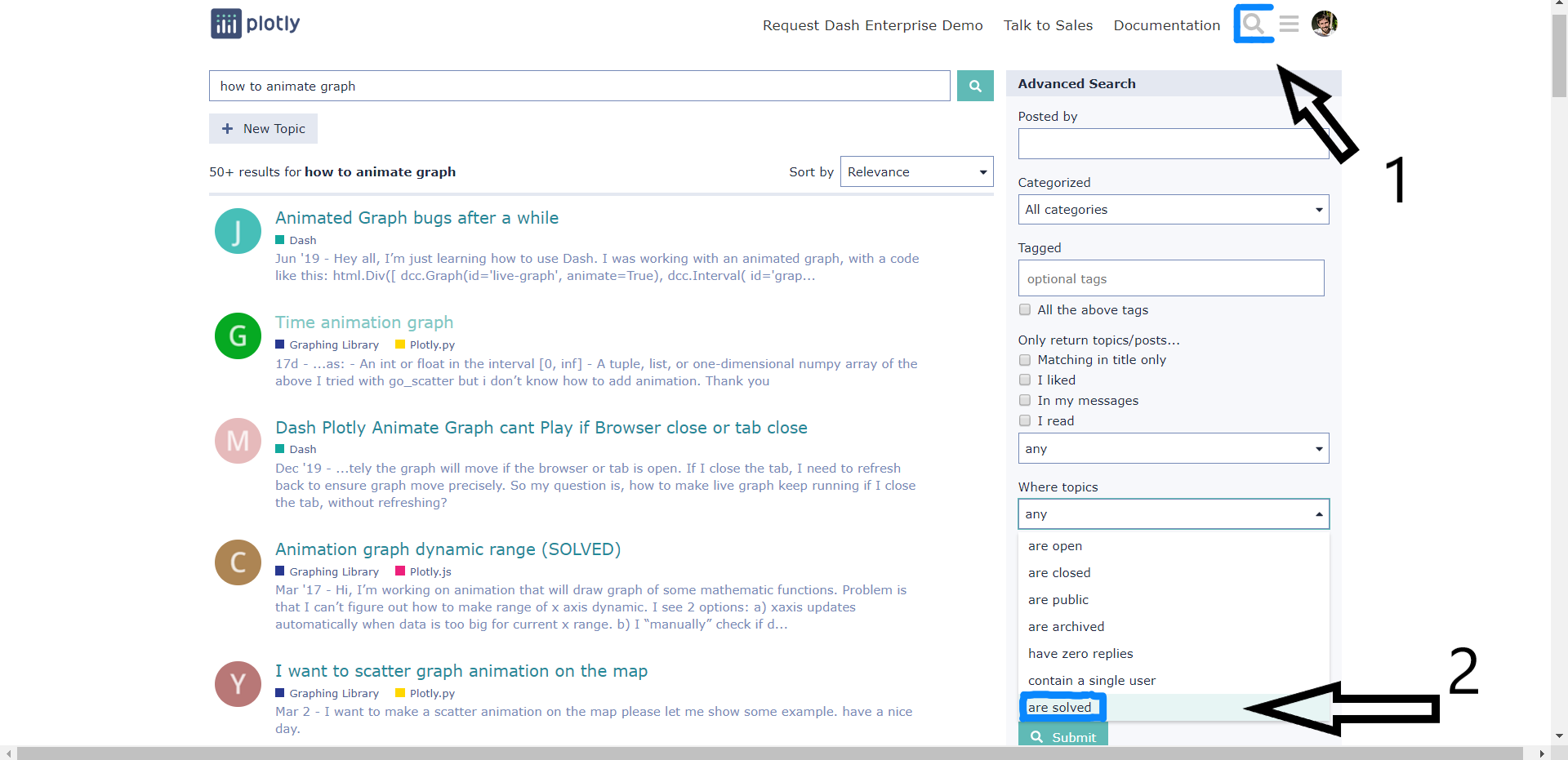
1. Put yourself in the shoes of the responders. Read a couple of solved questions and try to understand why these questions received an answer. To search for solved posts, use the “Advanced Search” section after searching for a topic.
1. Read the [official documentation](https://dash.plotly.com) and use the documentation’s [search features](https://community.plotly.com/t/updated-documentation-looking-for-feedback/36340) instead of relying on 3rd party sources. We update the documentation frequently and the library is frequently updated. When searching on Google, try searching with: `site:dash.plotly.com `.
## **WHILE POSTING:**
* * *
#### 1. **Be Clear:**
* * *
- Explain what your problem is and what you are trying to solve in clear, concise, and simple English.
- Share the exact wording of your error message and what line of code produced it.
- Include the version numbers and your operating system. For example,
- Check your version against the latest versions [announced in this forum](https://community.plotly.com/tag/announcements) or in the [CHANGELOG](https://github.com/plotly/dash/blob/dev/CHANGELOG.md). If you are on an older version, try upgrading.
- Share a screenshot of your plot if that helps convey the error.
- Before posting your code, use a formatting tool to improve readability ([https://black.vercel.app/](https://black.vercel.app/))
- Always put your code inside Preformatted text. It is very unclear and extremely time-consuming to read code that is not preformatted.

* * *
#### 2. **Be Minimal:**
* * *
- Ask one question per post.
- Include simplified, short code by taking out everything that is not related to the problem. Either
- Use dummy data. Many responders are familiar with plotly express dummy datasets, such as `px.data.gapminder()` and `px.data.tips()`. [View the full list of dummy datasets](https://plotly.com/python-api-reference/generated/plotly.express.data.html).
- Or create your own synthetic data. For example,
- Or create a subset of your data, using `head()`.
* * *
#### 3. **Be Reproducible:**
* * *
- Add all the packages/libraries that are needed inside the code.
- Don’t forget to add the data when necessary.
- Test your code to make sure that it can be run by others. When a potential responder copies and pastes your code into their console, they should get the exact same error you got.
## **AFTER POSTING:**
1. Wait! Give the community a day or two to answer your post.
2. If you did not get a reply to your post after waiting, try to update your question so it is coherent and saves more time for potential responders:
3. If you found the solution to your question, make sure to reply to your own post, so the Plotly community can learn from you.
4. If the proposed solution of the community did not work, do not just say “it didn’t work”. Include the new error message that you get and post your updated code.
5. Accept the answer by clicking on the checkbox if you found a solution. This helps others recognize that the problem was “solved”.
6. **Pay it forward! Help others with their questions.**
## Additional Resources:
[ ](https://www.youtube.com/watch?v=Gvdrb5ff3H8)
---
### Author:  [@Emmanuelle](https://community.plotly.com/u/Emmanuelle)
#### Post date: [June 4, 2020, 7:36am UTC](https://community.plotly.com/t/how-to-get-your-questions-answered-on-the-plotly-forum/40551/2 "2020-06-04T07:36:20Z")
---
### Author:  [@AnnMarieW](https://community.plotly.com/u/AnnMarieW)
#### Post date: [May 25, 2021, 9:11pm UTC](https://community.plotly.com/t/how-to-get-your-questions-answered-on-the-plotly-forum/40551/3 "2021-05-25T21:11:22Z")
Thanks to @adamschroeder for this great post. It has lots of helpful tips and I think it should be re-posted regularly for people new to the forum 🙂
---
### Author:  [@joseph.damiba](https://community.plotly.com/u/joseph.damiba)
#### Post date: [May 25, 2021, 9:28pm UTC](https://community.plotly.com/t/how-to-get-your-questions-answered-on-the-plotly-forum/40551/4 "2021-05-25T21:28:29Z")
---
### Author:  [@trader007](https://community.plotly.com/u/trader007)
#### Post date: [November 11, 2021, 7:01pm UTC](https://community.plotly.com/t/how-to-get-your-questions-answered-on-the-plotly-forum/40551/5 "2021-11-11T19:01:31Z")
Hi, sorry for bothering, if you can just tell me how to post a question on this forum?
Thanks!
---
### Author:  [@AnnMarieW](https://community.plotly.com/u/AnnMarieW)
#### Post date: [November 11, 2021, 7:35pm UTC](https://community.plotly.com/t/how-to-get-your-questions-answered-on-the-plotly-forum/40551/6 "2021-11-11T19:35:25Z")
Hi @trader007
I’m happy to help! I see that you just posted a question, so I’ll answer just this for the next person who has the same question.
Once you are signed in, you will see:

Click on the `+ New Topic` button on the right hand side and it will bring up a new screen to make your post:

---
### Author:  [@trader007](https://community.plotly.com/u/trader007)
#### Post date: [November 11, 2021, 7:46pm UTC](https://community.plotly.com/t/how-to-get-your-questions-answered-on-the-plotly-forum/40551/7 "2021-11-11T19:46:59Z")
Thanks, AnnMarieW!
---
### Author:  [@Bahageel88](https://community.plotly.com/u/Bahageel88)
#### Post date: [February 3, 2023, 7:17pm UTC](https://community.plotly.com/t/how-to-get-your-questions-answered-on-the-plotly-forum/40551/8 "2023-02-03T19:17:02Z")
It’s really beneficial piece of advice I am committed to making it a part of raising questions culture in plotly dash community
Thanks @adamschroeder
With best regards
---
### Author:  [@adamschroeder](https://community.plotly.com/u/adamschroeder)
#### Post date: [July 12, 2023, 2:13pm UTC](https://community.plotly.com/t/how-to-get-your-questions-answered-on-the-plotly-forum/40551/9 "2023-07-12T14:13:03Z")
---
### Author:  [@rajeshp2408](https://community.plotly.com/u/rajeshp2408)
#### Post date: [November 17, 2023, 3:48am UTC](https://community.plotly.com/t/how-to-get-your-questions-answered-on-the-plotly-forum/40551/11 "2023-11-17T03:48:42Z")
Thanks Adam. Appreciate for putting the information for easier to follow
---
### Author:  [@adamschroeder](https://community.plotly.com/u/adamschroeder)
#### Post date: [November 20, 2023, 4:22pm UTC](https://community.plotly.com/t/how-to-get-your-questions-answered-on-the-plotly-forum/40551/12 "2023-11-20T16:22:29Z")
Hey everyone,
Just closed this topic since it was created for the purpose of being a resource and less for the purpose of ongoing discussion.
If you have any questions, please feel free to open a new Topic.