Oh my God…  Thank you so much, it’s working now! I wish the error would have been more descriptive haha!
Small additional question: Do you happen to know whether it is possible to click on one of the modeBar buttons of a dcc.Graph object via a key press using JavaScript? For example to switch between the “Zoom” and “Pan” buttons.
Yes, it is possible.
You can right click on the modebar button you want to route to and inspect, once you have this, right click on the element in the DOM tree, copy the selector path then paste it into here:
document.querySelector('path').click()
If you use pattern-matching, it will be a little more difficult, you might also need to associate this with a specific id in the event of multiple charts.
Awesome, thank you so much! Pattern-matching won’t be necessary luckily.
Hi,
I have a similiar request. My app looks like this:
from dash import Dash, html, Input, Output, clientside_callback, ClientsideFunction
from dash import Dash, _dash_renderer
_dash_renderer._set_react_version('18.2.0')

import dash_mantine_components as dmc


def tab(app: Dash, name: str) -> dmc.TabsPanel:
    clientside_callback(
        ClientsideFunction(
            namespace='clientside',
            function_name='keyBinding'
        ),
        Output(f'btn_{name}', 'id'),
        Input(f'btn_{name}', 'id'),
    )

    @app.callback(
        Output(f'collapse_{name}', 'opened'),
        Output(f'out_{name}', 'children'),
        Input(f'btn_{name}', 'n_clicks'),
    )
    def update(n):
        if n % 2 == 0:
            return False, ''
        return True, f'{n}'

    return dmc.TabsPanel(children=[
                html.Button('Open Settings..', id=f'btn_{name}'),
                dmc.Collapse(
                    children=[dmc.Text(f'Tab {name}'), dmc.Text(id=f'out_{name}')],
                    opened=True,
                    id=f'collapse_{name}'
                ),

            ],
            value=name,
            )

def create_layout(app: Dash) -> html.Div:
    return html.Div(children=[
        dmc.Tabs(children=[
            dmc.TabsList(children=[
                    dmc.TabsTab('A', value='A'),
                    dmc.TabsTab('B', value='B'),
                    dmc.TabsTab('C', value='C')
                ],
                grow=True
            ),
            tab(app, 'A'),
            tab(app, 'B'),
            tab(app, 'C')

        ],
        id='tabs',
        value='A',
        orientation='horizontal',
        )
    ],
    style={'padding' : '5px'})


def main() -> None:
    app = Dash(
        prevent_initial_callbacks=True,
        suppress_callback_exceptions=True,

    )
    app.layout = dmc.MantineProvider(children=[create_layout(app)])
    app.run(debug=True, port=2222)

if __name__ == '__main__':
    main()
On each tab, I have a button which controls if a collapse element is shown or not. I want to control the Collapse behaviour on each tab using ctrl+x, so that the user can work on the page without using the mouse.
I’m using this .js function:
window.dash_clientside = {
    clientside: {
        keyBinding: function(id) {
            document.addEventListener("keydown", function(event) {
                if (event.ctrlKey && event.key === 'x') {
                    document.getElementById(id).click()
                    event.stopPropogation()

                }
            });
            return window.dash_clientside.no_update
        },
    }
};
The keybinding seems to work, but it will influence the collapse areas on the other tabs as well, what am I doing wrong?
Any suggestion?
Thanks!
Hi @jinnyzor, any suggestion regarding my app and the keybinding for multiple buttons on different tabs?
Thanks!
Hi @Bakira,
You are getting the event to trigger, the issue if that you need to know which one is active, and also dmc is a bit tricker to find the component to trigger an event:
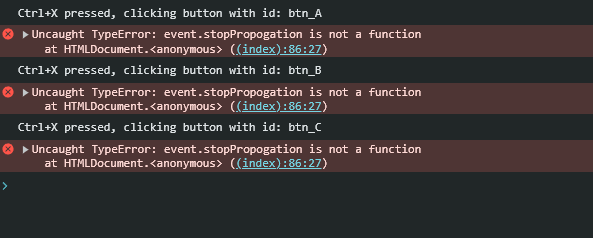
clientside_callback(
        """
        function(id) {
            document.addEventListener("keydown", function(event) {
                if (event.ctrlKey && event.key === 'x') {
                    console.log('Ctrl+X pressed, clicking button with id:', id);
                    document.getElementById(id).click()
                    event.stopPropogation()

                }
            });
            return window.dash_clientside.no_update
        }
        """,
        Output(f'btn_{name}', 'id'),
        Input(f'btn_{name}', 'id'),
    )
Here is a working code:
from dash import Dash, html, Input, Output, clientside_callback, ClientsideFunction
from dash import Dash, _dash_renderer

_dash_renderer._set_react_version('18.2.0')

import dash_mantine_components as dmc


def tab(app: Dash, name: str) -> dmc.TabsPanel:
    clientside_callback(
        """
        function(id) {
            document.addEventListener("keydown", function(event) {
                if (event.ctrlKey && event.key === 'x') {
                    el = document.getElemeberById(id);
                    if (el && el.parentNode.style.display !== 'none') {
                        el.click();
                        event.stopPropagation();
                    }


                }
            });
            return window.dash_clientside.no_update
        }
        """,
        Output(f'btn_{name}', 'id'),
        Input(f'btn_{name}', 'id')
    )

    @app.callback(
        Output(f'collapse_{name}', 'opened'),
        Output(f'out_{name}', 'children'),
        Input(f'btn_{name}', 'n_clicks'),
    )
    def update(n):
        if n % 2 == 0:
            return False, ''
        return True, f'{n}'

    return dmc.TabsPanel(children=[
        html.Button('Open Settings..', id=f'btn_{name}', n_clicks=1),
        dmc.Collapse(
            children=[dmc.Text(f'Tab {name}'), dmc.Text(id=f'out_{name}')],
            opened=True,
            id=f'collapse_{name}'
        ),

    ],
        value=name,
    )


def create_layout(app: Dash) -> html.Div:
    return html.Div(children=[
        dmc.Tabs(children=[
            dmc.TabsList(children=[
                dmc.TabsTab('A', value='A'),
                dmc.TabsTab('B', value='B'),
                dmc.TabsTab('C', value='C')
            ],
                grow=True
            ),
            tab(app, 'A'),
            tab(app, 'B'),
            tab(app, 'C')

        ],
            id='tabs',
            value='A',
            orientation='horizontal',
        )
    ],
        style={'padding': '5px'})


def main() -> None:
    app = Dash(
        prevent_initial_callbacks=True,
        suppress_callback_exceptions=True,

    )
    app.layout = dmc.MantineProvider(children=[create_layout(app)])
    app.run(debug=True, port=2222)


if __name__ == '__main__':
    main()
You might need to adjust based upon which version of dmc that you use.
Hi @jinnyzor,
thanks for taking your time to help me out.
I changed the design of my app, in order to only have one clientside callback and not attach to each single tab one.
The result is a more complex JavaScript function, but at least it’s only at one single place.
The app:
from dash import Dash, html, Input, Output, clientside_callback, ClientsideFunction
from dash import Dash, _dash_renderer
_dash_renderer._set_react_version('18.2.0')

import dash_mantine_components as dmc


def tab(app: Dash, name: str) -> dmc.TabsPanel:

    @app.callback(
        Output(f'collapse_{name}', 'opened'),
        Output(f'out_{name}', 'children'),
        Input(f'btn_{name}', 'n_clicks'),
    )
    def update(n):
        if n % 2 == 0:
            return False, ''
        return True, f'{n}'

    return dmc.TabsPanel(children=[
                html.Button('Open Settings..', id=f'btn_{name}'),
                dmc.Collapse(
                    children=[dmc.Text(f'Tab {name}'), dmc.Text(id=f'out_{name}')],
                    opened=True,
                    id=f'collapse_{name}'
                ),

            ],
            value=name,
            )

def create_layout(app: Dash) -> html.Div:
    clientside_callback(
        ClientsideFunction(
            namespace='clientside',
            function_name='globalKeyBinding'
        ),
        Output('tabs', 'id'),
        Input('tabs', 'id')
    )

    return html.Div(children=[
        dmc.Tabs(children=[
            dmc.TabsList(children=[
                dmc.TabsTab('A', value='A'),
                dmc.TabsTab('B', value='B'),
                dmc.TabsTab('C', value='C')
            ],
            grow=True
            ),
            tab(app, 'A'),
            tab(app, 'B'),
            tab(app, 'C')

        ],
        id='tabs',
        value='A',
        orientation='horizontal',
        )
    ],
    style={'padding' : '5px'})


def main() -> None:
    app = Dash(
        prevent_initial_callbacks=True,
        suppress_callback_exceptions=True,

    )
    app.layout = dmc.MantineProvider(children=[create_layout(app)])
    app.run(debug=True, port=2222)

if __name__ == '__main__':
    main()
and the scripts.js file in the asset folder:
window.dash_clientside = {
    clientside: {
        globalKeyBinding: function(tabsID) {

            if (!window.globalKeyBindingInitialized) {
                document.addEventListener("keydown", function(event) {
                    if (event.ctrlKey && event.key === 'x') {

                        const tabsElement = document.getElementById(`${tabsID}`);
                        if (tabsElement) {

                            const activeTabButton = tabsElement.querySelector('[data-active="true"]');
                            let currentActiveTab = null;

                            if (activeTabButton) {
                                currentActiveTab = activeTabButton.getAttribute('value') ||
                                                 activeTabButton.textContent.trim();
                            }

                            if (currentActiveTab) {
                                const targetButton = document.getElementById(`btn_${currentActiveTab}`);
                                if (targetButton) {
                                    targetButton.click();
                                    event.preventDefault();
                                    event.stopPropagation();
                                }
                            }
                        }
                    }
                });
                window.globalKeyBindingInitialized = true;
            }

            return window.dash_clientside.no_update;
        }
    }
};