# How to create trend annotations without pixel positioning?
**URL:** https://community.plotly.com/t/how-to-create-trend-annotations-without-pixel-positioning/47173
**Category:** 📊 Plotly Python
**Created:** [November 14, 2020, 11:43pm UTC](https://community.plotly.com/t/how-to-create-trend-annotations-without-pixel-positioning/47173 "2020-11-14T23:43:17Z")
**Posts on this page:** 2
**Page:** 1
### Author:  [@yasia](https://community.plotly.com/u/yasia)
#### Post date: [November 14, 2020, 11:43pm UTC](https://community.plotly.com/t/how-to-create-trend-annotations-without-pixel-positioning/47173/1 "2020-11-14T23:43:17Z")
Hi, I really need someone’s help!
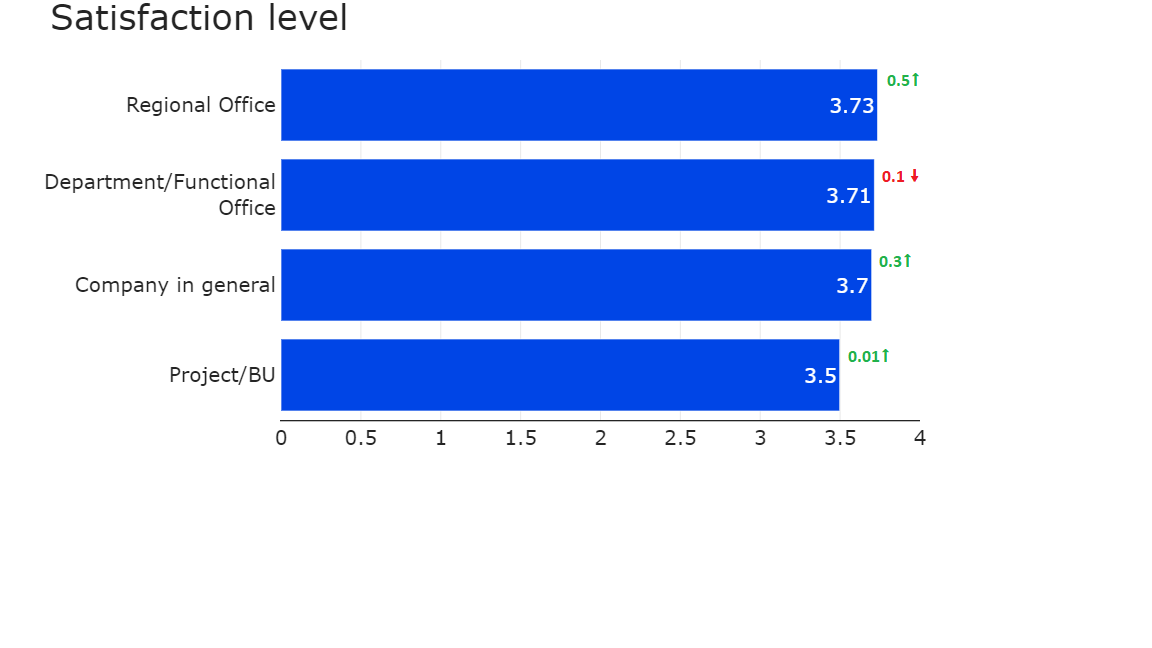
I am making simple bar plots or stacked subplots. How to position text like in the picture to each bar automatically without hardcoding it? Here is the example code:
```auto
def general_plot(df,title, h = 500, t_w = 21):
df_mean = df.mean().to_frame().reset_index().sort_values(0, ascending = True)
f1 = px.bar(level, y = text_wrap(df_mean['index'], t_w), x = df_mean[0], template="simple_white",
orientation = 'h',width = 1000, height = h, range_x = [0,4], text = round(df_mean[0],2))
f1.update_xaxes(showgrid=True, automargin=True, ticks='', title= '', linewidth = 1.3)
f1.update_yaxes(
ticks='',linecolor='rgba(0,0,0,0)', title= ''
)
f1.update_traces(hovertemplate=None, hoverinfo = 'skip',marker_color='#0045e6')
#fs5.update_traces(hovertemplate=None, hoverinfo = 'skip',marker_color='rgba(102,0,51,1)',texttemplate='%{text:.2s}', textposition='outside')
f1.update_layout( plot_bgcolor = 'rgba(0,0,0,0)', font = { 'size' : 20}, title = title, titlefont = {'size':35})
f1.show()
```
And the picture:
---
### Author:  [@yasia](https://community.plotly.com/u/yasia)
#### Post date: [November 19, 2020, 5:43pm UTC](https://community.plotly.com/t/how-to-create-trend-annotations-without-pixel-positioning/47173/2 "2020-11-19T17:43:38Z")
Can anyone answer this question, please?