I thought I provide a little background on why created this project and some benchmarks which showcase when to use a sync or async backend.
The Dash apps I develop mainly talk to dbs and other services in the network and most of the heavy lifting is in the data pipelines and ml platform. So I pretty quickly hit a wall where I would have to scale the number of containers to a unreasonable amount given the number of users and most of the callbacks would basically just wait 99% of the time. But I didn’t want to drop Dash because I really like the API, it is super easy to onboard Analysts and Data Scientists to your project and the intersection between prototyping in notebooks and your application is just great. So I decided to swap Flask with Quart and the results where pretty nice. A single instance was able to serve around 50x more users per instance and could move to a super simple 3 container single core setup.
I created 2 synthetic scenarios to showcase when to use an sync or async backend. Also one scenario showing the impact of event_callbacks.
Deployment Setup:
Each app runs in its own Docker container
[Dash](https://github.com/chgiesse/dash-router-examples/blob/main/app/dash_app.py\):
ENTRYPOINT ["python", "-m", "gunicorn", "–bind", "0.0.0.0:8051", "–workers", "2", "dash_app:server"]
[Flash](https://github.com/chgiesse/dash-router-examples/blob/main/app/app.py\):
ENTRYPOINT ["python", "-m", "uvicorn", "app:server", "--host", "0.0.0.0", "--port", "8050", "--workers", "2"]
Pen testing setup:
I use the hey cli tool to mock requests GitHub - rakyll/hey: HTTP load generator, ApacheBench (ab) replacement and run the pen testing. -n is the number of total request that get send and -c the amount of concurrent requests/users.
- CPU bound request setup:
hey -n 200 -c 20 -o csv http://localhost:8081/performance-check-1 > benchmarks
/cpu_bound_dash.csv
- Network bound:
hey -n 100 -c 10 -o csv http://localhost:8081/network-heavy-check > benchmarks/nhv_dash.csv
Now, lets look at some lovely Plotly Charts!
CPU bound tasks comparison:


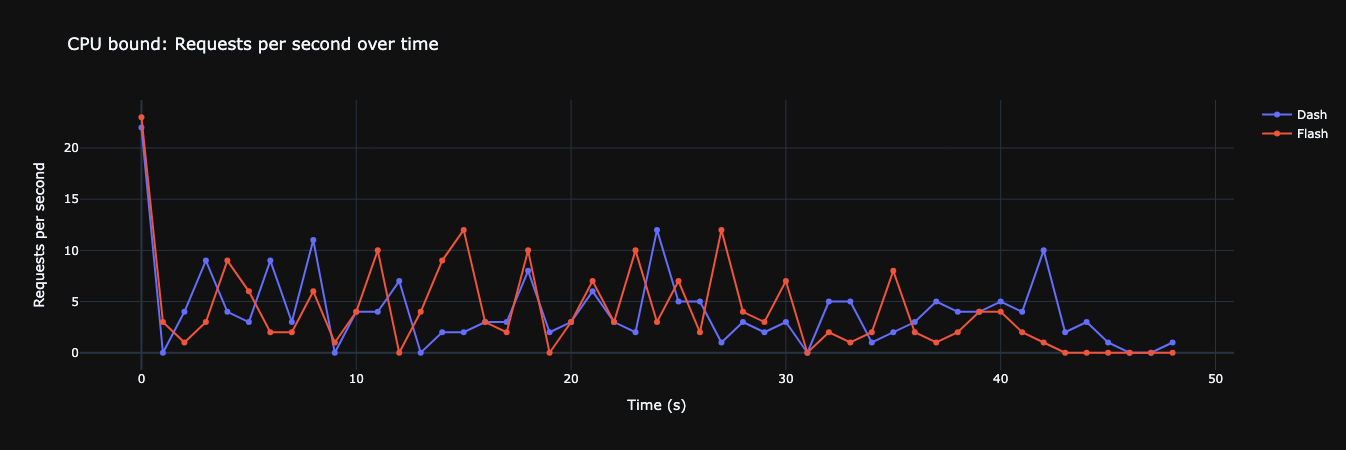
And as we can see we can actually don’t see a big difference. The difference is most likely due to the added randomness in the simulation. Dash/Flask could have been faster in the next round.
But now, lets extend the simulation while running a single event_callback during the tests.
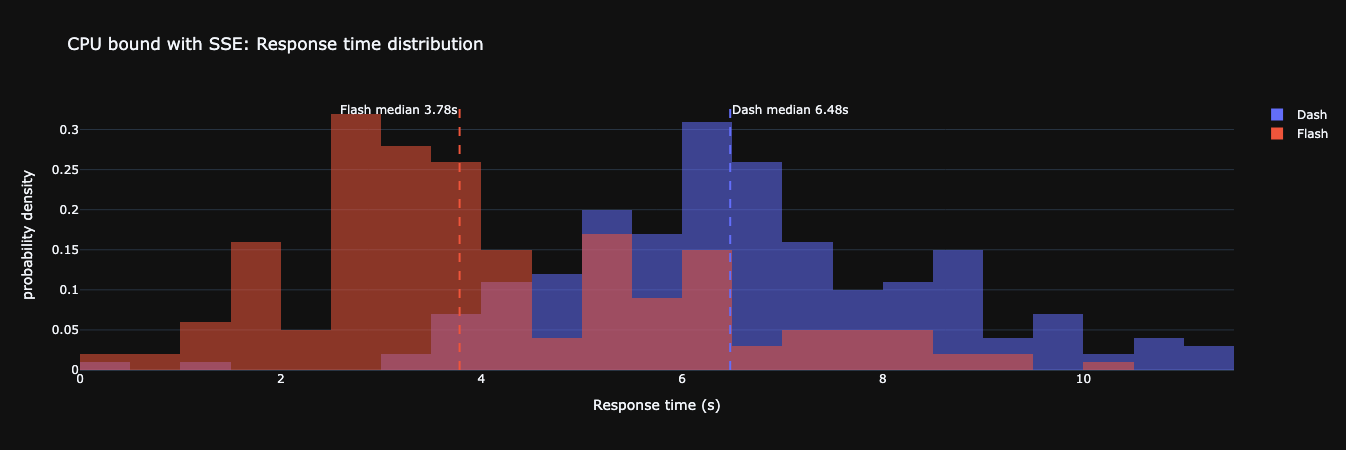


That’s where it is getting interesting, while the async version stays pretty much the same Flask drops exactly 1 rps and has 2s longer request times for **one** tab running the event callback! That’s why the Dash plugin doesn’t support endless streams. I could open 6 tabs with that stream and the whole container instance would be blocked. But, there is a difference that should be part of a design/decision process. Maybe the async version had “better” performance in terms of raw numbers, but Flask sends exactly responses as they become ready (every second), because the worker would have access to its resources at every moment in time while Flash responses came around every three seconds, thats when the event loop processed the stream further.
Lets look at the network i/o scenario - thats where it gets kind of crazy. As you can see above, I had to reduce the number of concurrent requests to 10 because Flask would drop/timeout requests. The mock io tasks are a random choice between 1.5 and 3.5 seconds.


Here you can see where the async backend shines, io bound tasks don’t block each other compared to Flask.
So the conclusion here would that if your app sole relies on files on the server, you don’t get any benefit but the moment you have io async gets way more efficient. Lets increase the workload.
hey -n 5000 -c 600 http://localhost:8080/network-heavy-check
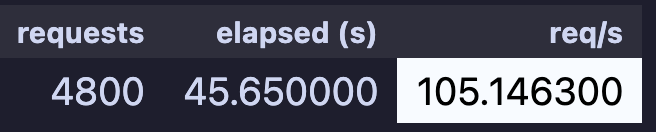

And I think its pretty awesome with 105 req/s and peaks at 160.
Let me know what you think and how your Dash application looks like!
Looking forward to your feedback and happy coding!